Outbound IP Addresses
Render services send traffic from specific IP ranges.
Render services send outbound traffic through specific sets of IP ranges depending on their region. You can use these ranges to connect your service to IP-restricted environments outside of Render.
Each IP range uses CIDR notation. As an example, the range 216.24.60.0/24 represents the IP addresses from 216.24.60.0 to 216.24.60.255, inclusive. Your service might use any IP address within its associated ranges.
Outbound IP ranges are shared across all services in the same region.
Want exclusive, static outbound IP addresses?
You can now add dedicated outbound IPs to your workspace.
Obtaining your outbound IPs
To obtain a service's outbound IP ranges:
-
From your workspace home in the Render Dashboard, click a service to open its details page.
-
Open the Connect dropdown in the upper right.
-
Switch to the Outbound tab. Copy the list of IP ranges:
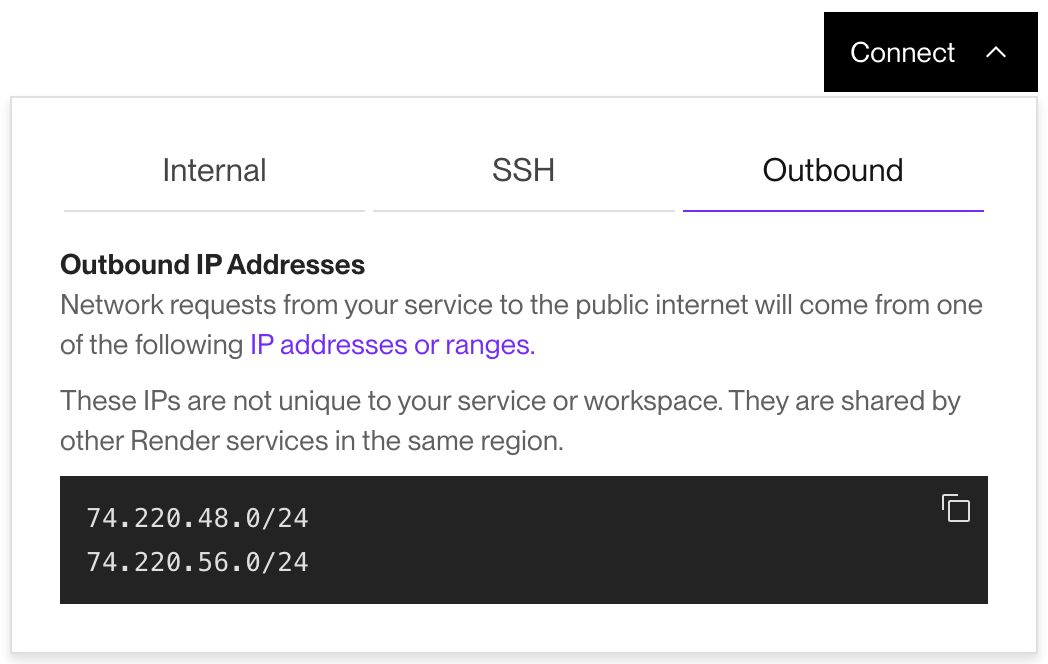
Don't see the Outbound tab?
- Make sure you're viewing the details page for a particular service, not your workspace home.
- Note that static sites don't use outbound IP addresses, because they can't initiate outbound traffic.
- If you created your workspace before January 23, 2022, see below.

Exception for some Oregon services
For workspaces created before January 23, 2022, services in the Oregon region do not use a fixed set of outbound IP addresses.
You can configure outbound IP addresses for these Oregon-region services in one of the following ways:
- Use an external proxy like QuotaGuard to route traffic through static IPs.
- Create a new workspace, then create replacement Oregon-region services in that workspace. Migrate over any data, domains, and configuration.
FAQ
What if my external system doesn't support allowlisting an entire CIDR range?
You can purchase dedicated outbound IPs for your workspace. With dedicated IPs, your services send traffic through static IP addresses that you can provide to any external allowlist.