For the complete Render documentation index, fetch https://render.com/llms.txt. Every docs page is also available as Markdown at https://render.com/docs/{slug}.md.

  • Docs
  • Changelog
Sign in
Get started

Workspaces, Members, and Roles

Create your workspace, add collaborators, and manage access.

Everything you create on Render (services, datastores, and so on) belongs to a workspace. Every workspace has an associated plan that determines available features and how many team members you can invite.

When you sign up for Render, we automatically create your first workspace on the free Hobby plan. You can create additional workspaces or change a workspace's plan at any time.

With a Scale or Enterprise plan, you can manage multiple workspaces and team members in a unified organization.

Create a workspace

You can have up to five Hobby workspaces.

You can create an unlimited number of paid workspaces.

  1. In the Render Dashboard, open the workspace dropdown at the top of the left pane, then click + New Workspace:
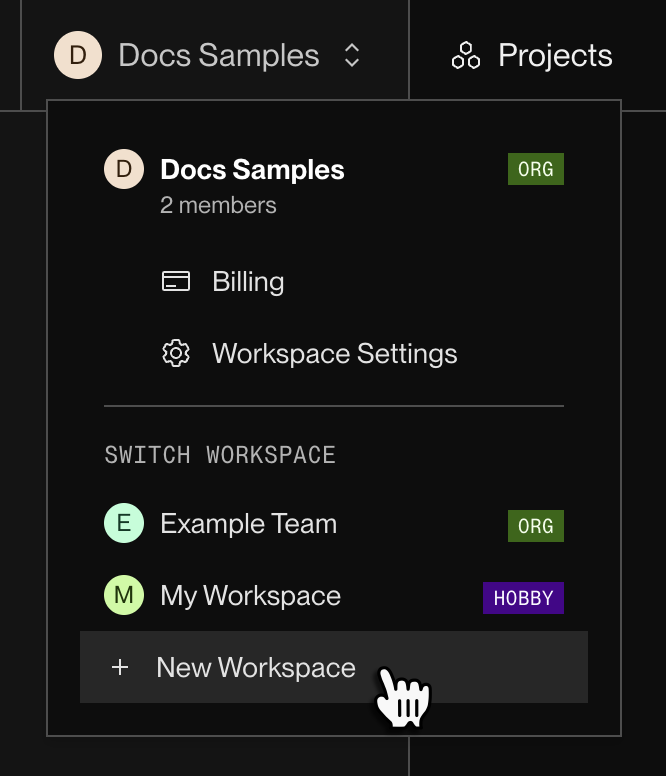
    Creating a new workspace in the Render Dashboard

  2. Complete the workspace creation flow, including specifying a plan type and payment method. Then click Create Workspace.

You're all set! Render creates your workspace and assigns you the Admin role. You can switch between your different workspaces from the same dropdown.

Now you can start creating services and other resources in your workspace. With a Pro workspace or higher, you can also invite team members.

Change a workspace's plan

You can change your workspace's plan in the Render Dashboard:

  1. From your workspace home, click Billing under Workspace in the left pane.
  2. Under the Plan section, click Update Plan.
  3. Click the Choose button for your desired plan.
    • To switch to an Enterprise plan, instead please contact sales.
  4. Review the details of your plan change, including any reduction in available features if you're downgrading.
  5. Click Confirm.

Your plan change takes effect immediately. You can view your workspace's current plan from the Billing page at any time.

Manage team members

You can't add team members to a Hobby workspace.

First, upgrade your workspace to Pro or higher.

Team members with the Admin role can manage other team members (including other admins):

  1. From your workspace's home in the Render Dashboard, click Settings in the left pane.

  2. Scroll down to the Team members section.

    • To add a team member, click + Invite members. Provide the member's email address and select a role from the dropdown.
    • To remove a team member, open the โ€ขโ€ขโ€ข menu next to that member and click Remove team member.
    • To change a team member's role, click their current role and select a new one.

Member roles

Each member of a workspace has one of the following roles:

RoleAvailable onDescription

Admin

All plans
  • Has full access to the workspace's resources and organizational settings (such as member management, billing management, and secure login enforcement).
  • Can also designate individual project environments as protected.
  • A workspace's creator is automatically assigned this role.

Developer

All plans
  • Has access to the workspace's resources (services, environment groups, and so on), but not organizational settings.
  • Access is limited for resources in a protected environment.

Contributor

Scale or higher

Similar to the Developer role, with the following additional restrictions:

  • Can't view sensitive fields (billing info, connection strings, environment variables, and so on).
  • Can't access running services via SSH or the Shell tab in the Render Dashboard.
  • Can't create, modify, or delete most resources.

Viewer

Scale or higher

  • Has read-only access to most of the workspace's resources (services, environment groups, and so on).
  • Can't view service logs or sensitive fields (billing info, connection strings, environment variables, and so on).

Billing

Scale or higher

  • Has full access to the workspace's billing settings, including updating payment method. Can also view non-sensitive details of the workspace's resources (such as members and service names).
  • Learn more about the Billing role.

Admins can reassign member roles from the Team Members section of the Workspace Settings page in the Render Dashboard.

On a Scale or Enterprise plan with multiple workspaces, org members can have a different role in each workspace.

Role permissions

๐ŸŸข Permitted

โŒ Not permitted

๐ŸŸจ Permitted with restrictions (details vary by permission)

Workspace administration

PermissionAdminDeveloperContributorViewerBilling

View workspace members

๐ŸŸข๐ŸŸข๐ŸŸข๐ŸŸข๐ŸŸข

Edit workspace settings

๐ŸŸขโŒโŒโŒ ๐ŸŸจ

Billing settings only.

Add/remove workspace members

๐ŸŸขโŒโŒโŒโŒ

Export audit logs

๐ŸŸขโŒโŒโŒโŒ

View billing details

๐ŸŸข๐ŸŸขโŒโŒ๐ŸŸข

Edit payment method

๐ŸŸขโŒโŒโŒ๐ŸŸข

Leave workspace

๐ŸŸข๐ŸŸข๐ŸŸข๐ŸŸข๐ŸŸข

Delete workspace

๐ŸŸขโŒโŒโŒโŒ

Projects and environments

PermissionAdminDeveloperContributorViewerBilling

View projects

๐ŸŸข๐ŸŸข๐ŸŸข๐ŸŸข๐ŸŸข

Create/modify projects

๐ŸŸข๐ŸŸขโŒ โŒ โŒ

Delete projects

๐ŸŸข ๐ŸŸจ

Can't delete a project with at least one protected environment.

โŒโŒโŒ

View environments

๐ŸŸข๐ŸŸข๐ŸŸข๐ŸŸข๐ŸŸข

Create environments

๐ŸŸข๐ŸŸขโŒโŒโŒ

Modify/delete environments

๐ŸŸข ๐ŸŸจ

Non-protected environments only.

โŒโŒโŒ

Designate an environment as protected or network-isolated

๐ŸŸขโŒโŒโŒโŒ

Move resources into or out of an environment

๐ŸŸข ๐ŸŸจ

Non-protected environments only.

โŒโŒโŒ

Manage environment secrets

๐ŸŸข ๐ŸŸจ

Non-protected environments only.

โŒโŒโŒ

Services and datastores

PermissionAdminDeveloperContributorViewerBilling

View services

๐ŸŸข๐ŸŸข๐ŸŸข๐ŸŸข๐ŸŸข

Create services

๐ŸŸข ๐ŸŸจ

Non-protected environments only.

โŒโŒโŒ

Modify service configuration

๐ŸŸข ๐ŸŸจ

Can't perform potentially destructive modifications to services in a protected environment.

โŒโŒโŒ

Trigger service deploys

๐ŸŸข๐ŸŸข๐ŸŸขโŒโŒ

Trigger rollbacks

๐ŸŸข๐ŸŸข๐ŸŸขโŒโŒ

Delete services

๐ŸŸข ๐ŸŸจ

Non-protected environments only.

โŒโŒโŒ

View connection strings and credentials for datastores

๐ŸŸข ๐ŸŸจ

Non-protected environments only.

โŒโŒโŒ

Manage inbound IP rules

๐ŸŸข ๐ŸŸจ

Varies by resource type. See details.

โŒโŒโŒ

Access running services via SSH or the Shell tab

๐ŸŸข ๐ŸŸจ

Non-protected environments only.

โŒโŒโŒ

Observability

PermissionAdminDeveloperContributorViewerBilling

View service events

๐ŸŸข๐ŸŸข๐ŸŸข๐ŸŸขโŒ

View service metrics

๐ŸŸข๐ŸŸข๐ŸŸข๐ŸŸขโŒ

View service logs

๐ŸŸข๐ŸŸข๐ŸŸขโŒโŒ

Integrations

PermissionAdminDeveloperContributorViewerBilling

Configure notification settings

๐ŸŸขโŒโŒโŒโŒ

Create and configure webhooks

๐ŸŸขโŒโŒโŒโŒ
Workspaces, Members, and Roles
  • Create a workspace
  • Change a workspace's plan
  • Manage team members
  • Member roles
  • Role permissions
    • Workspace administration
    • Projects and environments
    • Services and datastores
    • Observability
    • Integrations
    • Home
    • Your first deploy
    • Free instances
    • Platform features by plan
    • Use with coding agents
    • FAQ
    • Templates
      • Migrate fromโ€ฆ
        • Heroku
        • Railway
    • Compute plans
    • SandboxesBeta
      • Service types
        • Which to use?
        • Static sites
        • Web services
        • Private services
        • Background workers
        • Cron jobs
        • Workflows
        • Multi-service architectures
      • Data storage
        • Render Postgres
        • Render Key Value (Redisยฎ-compatible)
        • Persistent disks
    • How deploys work
    • Supported languages
    • Git providers (GitHub, etc.)
    • Build pipeline
    • Deploy hooks
    • Monorepo support
    • Troubleshooting deploys
      • Previewing changes
        • Single-service previews
        • Preview environments (multi-service)
      • Docker deploys
        • Overview
        • Deploy a registered image
        • Using secrets
      • Runtime
        • Native runtimes
        • Environment variables & secrets
        • Default environment variables
    • Intro to sandboxes
    • Limits & pricing
      • How toโ€ฆ
        • Create & configure sandboxes
        • Execute commands
        • Upload and download files
        • Manage snapshots
      • Use withโ€ฆ
        • Claude Managed Agents
        • Cursor Cloud Agents
        • OpenAI Agents API
      • SDK/CLI reference
        • TypeScript SDK
        • Python SDK
        • CLI commands
    • Intro to workflows
    • Tutorial
    • Limits & pricing
      • How toโ€ฆ
        • Define tasks
        • Define flowsNew
        • Trigger runs
        • Develop locally
      • SDK reference
        • TypeScript SDK
        • Python SDK
      • Example workflows
        • TypeScript examples
        • Python examples
    • Overview
    • Create & connect
    • Database credentials
    • Extensions
    • Version upgrades
    • Logical replication
    • Legacy instance types
      • Database recovery
        • Recovery & backups
        • High availability
      • Database performance
        • Read replicas
        • Connection pooling
        • Admin apps
        • Repacking tables
        • Troubleshooting performance
    • Regions
    • Inbound IP rules
    • Edge caching
    • WebSockets
    • TLS certificates
      • Custom domains
        • Overview
        • Cloudflare
        • Namecheap
        • Other DNS providers
      • Internal traffic
        • Private network
        • Private links
      • Outbound traffic
        • Default IP ranges
        • Dedicated IP addresses
        • Outbound bandwidth
        • Handling network changes
      • Static site config
        • Custom response headers
        • Redirects & rewrites
    • The Render Dashboard
    • SSH / Shell access
    • Projects & environments
      • Service actions
        • Scaling
        • Rollbacks
        • Maintenance mode
        • One-off jobs
      • Infrastructure as code
        • Blueprints overview
        • render.yaml reference
        • Terraform provider
    • In-dashboard metrics
    • Health checks
    • Uptime best practices
      • Logging
        • In-dashboard logs
        • Log streams (syslog/HTTPS)
      • OpenTelemetry (OTel) metrics
        • Provider setup
        • Metrics reference
      • Notifications
        • Webhooks
        • Email / Slack
    • API keys
    • MCP Server
      • Render CLI
        • Overview
        • Command reference
      • REST API
        • Overview
        • API reference
      • Third-party connections
        • OIDC support
        • Datadog
    • Workspaces, members, & roles
    • Login settings
    • Audit logs
      • Organizations
        • Overview
        • SAML SSO
    • DDoS protection
    • Platform maintenance
      • Compliance
        • Overview
        • HIPAA (US health data)
        • HIPAA best practices
        • Shared responsibility model
        • Pentest policy
    • Heroku vs Render
    • Vercel vs Render
All Systems Operational
ยฉ Render Inc. All rights reserved.