Git to Production on a Managed Platform: Builds and Configuration for Zero-Downtime Releases
TL;DR
- To safely deploy from a Git repository to production, automate a delivery pipeline that cleanly separates build and start commands and gates traffic with strict HTTP health checks.
- The build phase creates the immutable artifact. Separating it from the release phase ensures the artifact remains uncorrupted. This prevents compilation errors from impacting live traffic during rollouts or rollbacks.
- Moving from manual dashboard configurations to declarative infrastructure-as-code (IaC) is necessary to maintain reproducible environments as architectural complexity scales.
- Which stacks you can deploy is a separate decision from which platform runs them. Node.js, Python, Rails, Next.js, Go, Rust, Phoenix, and Docker all use the same seven steps.
- Render keeps the build artifact, start command, health check path, and environment variables for every deploy, which makes rolling back a single click instead of a rebuild.
Pushing to the main several times a day is how velocity works. The same frequency is what turns one overlooked detail into a production incident. Four failures account for most of them:
- A failed health check still swaps traffic to the new version, replacing a healthy instance with a broken one
- A migration runs in the deploy itself, so a rollback re-applies a schema change that already landed
- A secret that exists in staging is missing in production, and the app boots anyway
- A local environment passes every test because it never carried live traffic
Shipping speed and service reliability pull against each other until the pipeline handles both. You need to deploy frequently enough to stay small, and guarded closely enough that a bad one never reaches users. That means the build has to produce a fixed artifact before anything goes live, configuration has to come from outside the code, migrations have to survive being rolled back, and traffic has to wait for a real readiness signal.
This article explains the core concepts of automated delivery, walks through the seven steps of a production deployment, and closes with the stacks you can ship through that pipeline.
What defines a production-grade Git deployment?
A production-grade pipeline automatically triggers a sequential process to build and release software when code is pushed to a designated branch. Each service maps to a single tracked branch. Branch pushes and merges translate to deployment actions.
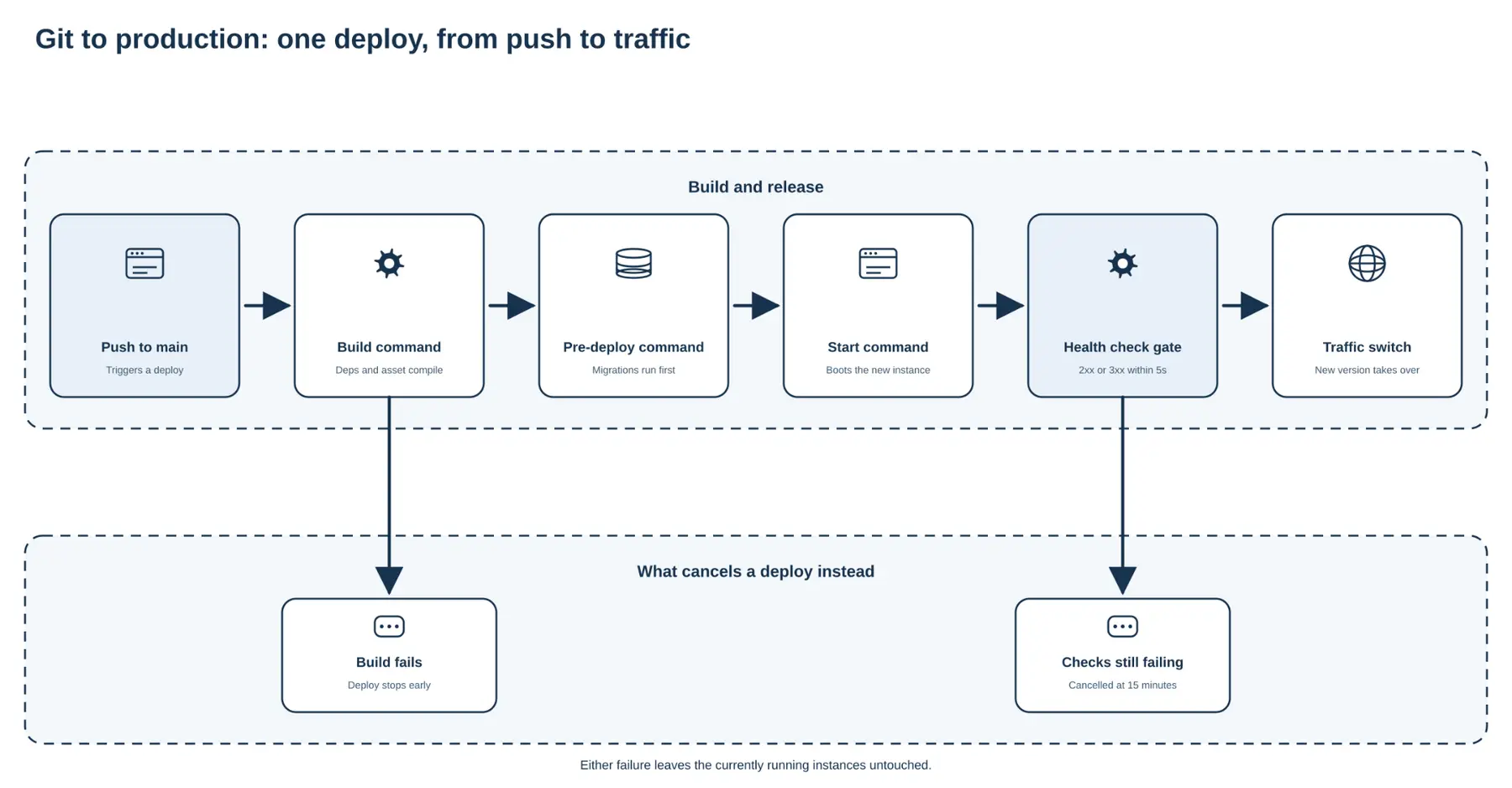
Delivery pipelines rely on strict separation between build and release stages. Once code merges, the system compiles it and retrieves dependencies to create an immutable build artifact. Storing that artifact eliminates unexpected compilation errors during rollouts or future rollbacks. A failed build stops the deployment before it affects live traffic.
Predictable deployments externalize configuration into environment variables. The same build artifact then moves securely between staging and production, under health gating that holds back traffic from a version that cannot serve it.
Managed platforms enforce this architecture for you. Services like Render run a designated build command and a start command in strict sequence to ensure applications boot reliably.
How do you automate delivery? A 7-step platform deployment tutorial
The shortest path to an automated deployment involves integrating a version control repository and setting runtime commands. This platform deployment tutorial walks through building a pipeline that stays up, using Render as the concrete example. Each step applies on any managed platform. Only the screen names change.
Before you start, you need:
- A Git repository on a supported provider (GitHub, GitLab, Bitbucket)
- A branch your team has agreed represents production, typically
main - At least one service already deployed, so you can compare behavior before and after
Step 1: Connect the repository
A secure deployment starts with an authorized connection between your cloud provider and your version control system. The provider requires read access to the specific repository to fetch source code.
When configuring this connection to deploy from GitHub to production, link the production branch your team agreed on. Avoid linking active feature branches directly to production services. Pushes to that branch trigger redeploys automatically, which is the foundation of continuous delivery.
Step 2: Configure build and start commands
Platforms require clear instructions on how to prepare and execute the application. The build command handles installing dependencies and compiling code. The start command defines how the application boots the web server. Each deploy runs them in that fixed order, and if either fails the deploy stops before traffic moves.
Asset compilation must happen during the build phase, not the release phase. In container-based architectures, ephemeral filesystems lose newly generated assets between deployment phases. Compiling a CSS file during the start command delays server boot times and wastes CPU on every instance scale-out.
Render's native runtimes and standard Dockerfiles both require this strict separation between compilation and execution. Native runtimes detect your language and install dependencies from your lockfile. A Dockerfile gives you full control over the image.
Step 3: Manage environment variables and secrets
Manage configuration that varies across environments via environment variables. A managed platform typically supports both service-level variables and shared environment groups for secrets used by multiple applications.
The exact hierarchy matters for predictable execution. Service-level variables deterministically override environment group variables. Avoid defining the same key in multiple attached groups: platforms generally don't guarantee which conflicting group wins.
Updating a variable triggers different operational effects. On Render, the save option you pick decides whether the application restarts now or waits for the next code push. Render sets NODE_ENV=production for Node.js services at runtime.
Step 4: Execute database migrations on deploy
Schema changes carry the most risk in a release. A distinct pre-deploy command best handles database migrations on deployment. It runs after the build completes and before the new version accepts traffic. On Render, this pre-deploy stage is available to paid web services, private services, and background workers. The command runs on a separate instance from your live service, so filesystem changes it makes do not reach the deployed version, and it cannot read an attached persistent disk.
Migrations must use the parallel change pattern, also known as expand-migrate-contract. To prevent irreversible data loss during a rollback, migrations must remain backward-compatible.
To safely rename a column:
- First add the new field (expand)
- Backfill the data (migrate) and update application code to read from the new field
- Drop the old field later (contract) only after the old code is no longer a plausible rollback target
Teams should also use application-enforced advisory locks to prevent simultaneous release processes from causing database migration collisions.
Step 5: Configure health checks for zero-downtime deploys
A process that is alive isn't necessarily ready to serve requests. Zero-downtime deploys rely on multi-layered health checks to gate traffic routing until an instance is prepared to handle user load.
On Render, a successful HTTP health check must respond with a 2xx or 3xx status within five seconds. Configuring a 3xx redirect response for a health check is an engineering anti-pattern: routing redirects don't guarantee actual application readiness.
The deployment gate is strict. Render cancels a deploy after 15 minutes if new instances do not simultaneously pass their checks. Existing instances continue to serve traffic. For running instances, consecutive failed checks stop traffic routing after 15 seconds and trigger an automatic restart after 60 seconds.
Step 6: Enable PR previews for full-stack testing
Smoke-testing complex changes before merging requires isolated, automated environments. Relying solely on local testing fails to account for cloud-specific network routing or database latency.
Frontend-only previews verify user interface changes. Full-stack preview environments spin up isolated databases alongside backend logic, which lets reviewers run behavior-based code reviews. On Render, Preview Environments build a fresh copy of your services, datastores, and environment groups for each proposed pull request. Datastores come up empty, so you seed them with an initialDeployHook. The feature requires a Pro workspace plan or higher.
Step 7: Rehearse a deploy rollback
A deploy rollback is a critical recovery drill. Teams must understand its technical boundaries. A rollback restores application code artifacts only. It does not revert mutable database states.
Selecting a previous successful deployment on Render starts a new rollout using that earlier, immutable build artifact. Render disables autodeploy at the same time, so the next commit does not immediately reintroduce the bad release.
On Render, a rollback reuses the target deploy's build artifact, start command, health check path, and environment variables. It does not roll back disk data, your compute plan, or custom domains, and it does not revert the database. So roll back the code and the configuration together. If the bad release changes an environment variable, restore that value in the Render Dashboard first. Practice this step with deliberately harmless changes until the drill is automatic.
When should you move to infrastructure-as-code with Blueprints?
A dashboard UI provides the fastest initial path to production. Teams scaling their architecture need to review infrastructure changes alongside their application code, in the same pull request that changes the code.
Declarative configuration using Infrastructure-as-Code (IaC) solves this by versioning your cloud architecture. Render Blueprints manage web services and persistent databases via a single render.yaml file stored directly in the repository root.
A Blueprint can configure Git-based deploys and environment variables in one place:
services:
- type: web
name: my-app
runtime: node
repo: https://github.com/example/repo
branch: main
previews:
plan: 0.5c-512mb
envVars:
- key: LOG_LEVEL
value: debug
Approving infrastructure through pull requests turns it into ordinary code review. Adding a background worker or upgrading a database version then gets the same scrutiny as any application change.
Which tech stacks can you deploy?
The same seven steps apply to whatever you write. What changes is which runtime builds the artifact and how it reaches the platform.
Most stacks run on a native runtime, which detects your project and installs dependencies from your lockfile. Render ships six: Node.js (and Bun), Python, Ruby, Go, Rust, and Elixir. Pin the version each one defaults to, or the deploy that works today can break on the next platform update:
- Node.js and TypeScript set the version through
NODE_VERSION. The Express quickstart covers the common case. - Python sets
PYTHON_VERSION, with separate controls forpoetryanduv. The FastAPI quickstart covers the async server setup. - Ruby reads the
rubydirective from your Gemfile. Rails 8 needs a Sidekiq worker for background jobs. - Go tracks the latest stable release and cannot be pinned on a native runtime, so pin it yourself in a Docker image if that matters.
- Rust sets
RUSTUP_TOOLCHAINthrough arust-toolchainfile. - Elixir sets
ELIXIR_VERSIONandERLANG_VERSION.
Frameworks sit on top of those runtimes, so Next.js needs no special configuration and runs on Node.js like anything else. Anything outside the six runs too, as long as you bring a Dockerfile. That covers PHP, .NET, Java, and anything else, and you can pull a prebuilt image instead of building one.
When you run two services on different runtimes, they deploy independently and reach each other over the private network. The multi-runtime guide walks through a Python API beside a Next.js frontend.
Conclusion
Connecting a Git repository to a server is the easy part. Shipping without incidents takes a pre-deploy command that tolerates being rolled back, and health checks that refuse traffic until the new version answers.
Both point at the same boundary. Code is immutable and rolls back in one click. Databases are mutable and do not, which is why migrations stay backward-compatible and rollback drills stay on the calendar.
Deploy your full-stack applications and databases on Render to get automated Git-based deploys and safe rollbacks.