Trace an AI Agent Across Models, Tools, Queues, and Workflows
TL;DR
To debug an AI agent in production, you need to follow a single user request across every service it touches:
- Record model calls, tool runs, database queries, and background job attempts in one connected timeline.
- Pass trace context and a shared
run_idwhenever the web service hands work to a queue or workflow. - Keep model spans open until the streamed reply finishes, fails, or is canceled.
- Turn off raw prompt capture when handling sensitive data, and separate cached tokens from new input tokens so retries don't double-count costs.
- Deploying AI Agents on Render lets you run your web service, database, background worker, and Render Workflows tasks in one workspace so long agent runs aren't cut off by short serverless timeouts.
A customer support agent might call an LLM, search a knowledge base, and hand a longer task to a background worker. When a user says the agent is hanging, model API logs alone won't tell you whether the delay happened in the model, the database query, or the job queue.
Distributed tracing solves this by recording the full path of a request across your services. A trace is the end-to-end timeline of one user request, and a span is a timed record of a single step inside that trace (such as one model call, one SQL query, or one background job). OpenTelemetry is the open-source standard for generating and connecting these traces across services, so you can send data to observability tools like Langfuse, Arize Phoenix, Datadog, or Honeycomb without locking into one vendor's agent framework.
Throughout this guide, we'll use this customer support agent running a concrete Python stack on Render as our example workflow:
- A Python FastAPI web service receives the user's support question and streams back the response.
- An LLM call and a lookup tool query a Render Postgres knowledge base.
- Slower tasks like compiling an account audit go into Render Key Value (Render's managed Redis®-compatible datastore) for a Celery background worker, or run as durable tasks in Render Workflows with managed retries.
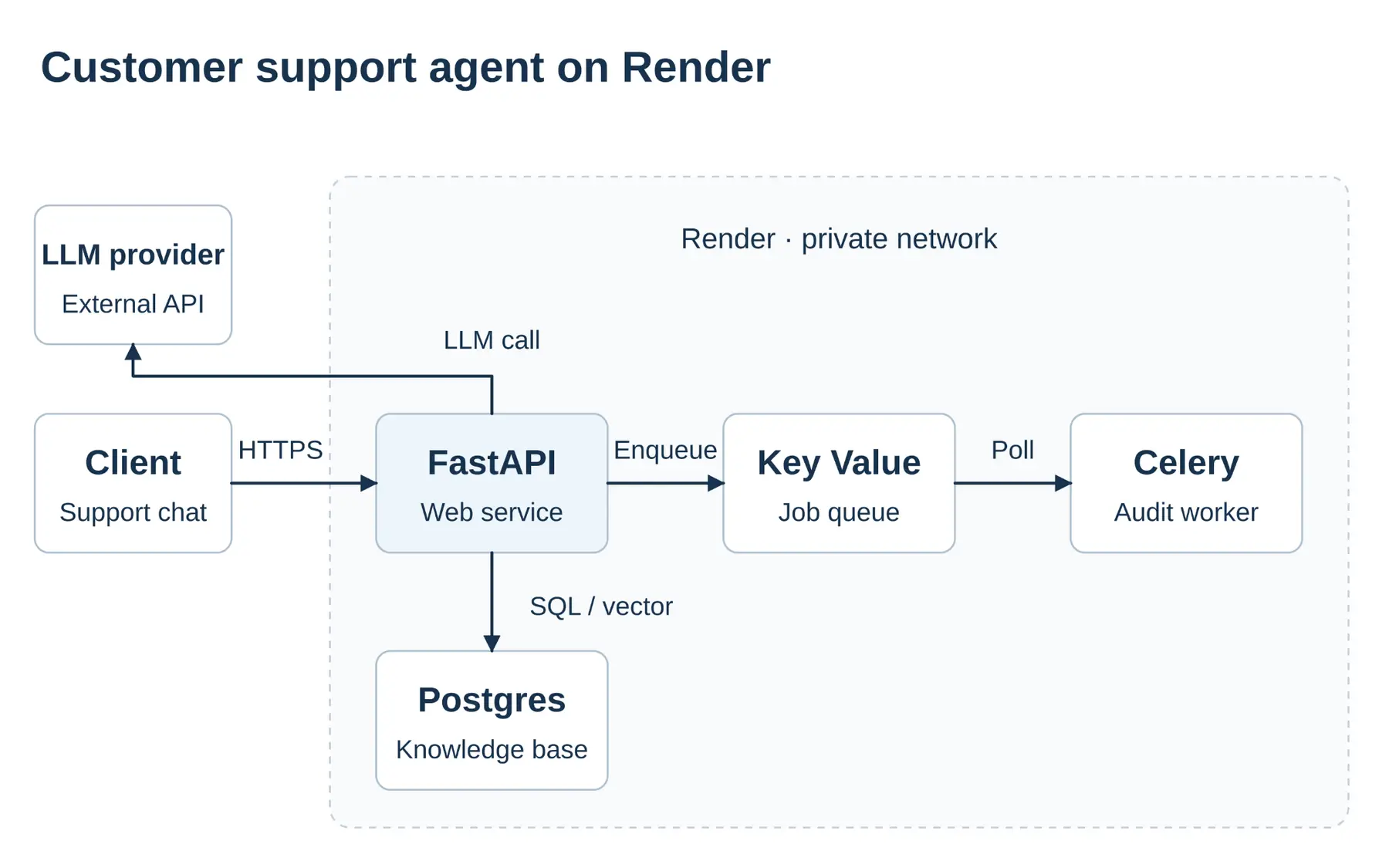
The sections below break down how to trace each of these boundaries, from model calls and database queries to queue handoffs and log correlation, so you can follow a user request end to end.
What are the types of AI agent tracing, and why do partial traces miss failures?
When a support agent slows down or fails, what you can see depends on which layer of tracing you use. Most teams start with model provider logs or an agent SDK dashboard, only to hit a blind spot as soon as the agent queries a database or hands a job to a background worker:
Tracing approach | Example tools | What it captures | What it misses in a production agent |
|---|---|---|---|
Model API and gateway logs | OpenAI API dashboard, Anthropic Console, OpenRouter | Prompts, completions, token usage, model latency, and gateway fallback routing | Everything outside the LLM call, including tool functions, database queries, queue wait times, and background workers |
Agent framework tracing | OpenAI Agents SDK tracing, LangSmith, Langfuse SDK wrappers | The in-process agent loop, prompt chains, model calls, and tool function inputs and outputs | Infrastructure execution underneath the SDK, including slow SQL queries in Postgres, Redis queue delays, separate worker processes, and HTTP container logs |
Full-stack distributed tracing | OpenTelemetry sent to Langfuse, Arize Phoenix, Datadog, or Honeycomb | The entire request across your web service, LLM calls, database queries, remote tools, background workers, and workflows | Provider-internal fallback attempts unless you also record gateway routing metadata |
In our Render support agent example, a user asks why their invoice failed. The agent's first LLM call returns a tool-call decision in 700 ms, directing the agent to run search_billing_records. That tool executes a slow vector and SQL query against Render Postgres (taking 12 seconds), queues an account audit job in Render Key Value for a Celery background worker, and runs a second LLM step to synthesize the answer. The user waits 25 seconds in total:
- Model API logs only show the initial 700 ms model completion and leave no clue why the user waited 25 seconds.
- Agent framework tracing shows that
search_billing_recordstook 12 seconds inside the Python web service, but it can't show whether the bottleneck was connection pooling in Postgres or an external API call, and the trace stops as soon as the job enters the queue. - Full-stack OpenTelemetry tracing shows the FastAPI web request, the LLM span, the exact Postgres query span underneath the tool call, and the background worker or Render Workflows task that picks up the queued job. You can even export those OpenTelemetry spans to AI-native dashboards like Langfuse or Arize Phoenix so you get prompt evaluation and infrastructure tracing in one place.
How do you set up tracing across models and tools without leaking sensitive data?
Trace model calls, tool runs, and database queries together
To connect every step of our support agent, configure the OpenTelemetry Python SDK and a trace exporter in both the FastAPI web service and the Celery background worker, pointing both services at the same tracing backend. Give each service a distinct service.name (such as support-agent-web and support-agent-worker) so you can immediately see which Render service ran each step.
Inside the web service, OpenTelemetry's GenAI tracing conventions organize the agent turn as a hierarchy of spans under the incoming HTTP request. When the agent invokes search_billing_records, executing the database query within that active tool context lets OpenTelemetry database auto-instrumentation automatically nest the Render Postgres query span directly underneath that tool span rather than attaching it to the top-level web request. That hierarchy makes it immediately clear whether a 12-second delay happened while waiting on the model API or inside the SQL query that the tool ran:
If your agent calls external tools over the Model Context Protocol (MCP), an open standard for connecting AI models to external data and tool servers, trace both the MCP client call and the remote server execution. If your agent framework already creates a span for a tool call, reuse that span rather than wrapping it a second time.
Keep sensitive prompts and customer data out of traces
Why does data privacy matter when setting up tracing? When a user asks our support agent about a failed invoice, the LLM prompt and the search_billing_records tool result often contain customer emails, billing addresses, internal database rows, or API tokens. If your tracing library records full inputs and outputs, all of that sensitive data is shipped straight to your external observability dashboard.
To prevent data leaks, record operational metadata (latency, model name, token counts, and error status) while leaving raw prompt and tool payload capture turned off by default:
- OpenTelemetry GenAI conventions omit raw message prompts and tool outputs by default, requiring an explicit configuration or environment flag to capture payload content.
- Third-party AI frameworks often make the opposite choice. For example, OpenAI Agents SDK tracing and Vercel's AI SDK telemetry record full inputs and outputs by default when enabled (in the AI SDK, you must set
recordInputs: falseandrecordOutputs: false).
Before deploying your agent to production, inspect a sample trace, including a failed tool run where stack traces or error messages might dump raw arguments, to verify that customer PII and credentials are stripped before spans leave your Render service.
How do you track streamed responses, retries, and token costs?
When our FastAPI web service streams a reply back to the user, keep the model span open until the entire stream finishes, errors out, or is canceled by the user. Closing the span when the first token arrives only measures time-to-first-token and hides mid-stream network drops or truncated replies. Record why generation stopped (such as normal completion, hitting a token limit, or an error) alongside the span status. Because Render web services support a 100-minute request timeout, long streaming agent loops can finish and export their spans cleanly without getting cut off mid-stream.
To prevent runaway bills across multi-turn agent loops, track token usage and charges carefully on every call:
- Distinguish cached input tokens from new input tokens. Most LLM providers include cached prompt reads inside the total input token count, so adding cached tokens on top of total input tokens will double-count your usage. Watching total input tokens grow across turns also helps you spot when an agent is resending a bloated conversation history on every step.
- Count retries without double-counting spans. If your LLM client automatically retries a brief rate-limit error inside a single model call, keep those transient attempts inside that model span's metadata. When your agent loop or background worker retries a failed step, record a separate span for each attempt so you still see the tokens spent on failed runs. If a failed call stops before returning token numbers, leave usage blank rather than logging
0tokens. - Roll up total cost per agent run with a shared
run_id. Store provider-reported dollar charges when your gateway exposes them (such as OpenRouter usage accounting), or calculate cost from the model name, token counts, and pricing rate active at the time of the request. Attach the samerun_idto every span across your FastAPI web service, Celery worker, and Render Workflows tasks so you can sum the true cost of resolving one customer ticket.
How do you keep a trace connected across queues, background workers, and workflows?
Pass trace IDs through queues to background workers
When our FastAPI web service queues an account audit job in Render Key Value for a Celery worker, the work moves to a separate process. Unless you pass the active trace ID inside the queue message, the background worker will start a brand-new, disconnected trace.
Most queue libraries (including Celery's OpenTelemetry integration) can inject the active trace context (a standard traceparent header string) into the job metadata before enqueueing the message, then read it back when the worker picks up the job. In OpenTelemetry's messaging conventions, the worker either attaches its processing span directly under the web service's span or connects them with a span link (helpful when one worker batch-processes several messages at once).
Alongside the trace context, include your application's run_id and task ID in the job payload. If a worker span never shows up in your dashboard, checking the queue state by task ID tells you immediately whether the job is still waiting in the queue or if the worker failed to export its trace.
Trace task retries in background workers and Render Workflows
Long-running agent work on Render typically uses one of two execution models, and both let your agent run without HTTP timeout pressure:
- A Render background worker runs continuously in the background and polls your queue (such as Celery backed by Render Key Value), where your queue library controls retry rules and backoff timing.
- Render Workflows runs multi-step agent tasks as managed jobs, handling task queuing, execution, and automatic retries for you without requiring a separate queue broker.
Whichever option you choose, wrap each execution attempt inside the worker or workflow task in its own span and record the task_id, attempt number, and any error message. When triggering a Render Workflows task from your web service, pass the trace context and run_id as part of the task input so every retry attempt links back to the original customer request.
How do you connect application traces with Render logs?
A trace shows you which step of an agent run was slow or failed, while your application and platform logs tell you why. In production, your application exports OpenTelemetry spans directly to your tracing backend (such as Langfuse, Arize Phoenix, Datadog, or Honeycomb), while Render provides the underlying compute, incoming request identifiers, and log streams. In your observability dashboard, you interact with waterfall views of the full request and search container logs to inspect errors.
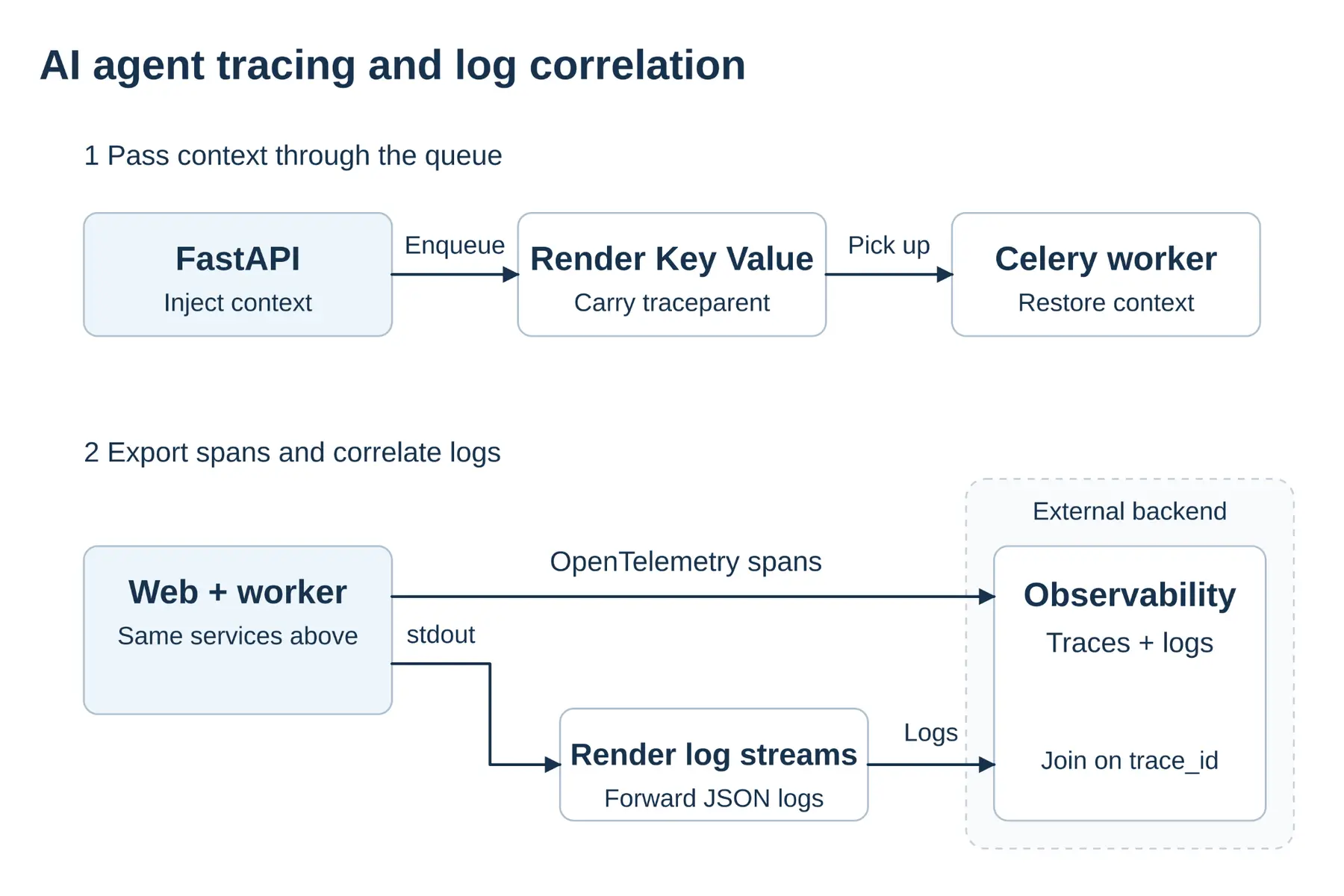
To connect those views, inject the active trace_id and span_id into your structured JSON logs (using OpenTelemetry's Python logging integration or a custom log formatter). That allows you to jump straight from a slow span in your tracing dashboard to the exact log lines emitted during that step.
When a user hits your FastAPI web service on Render, Render automatically attaches a Rndr-Id HTTP header to the incoming request, matching the requestID field in Render's HTTP request logs. Save that value under a consistent key like rndr_id alongside trace_id in your application logs, and pass it in job metadata when queuing work for a Celery background worker or Render Workflows task.
Here is an example structured log entry emitted by our support-agent-worker service on Render after it restores the trace context from the queue and finishes a tool retry:
This structured entry pairs application lifecycle context with platform identifiers:
eventrecords significant milestones such astool.completed,tool.failed, ortask.retried.run_idandtask_idgroup multi-turn agent interactions and background jobs across workers.trace_idandspan_idlink the log directly to the active OpenTelemetry span in your dashboard.rndr_idconnects the entry with Render's incoming HTTP proxy logs for cross-system correlation.
You can also use Render's log streams to forward structured logs from your web service, Postgres database, and background workers directly to the same observability platform that ingests your traces. Log meaningful lifecycle events (such as tool completions, retries, and errors) rather than writing a log line for every streamed token.
How does running your agent on Render simplify observability?
Even well-instrumented OpenTelemetry code will lose spans if the underlying hosting platform kills long-running requests mid-stream or forces you to stitch together separate vendors for web hosting, databases, and background queues. On short-lived serverless function platforms, hitting an execution cap terminates the function before open spans finish or buffered traces flush to your backend.
Running your agent stack on Render gives every part of the workflow the execution model it needs inside one workspace and private network:
Render component | Role in our support agent stack | Why it helps observability |
|---|---|---|
Runs the Python FastAPI endpoint and streams LLM replies (using a native Python runtime or Docker) | Supports a 100-minute request timeout so long streaming turns complete and export their spans cleanly, and provides Rndr-Id for instant HTTP log correlation | |
Stores the knowledge base ( pgvector) and the Celery job queue on the same private network | Eliminates cross-cloud network hops so database and queue spans reflect real query and worker timing | |
Runs persistent Celery workers that poll the queue for slow account audits | Runs continuously without HTTP request timeouts, allowing long-running tool and model spans to finish and flush | |
Executes multi-step task chains with managed queuing and automatic retries | Tracks task runs and retries without managing a separate queue broker, pairing cleanly with per-attempt spans and run_id |
At the infrastructure layer, Render's log streams forward service and database logs to your observability provider, and metrics streams export OpenTelemetry-compatible CPU, memory, and HTTP metrics alongside your application's GenAI traces. During deploys or scaling events, flush your OpenTelemetry span processor on shutdown so every completed span exports before an instance stops.
Conclusion
Model API logs and single-process agent SDK dashboards only show part of what happens when an AI agent handles a user request. Full-stack OpenTelemetry tracing connects your web service, LLM calls, database queries, and background retries into a single timeline so you can see exactly where a slow or failing run stalled.
By passing trace context and a shared run_id across queues and injecting trace_id and Rndr-Id into structured logs, you can track the true token cost of every multi-step run and jump straight from a slow span to the exact log line that explains it.
Deploy your AI agent on Render to run your FastAPI web service, Render Postgres knowledge base, background workers, and Render Workflows in one workspace with built-in log and metrics streaming.
Frequently asked questions
Redis is a registered trademark of Redis Ltd. Any rights therein are reserved to Redis Ltd. Any use by Render is for referential purposes only and does not indicate any sponsorship, endorsement, or affiliation between Redis and Render.