Rails Hosting in Production: Sidekiq, Postgres, Assets, and Scaling
TL;DR
- Production Rails hosting splits into a web service for Puma, a background worker for jobs, Render Postgres, and a queue. New apps can keep the queue in Postgres with Solid Queue; a dedicated queue on Render Key Value takes the polling load off your database.
- Budget Puma and Sidekiq threads against the Postgres connection limit, which is a hard cap: 100 simultaneous connections on a database under 8 GB.
- Run Sidekiq on its own worker. Use
noevictionso a full queue is not evicted, and keep disk persistence on a paid Key Value plan. - Compile assets in the build, run schema migrations as a pre-deploy command, and point the health check at
/upwhen you want an HTTP check. - The whole stack ships from one place: a Blueprint deploys the web service, the background worker, Render Postgres, and Render Key Value together.
A single server running Puma, Sidekiq, Postgres, and a key-value store hides three production failures: uploads stuck on local disk, a connection pool that exhausts Postgres, and a long HTTP request that blocks every Puma thread. This article covers the four-process topology, how to size Puma and Sidekiq against the database, how to run migrations and set up health checks on a Render deploy, and what a small always-on stack costs.
What is the anatomy of a production Rails deployment?
A conventional production Rails architecture runs four processes. One instance doing all four becomes a single bottleneck. Split them so you can size each process for its own constraint.
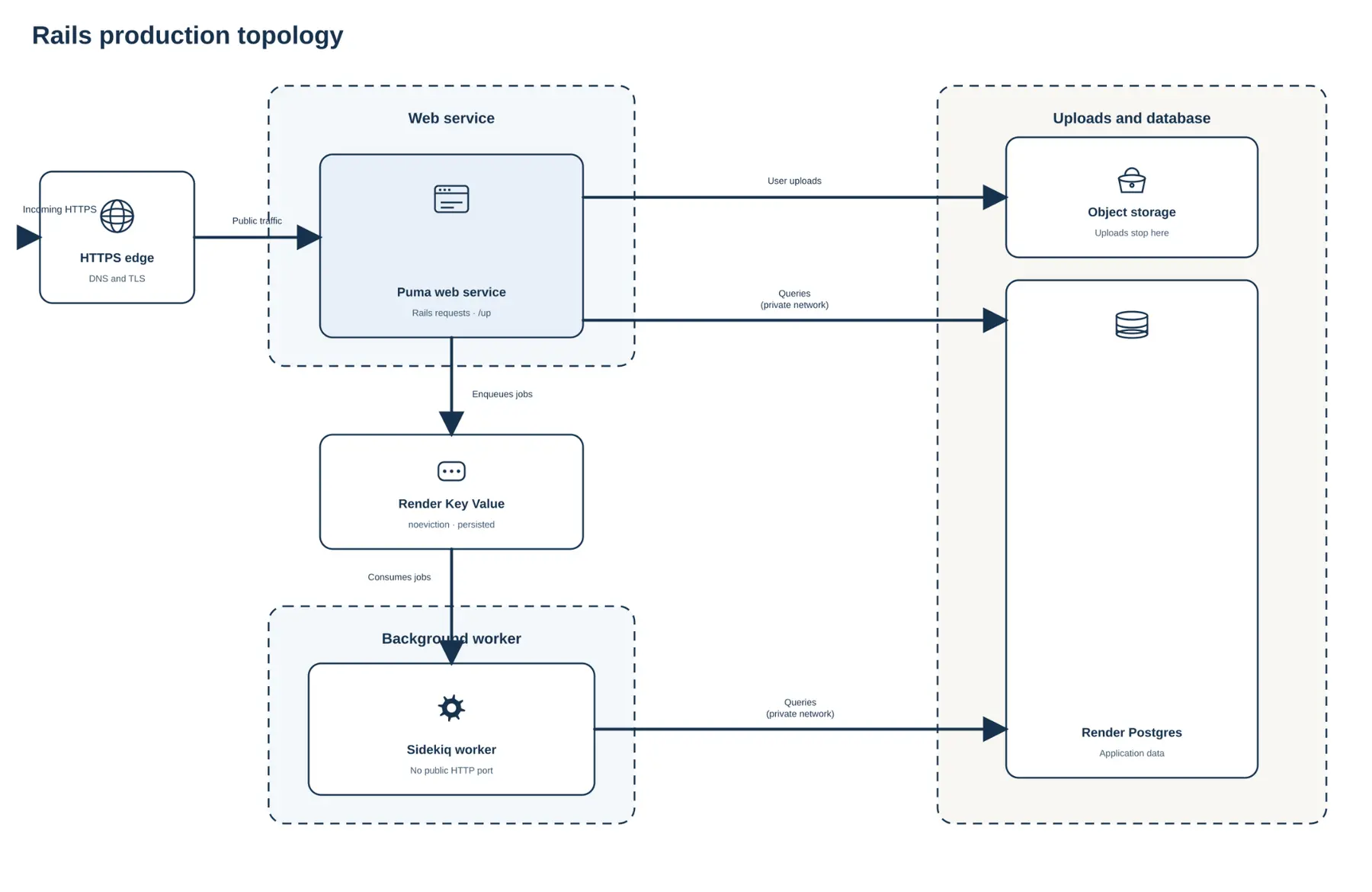
A new Rails app starts with defaults that suit a single machine: SQLite for data, Solid Queue for jobs, and no separate worker process. Production changes each of those. SQLite gives way to PostgreSQL, because the web service, the background worker, and every new deploy have to read and write the same rows at the same time, which a database file on one machine cannot do. Running jobs inside the web request gives way to a background worker, so a heavy job does not take CPU from a request. An app that keeps Solid Queue still runs the same web-plus-worker split, with the queue stored in the primary database instead of Render Key Value.
Mapping core Rails processes to cloud primitives
The HTTP application (Puma) handles active web requests, sessions, dynamic rendering, and API responses. The asynchronous worker (Sidekiq) sends transactional email, processes bulk imports, and delivers webhooks.
Render Postgres holds durable application data. Render Key Value holds the Sidekiq queue, and it can also hold query cache entries and rate-limit counters.
Rails component | Cloud primitive | Primary function |
|---|---|---|
Puma | Active HTTP requests, sessions, and API responses | |
Sidekiq | Asynchronous jobs, bulk imports, and webhooks | |
PostgreSQL | Render Postgres | Durable application data |
Redis® | Render Key Value | Sidekiq queue, query cache, and rate limits |
Paid web services and background workers can run more than one instance. On a Pro workspace or higher, autoscaling adds and removes instances to hit a CPU or memory target. Request latency and Sidekiq queue depth are signals you watch when you set the instance count yourself. A service with a persistent disk stays on one instance, and that disk also turns off zero-downtime deployments. Binding Puma and Sidekiq to the same server forces you to size that server for the heavier process.
Services in the same region reach Postgres and Key Value over the private network, using each datastore's internal URL.
How do you handle Puma configuration in production and size the database pool?
Puma serves each request on its own thread. CPU, RAM, and the database pool cap how many of those threads you can run.
Calculating connection limits
Count connections per instance, not per process. Puma is multi-process and multi-thread, so a web service with WEB_CONCURRENCY=2 and five threads per worker opens ten connections. Each thread can hold one connection for the length of a query, so the pool in each process has to cover that process's threads. Otherwise a thread waits on checkout and the request times out, often as FATAL: too many connections once the database itself is full. Sidekiq runs as a single process, so its pool matches its concurrency setting.
The plan's connection limit is a hard cap on simultaneous connections, not a target pool size. Add the Puma pools across every web instance to the Sidekiq pools across every worker instance, and keep that sum under it. A database under 8 GB allows 100 connections, 8 GB to under 16 GB allows 200, 16 GB to under 32 GB allows 400, and 32 GB and above allows 500. PostgreSQL holds a few connections back for maintenance, so leave a small buffer under the cap. Two workers at five threads each means ten connections per web instance, so three web instances and two Sidekiq workers at five threads each already use forty of the hundred a database under 8 GB allows.
Set WEB_CONCURRENCY yourself. Each Puma worker is a full Rails process with its own heap, and each thread adds its own working set on top, so measure one process and multiply by the worker count. A default that forks one process per visible CPU can exhaust memory on boot. Two workers is a reasonable start only when the instance has RAM for two Rails processes.
When clients need more connections than the plan allows, enable integrated PgBouncer on a paid Render Postgres database. It is off by default, runs in transaction mode only, and listens on port 6432. Direct connections stay on port 5432. On the pooled URL, set prepared_statements: false. Keep migrations on the direct URL: transaction mode ends temporary tables, advisory locks, and LISTEN/NOTIFY with the transaction.
Handling long-running requests
A slow request occupies a Puma thread until it finishes, so a request that runs for minutes holds capacity that a page view needs. Plan web requests against seconds, and treat the 100-minute web service timeout as an outer ceiling. The request also crosses proxies and the client's own timeout before it reaches your thread, and a deploy ends any request still running, so a long request can fail after all that work is done. Heroku's router stops a request at 30 seconds, and an Application Load Balancer in front of Elastic Beanstalk defaults to a 60-second idle timeout that you tune yourself. On Render the request window is a property of the service, so you get minutes without a proxy setting to maintain. Answer the user quickly, then do the slow part in a background worker, where an interrupted job goes back on the queue.
With only a few threads, several slow requests can occupy every thread. Later requests wait at the socket until they time out. Size the thread count for the connection budget.
Surviving a database failure
High availability on Render Postgres keeps a standby in a second zone and promotes it automatically when the primary stops responding, so a database failure becomes a few seconds of reconnection instead of an outage. The promoted instance answers at the same database URL, but the swap terminates existing connections, so your connection logic needs to retry instead of treating a dropped connection as fatal. It requires a compute plan with at least 1 CPU, and the standby is billed at that same plan. The 256 MB baseline is 0.1 CPU, so enable HA after you move the database to a plan that qualifies. HA covers a failing instance, so it does not rewind a destructive query. Point-in-time recovery does. The recovery window is 3 days on a Hobby workspace and 7 days on Pro and higher.
How should you structure Sidekiq hosting, queue topology, and state?
A background queue fails in two ways: a job that is lost when the process stops, and a job that runs twice when a retry lands. Both are decided by how the worker is hosted and how the queue stores state.
Choosing between dedicated and embedded background workers
Start with one question: does any job need CPU or memory that a page load should not wait for? If yes, run Sidekiq in its own background worker, which is the usual production layout. If the app sends a few emails and no job ever competes with a request, embedding the queue in the web process is enough and you skip a service.
A dedicated worker costs a second service to size, deploy, and watch. It also gives the queue its own CPU and its own failure domain, so a heavy import cannot slow a page load. Embedding inverts that: throughput follows web traffic, so a busy queue and a busy site stall together.
A background worker has no request to finish, so a deploy needs an explicit shutdown window. On Render, the instance receives SIGTERM when it stops for a deploy or a scale-down. Render then waits up to the shutdown delay (maxShutdownDelaySeconds, default 30 seconds, maximum 300) before SIGKILL. Sidekiq treats TERM as shutdown: it stops fetching new jobs and, when its own timeout expires, pushes unfinished work back onto the queue. That timeout is the -t flag, and it defaults to 25 seconds. Set the Render delay a few seconds above it so those jobs can finish or be requeued before SIGKILL. Sidekiq's deployment docs also describe TSTP, the quiet signal you send yourself at the start of a deploy script so the process stops fetching earlier.
Staging apps and prototypes sometimes embed the queue in the web process, using Sidekiq's embedded mode or SuckerPunch. That saves a service, and it is the right trade for a staging environment where no job competes with real traffic.
Making long jobs resumable and safe to retry
Sidekiq executes a job at least once, and its own documentation makes no exactly-once guarantee: a job that has already finished can run again when the acknowledgement back to Redis is lost, and a job that raises an exception is retried. Two practices cover that. Make the job idempotent, so running it twice produces one effect: look the record up by ID, check whether the work is already done, and skip if it is. Wrap the job in a database transaction, so a failure part-way through rolls back instead of leaving half the work committed. Then split a long job into chunks that record their progress, so a shutdown resumes where it stopped instead of starting over.
Choosing a job queue
A Rails app has three realistic queue shapes, and the choice follows from what the app already runs.
Queue | Where jobs live | Pick it when |
|---|---|---|
Solid Queue | Render Postgres | The app is new, job volume is modest, and you would rather not run a second datastore |
Sidekiq on a new Render Key Value instance | Render Key Value (Valkey 8) | You want the queue off the primary database, or the app already runs Sidekiq |
Sidekiq on an existing Key Value instance | Render Key Value (Redis 6) | You are staying put, on Sidekiq 7 or below, until you create a new instance |
For a production app that has outgrown the database-backed default, the second row is the shape to aim for. Keeping the queue in the primary database means job polling shares those connections, which is the reason many teams move to a dedicated queue.
Keeping a queue durable
A cache may drop old keys when memory is full. A job queue has to keep every unprocessed job. Set the Key Value maxmemory policy to noeviction so a full instance refuses new writes instead of deleting queued jobs. Persistence is a separate setting. Paid Key Value instances write state to disk, and that setting is on by default. The 256 MB plan is the smallest with persistence. Use Journal + Snapshot for a queue, and turn persistence off only when the instance is a cache.
New Render Key Value instances run Valkey 8. Sidekiq 8 needs Redis 7+ or Valkey 7.2+, and instances created before 12 February 2025 run Redis 6, so create a new Key Value instance before upgrading to Sidekiq 8.
How do you ensure deployment safety with migrations and health checks?
A Rails deploy is a sequence. Mixing asset compilation, schema changes, and live traffic in one step is how a release takes the app down.
Handling the Rails asset precompile in production
Compile assets during the build, then serve the finished files from the running web service. New Rails 8 apps fingerprint those files with Propshaft and write them to public/assets, as the asset pipeline guide describes. Existing apps often still use Sprockets. The same split applies: compile in the build, serve from the service.
On a Pro workspace or higher, the Performance build pipeline runs that compile on a larger machine. Those minutes are billed separately, at $25 per 1,000 minutes.
Thruster, the HTTP/2 proxy from 37signals, can sit in front of Puma and serve the compiled files. It is optional.
User uploads are not compiled assets. Local disk is private to one instance, so a second instance cannot see them. Configure Active Storage with object storage such as Amazon S3, so uploads are shared across every instance.
Decoupling schema migrations from builds
Schema migrations can take an exclusive lock, so they stay out of the asset build and out of the window where old code is still serving traffic. Run `bundle exec rails db:migrate` as a pre-deploy command. It runs after the build and before the new instances receive traffic.
For a large table, use a safe-migration library such as Nandi so the change avoids a long exclusive lock.
Rails 7.1 and later ship a /up endpoint. On Render, health checks are TCP by default. Set the health check path to /up when you want an HTTP check. That check passes on any 2xx or 3xx response within five seconds. Render starts the new instances, waits until they are healthy, and then shifts traffic to them.
How do Rails hosting costs compare across platform alternatives?
A Rails production stack is four bills: web, worker, Postgres, and Key Value.
Comparing representative cost scenarios
Prices below are from Render's pricing page as of September 2026. A small always-on baseline is:
- A web service on
0.5c-512mb(512 MB, $7/month) - A background worker on the same plan ($7/month)
- Render Postgres on
0.1c-256mb(256 MB, 100 connections, $6/month) - Render Key Value on
256mb(256 MB, $10/month)
That is $30/month before bandwidth and the workspace plan. A 2 GB web service or worker is plan 1c-2g at $25/month. Postgres at 2 GB is a different plan, also called 1c-2g, at $40/month.
Heroku charges a separate dyno for the web process and another for Sidekiq, then bills Postgres and the key-value store as add-ons. The comparable stack comes to $79 a month, and two of those prices are doing real work. Heroku Postgres Essential-0 allows 20 connections, against Render's 100 on the same baseline, so three web instances at two workers and five threads would not fit. The $3 Key-Value Mini plan holds 25 MB and, as Heroku's own documentation states, does not persist data, which rules it out for a job queue. The 250 MB tier that matches Render's Key Value is $60.
Evaluating platform fit (Render, Heroku, Fly.io, AWS, Railway)
The cost table prices the same stack on each platform: a 512 MB web service, a 512 MB worker, a Postgres database, and a queue, in a US region, running continuously. Figures are as of September 2026.
Platform | Core differentiator | Operational overhead |
|---|---|---|
Render | CPU and memory autoscaling on Pro workspaces; zero-downtime deploys; HA Postgres on plans with at least 1 CPU | Low |
Heroku | A large add-on marketplace for Postgres and Redis, against a fixed 30-second router timeout | Medium |
Fly.io | Geographic routing at the application level | Medium |
AWS (Elastic Beanstalk) | EC2, RDS, and load balancers under your own IAM and network setup | High |
Railway | Hobby projects, prototypes, and early-stage iteration | Low |
Platform | What you pay for | Total |
|---|---|---|
Render | $7 web + $7 worker + $6 Postgres + $10 Key Value | $30 |
Heroku | $7 + $7 dynos + $5 Postgres + $60 Key Value | $79 |
Fly.io | $3 + $3 compute + $5 Redis + $38 Managed Postgres + $3 storage | $52 |
AWS (Elastic Beanstalk) | $24 EC2 + $12 RDS + $16 load balancer + $12 cache node | $64 |
Railway | Metered: $10 per GB of RAM, $20 per vCPU | $40 |
Render and Heroku publish a monthly price for each piece. Fly.io and AWS price the same work by the second and the hour, so the figures above are computed from their published per-second and on-demand rates for the sizes named, and neither publishes a monthly total for this stack.
Render publishes the number, so the bill does not move with load. Railway is metered, so its figure depends on how hard the app works: the $40 above assumes the four services average 1 vCPU between them, which is a light production load, and every vCPU beyond that adds $20. AWS bills CPU credits on burstable instances at $0.04 per vCPU-hour once load passes the baseline, and the $64 above assumes instances sitting inside their included burstable credits. On a stack that keeps working all month, both cost more than Render, and the gap widens as traffic grows.
What each platform asks of you
Fly Managed Postgres still lists security patches, version upgrades, and customer-facing alerting as in progress.
Elastic Beanstalk has no separate product charge. It provisions the EC2 instances, database, and load balancer in your own AWS account and manages them through a CloudFormation stack, so the resource definitions are yours to read and change. The IAM roles and network boundaries around them are yours to design, which is what the overhead rating in the table refers to.
Railway bills by usage and suits hobby projects, prototypes, and early-stage iteration.
Conclusion
Production Rails is a set of boundaries: Puma threads sized to the Postgres pool, Sidekiq on its own worker, assets compiled in the build, and migrations in a pre-deploy command. New Rails 8 apps default to Solid Queue. An existing Sidekiq deployment keeps the worker and Key Value.
Put the web service, Sidekiq worker, Postgres database, and Key Value instance in one Blueprint.
Frequently asked questions
Redis is a registered trademark of Redis Ltd. Any rights therein are reserved to Redis Ltd. Any use by Render is for referential purposes only and does not indicate any sponsorship, endorsement or affiliation between Redis and Render.