Hosting a Strapi CMS in Production: Media, Database, and Admin Access
TL;DR
- Run the Strapi app, database, and uploaded-file storage as separate services. Use PostgreSQL to store content and external file storage for images, videos, and documents. This setup lets you add app instances without keeping uploads on one instance's local disk.
- Protect the admin panel with HTTPS and multi-factor authentication (MFA), which adds another check when someone logs in, such as a code from an authenticator app.
- When a release changes database tables or runs migrations, let one Strapi instance finish those updates before starting the others. Ensure scheduled tasks run only once across all instances.
- Keep API responses small by requesting only the fields and related content you need instead of using
populate=*to fetch everything one level deep. - Before going live, test the setup in staging, a separate test environment. Check that backups restore both content and uploaded files, another app instance can access uploads, and admin login requires HTTPS and MFA.
- On Render, one Blueprint covers the Strapi web service and managed Postgres. Render runs the web service and database infrastructure. You still own Strapi upgrades, schema changes, media backups, and security configuration.
Strapi is an open-source content management system that runs on Node.js. Teams use it to create and edit content, then serve that content to websites and apps through an API. For local development, Strapi stores content in SQLite by default: a small database that lives as a file on your computer. That setup is fine for early prototypes.
Moving Strapi from your laptop to production changes how you handle content, uploaded files, and updates:
- Uploaded files need storage that survives app updates and restarts. On Render, files saved to the app's default local storage are lost when it redeploys or restarts.
- Running several copies of Strapi helps serve more traffic, but updates need coordination. If several copies try to change the database's tables at the same time, those changes can conflict.
- Strapi needs permission to create and update its database tables. Incorrect permissions can prevent the app from starting.
This guide shows how to set up the database and file storage, protect admin access, and deploy and scale Strapi on Render.
What is the anatomy of a production Strapi architecture?
This guide focuses on a setup that can run multiple Strapi instances.
On most cloud hosts, the app's local disk is ephemeral (temporary): files written there at runtime do not survive a new deploy or a process restart. Databases and uploaded media need storage outside the app so they survive release cycles.
This setup separates four responsibilities:
- The stateless Node.js application runs the core Strapi service
- A dedicated relational database handles structured content
- A durable external storage solution manages media assets
- A separate worker or scheduler runs scheduled tasks once, when needed.
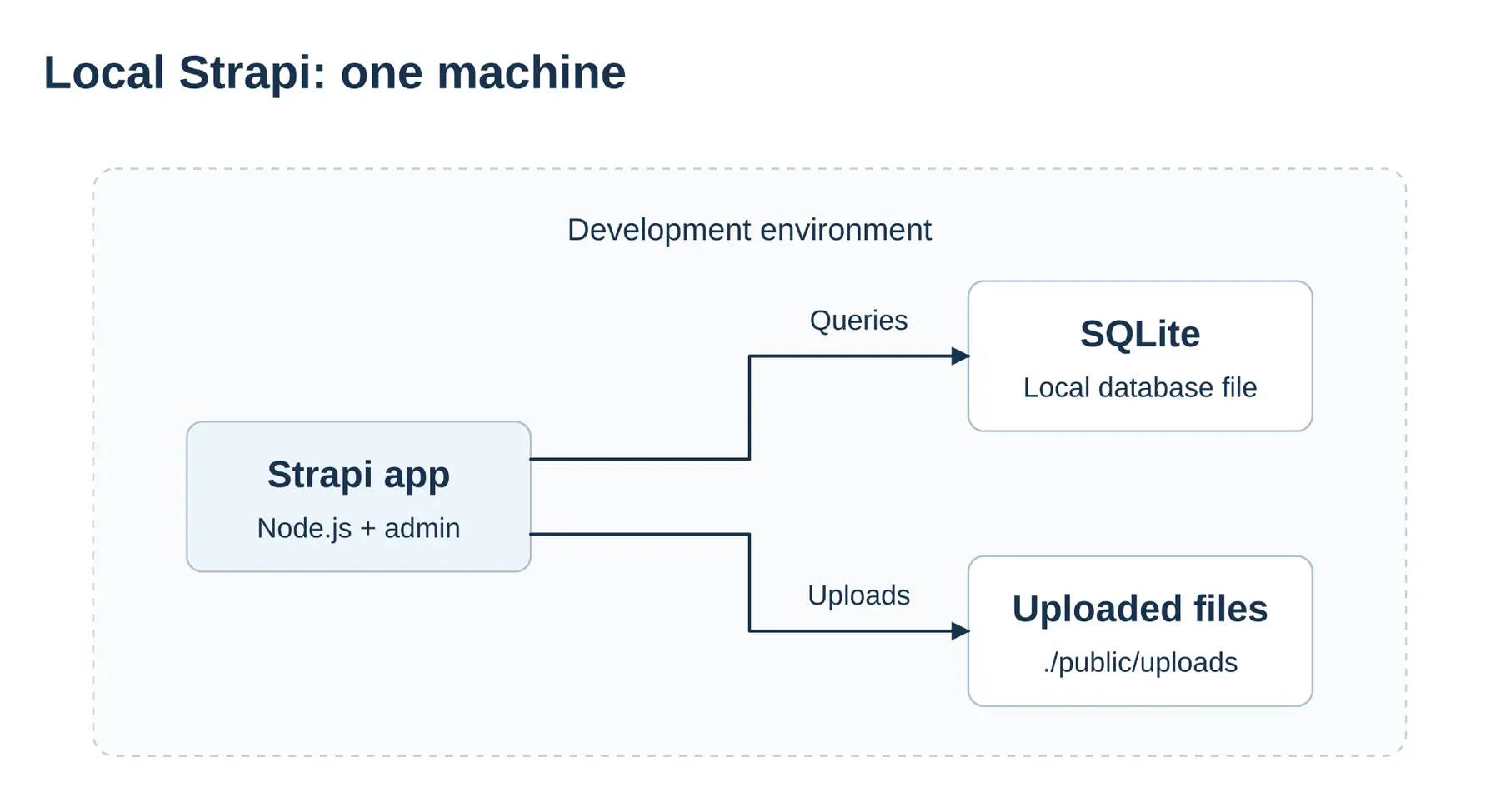
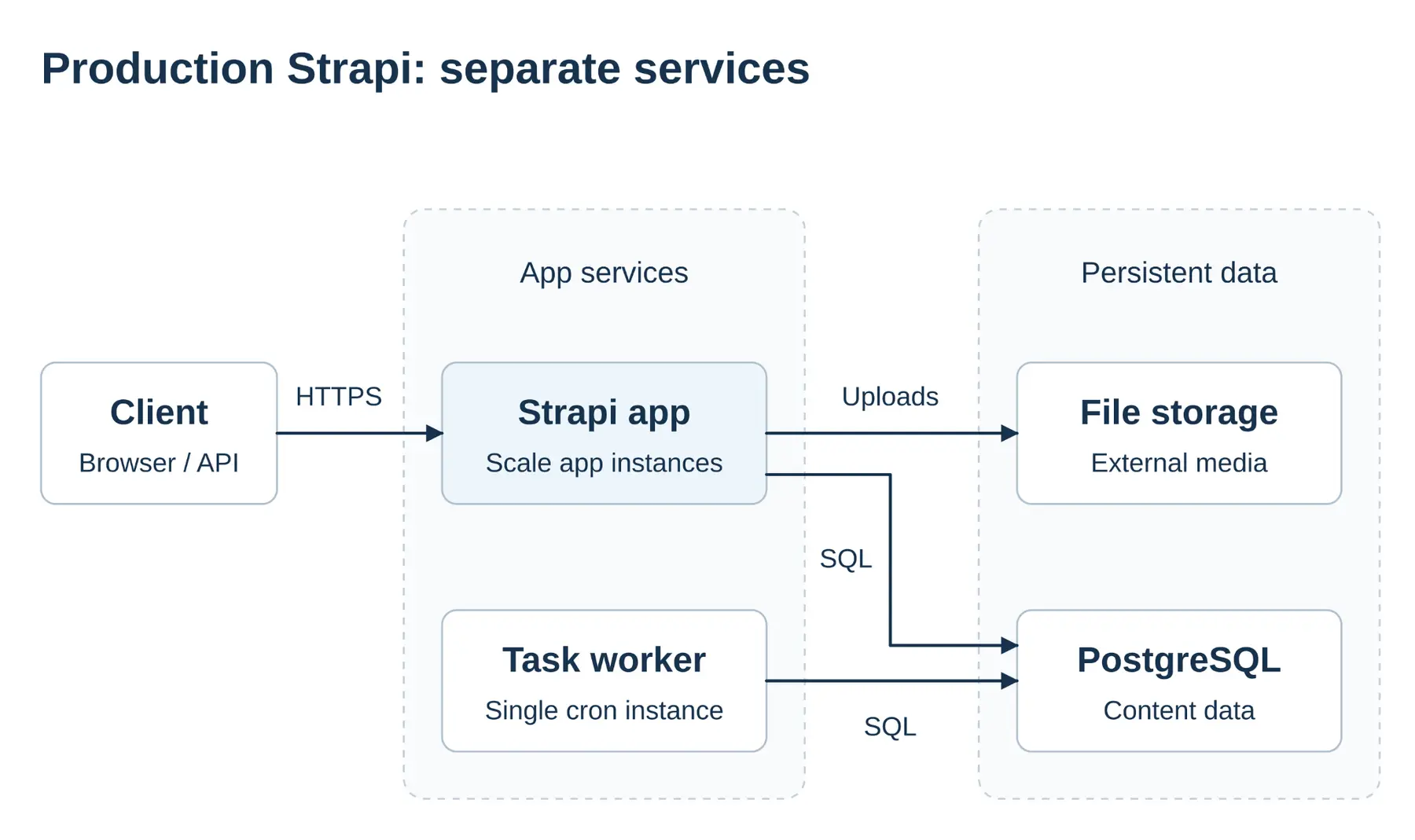
Separating these layers supports horizontal scaling across multiple instances and allows continuous deployments without data loss.
How do you configure Strapi databases and media storage?
Strapi 5 supports PostgreSQL, MySQL, MariaDB, and SQLite, and does not support NoSQL databases like MongoDB.
Use an empty database dedicated to a new Strapi project. When moving an existing Strapi project, use its compatible database. Do not point Strapi at another app's populated database.
Ensure Strapi's database user can access its PostgreSQL schema and create tables.
To scale horizontally, teams must use an external object storage provider. Use Strapi's official AWS S3 upload provider to connect to Amazon S3, DigitalOcean Spaces, or Cloudflare R2. Spaces and R2 work with this provider because they support S3-compatible upload requests. For providers that support it, set the access control list (ACL) to private for sensitive files. Cloudflare R2 does not support ACLs, so omit that setting there. Strapi's default security policy can block previews of files stored on another domain. In config/middlewares, update contentSecurityPolicy to allow your file-storage or CDN domain under img-src and media-src, the rules controlling where images and other media can load from. This lets the admin panel display those previews.
Cloudinary is another option for storing uploaded files outside the Strapi app. Connect it using Strapi's official Cloudinary provider, configured with your Cloudinary cloud name, API key, and API secret.
How do you secure Strapi admin access?
Render handles HTTPS through a proxy, which receives requests before passing them to the Strapi app. It forwards headers that tell Strapi the original connection used HTTPS. Set proxy.koa to true in config/server so Strapi trusts those headers. This allows it to set secure login cookies, which keep you signed in and are sent only over HTTPS. Without this setting, Strapi may treat the connection as HTTP, causing login problems.
Strapi's built-in admin login uses an email address and password. It does not include an authenticator-code check. You can add MFA through a compatible plugin such as HeadLockr. Alternatively, use single sign-on (SSO) so your team signs in through an identity provider that requires MFA, or place an access service with MFA in front of the admin panel. Strapi's SSO feature requires the Strapi Enterprise plan, or the Strapi Growth plan with the SSO add-on.
Give administrators and API tokens only the permissions they need. Keep login rate limiting enabled, and test security updates in staging before applying them to production.
How do you scale and optimize Strapi for production?
Running more than one Strapi instance takes some planning. You'll also want to shape your API queries so responses stay small.
Each running copy of Strapi is called an instance. At startup, each instance checks whether the database's tables match the content types defined in your project. This check also runs in production.
If an update changes content types or includes database migrations, which are scripts that update the database, several instances starting together can attempt conflicting changes. Start one instance with the new version first and let it finish updating the database before starting the others. When the database structure is unchanged and no migrations are pending, this startup check does not create the same conflict.
Before upgrading Strapi, back up the code, database, and uploaded files, then test the upgrade in staging. Render updates a scaled web service one instance at a time, so old and new versions overlap. For database-changing releases, confirm both versions work with the updated database and avoid simultaneous deployments of other Strapi services using it. Changes that break compatibility need planned downtime.
Strapi runs scheduled tasks inside each instance where cron.enabled is true. With several web instances, the same nightly task can run several times.
Disable Strapi cron in the web service and choose a separate place to run scheduled tasks:
- Run one Render background worker with Strapi cron enabled. This lets the scheduled tasks use Strapi's internal functions.
- Create an authenticated Strapi endpoint that performs the task, then configure a Render cron job to call it on a schedule.
Choose the worker for tasks that need Strapi's internal functions. Choose the cron job when a scheduled request to an endpoint is sufficient.
Slow APIs often come from heavy queries. Developers often rely on the wildcard population (populate=*) syntax. That query returns every relation one level deep, which bloats payloads and join work. Prefer explicit field selection. For frequently requested content, you can add caching with Render Key Value. A cache temporarily stores results so the Strapi app can reuse them instead of repeating the same database query. Refresh or expire cached results when content changes.
How do you back up and restore Strapi?
Recovery has two parts that must stay in sync. Restoring a managed database to an earlier point in time (point-in-time recovery, or PITR) does not bring back missing media files. Back up both the database and uploaded files, and test restoring them together. Run scheduled backups on one instance or a worker service so each scheduled backup runs only once.
In staging, a separate test environment, run four checks. First, restore a database backup and confirm that Strapi can display the restored content. Second, add another app instance and check that it can access uploaded files and that scheduled tasks still run only once. Third, test admin login over HTTPS and confirm that MFA is enforced. Fourth, restore both the database and uploaded files, then open restored content and check that its images and documents load. This last check needs file-storage backups as well as database backups.
How do you manage build behavior and environment variables?
Strapi reads some settings when building the admin panel and others when the Strapi app starts. Because the admin panel functions as a static bundle, it must be built during pipeline execution with NODE_ENV=production explicitly set. The build includes settings such as the admin panel's path and backend URL. If you change these settings after the build, rebuild the admin panel for the changes to take effect.
Store Strapi's security secrets in environment variables and keep them consistent across instances and deployments. Changing them can invalidate sessions or API tokens.
How do you deploy Strapi on Render with a Blueprint?
A Render Blueprint puts the Node.js web service, managed Postgres, and environment variables in a single render.yaml:
The example below defines the Strapi app and database. It does not configure storage for uploaded files or scheduled tasks.
In config/database, set the database client to postgres and read the connection string with env('DATABASE_URL').
Commit package-lock.json to your repository. The build command installs the locked dependencies, including development dependencies needed to build the admin panel, before running the build.
Render generates each secret only if its environment variable does not already exist, then preserves the value across later deploys.
TRANSFER_TOKEN_SALT protects tokens used to transfer content between Strapi projects. ENCRYPTION_KEY supports API-token encryption. Configure Strapi to read these values in config/admin.
This example gives the Strapi app 2 CPU cores and 4 GB of memory, matching Strapi's recommended CPU and memory requirements. Adjust the instance size after testing your workload.
Render calls Strapi's built-in /_health endpoint to check that the Strapi app is responding. This checks the app itself. Use the staging checks to verify content and uploaded-file recovery.
The mapping table below also covers storage for uploaded files and services for scheduled tasks. For the full walkthrough, follow the Strapi deploy guide. For external media storage, see the Postgres and Cloudinary template. Its example currently uses Strapi 4, so update the dependencies and configuration for Strapi 5 and test before deploying. The Strapi Postgres template stores uploads on a persistent disk, which limits the service to one instance.
This is how the full production setup maps onto Render:
Strapi component | What it is | Render service type |
|---|---|---|
Node.js CMS engine | Stateless compute | Web service |
Relational data | Managed SQL database | Render Postgres |
Media uploads | Object storage / block storage | External file storage / persistent disk for one instance |
Scheduled tasks | Scheduler | Background worker or cron job calling Strapi |
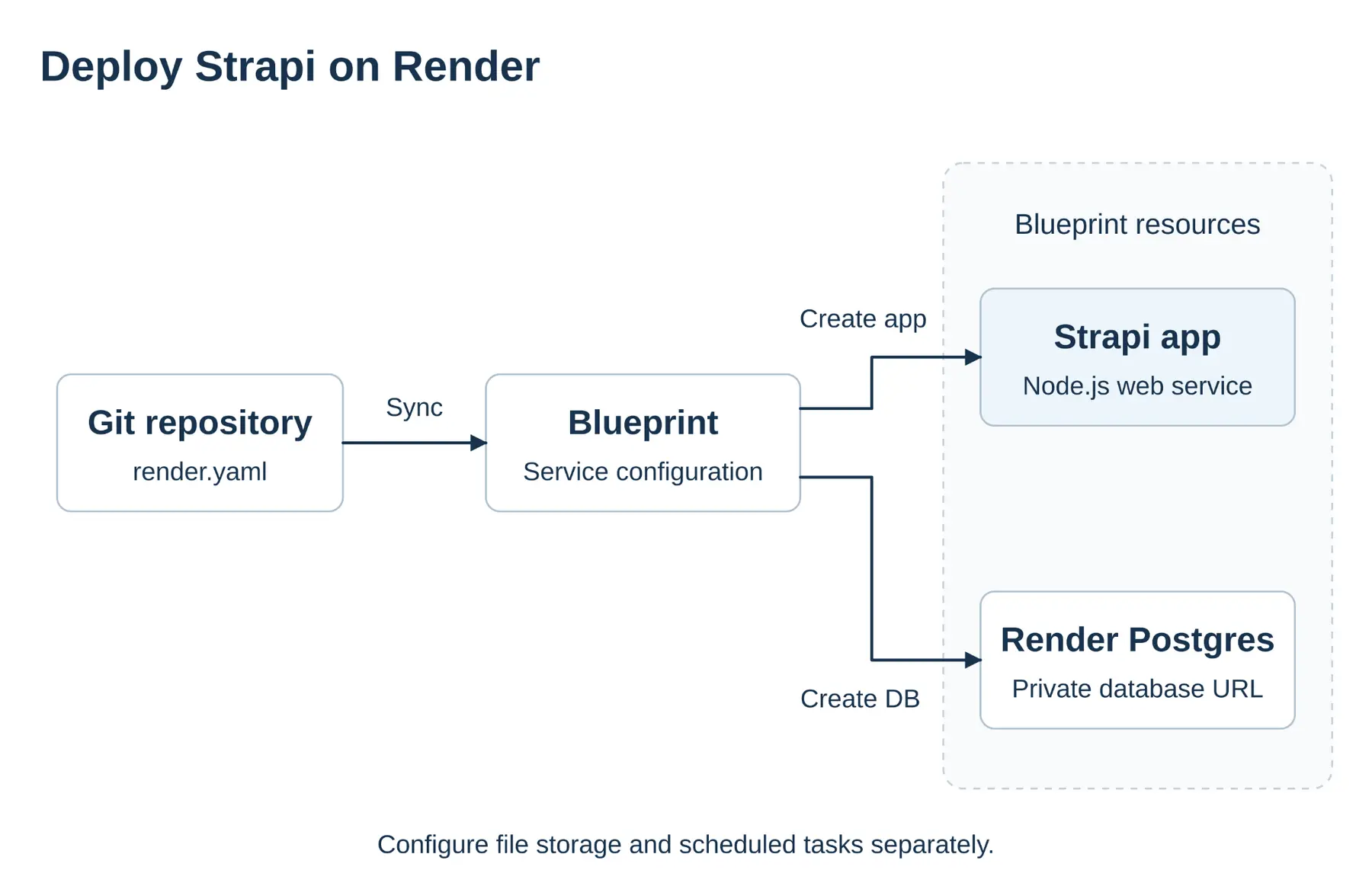
Render manages the database lifecycle for you. For production Strapi, Render Postgres continuous backups support point-in-time recovery into a new database instance. After a restore, repoint DATABASE_URL to that instance.
Render web services support 100-minute request timeouts. This can accommodate long-running imports and media processing. Every Render Postgres database has an internal URL for same-region, same-workspace web services on the private network. Same-region private traffic is not billed as outbound bandwidth. New databases also accept external connections from any IP by default, so set an IP allow list or turn off external access.
When should you host Strapi on Render instead of Strapi Cloud?
This guide's setup uses a Strapi web service, managed PostgreSQL, external file storage, and a separate scheduler when needed. Choose a host based on which parts you want the provider to manage and which you want to control yourself.
Render fits when you want to declare the web service, Render Postgres, and environment in one Blueprint. Connect the file-storage provider you already use, and add more Strapi instances on Render without moving your CMS to Strapi Cloud. Choose Render when horizontal scale, private-network database connections, Infrastructure as Code, and ownership of media and workers matter more than one combined hosting plan.
Strapi Cloud is a managed CMS host. It includes a managed PostgreSQL database plus asset storage and bandwidth. Database backups are automatic on Pro and Business plans (not on Starter). Choose Strapi Cloud when you want Strapi to run and maintain the hosting for you.
Other hosts often come up in evaluations. Here's how they compare as of October 2026:
Hosting option | What you buy | Database & media | Fit |
|---|---|---|---|
Render | Cloud platform for your Strapi setup | Managed PostgreSQL plus external object storage (or a disk for single-instance) | Teams that need multiple Strapi instances, private database connections, and a setup defined in code. |
Strapi Cloud | Managed CMS host | PostgreSQL provisioned for you | Strapi operates the host |
DigitalOcean | App Platform plus separately billed managed databases and Spaces | Managed databases + Spaces | Teams that use DigitalOcean's broader portfolio |
Railway | Usage-billed cloud application platform | Railway Postgres and S3-compatible Buckets | Teams that prefer Railway's deployment experience or usage-based billing |
Conclusion
Keep the Strapi app, PostgreSQL, and uploaded-file storage separate, and test backups and admin access before launch. Deploy Strapi on Render with managed PostgreSQL, private database connections, and a Blueprint that defines your services in code.