Deploy Directus on Render: A Practical Guide
TL;DR
- Directus is a headless CMS: an admin UI plus REST and GraphQL APIs on your database. On Render, run the official Docker image as a web service, and keep Postgres and uploads outside that container.
- Connect Directus to Render Postgres through PgBouncer (the pool URL) so Directus Flows and other async work do not open more database clients than Postgres can accept.
- Store uploads on a Persistent Disk or S3-compatible object storage. Files written only to the web service disk disappear after a restart or redeploy.
- Define the stack in a Render Blueprint (
render.yaml) soPUBLIC_URL, secrets, storage, and license settings stay reproducible without committing secrets to Git. - On Directus v12, set the health check to
/server/ping. LeaveLICENSE_KEYunset in preview environments.
You are deploying Directus on Render. Directus is a headless CMS: an admin UI plus REST and GraphQL APIs on your database.
Directus needs durable data next to the app: a database for your collections and a place for uploaded files. Locally that is often SQLite or Postgres beside the container in Docker Compose. On Render, this guide uses the official image as a web service, Render Postgres for that database, and either a Persistent Disk or S3-compatible object storage for media. That split matches how Render deploys work: each deploy replaces the service, while the database and upload storage stay put.
This article covers a baseline Directus stack on Render, the Render Blueprint that defines it, Render Postgres with connection pooling, persistent uploads, Directus v12 health checks and preview licensing, then how to verify the deploy.
What does a Directus architecture on Render look like?
Directus in production needs three roles next to the app process: a web service for the official image, a database for collections, and storage for uploads. Render maps those onto a web service, Render Postgres (with optional PgBouncer), and a Persistent Disk or S3-compatible object storage, which you can declare together in a Blueprint. Here is that shape as separate services:
-
Web service: official Directus Docker image
-
Render Postgres for application data
-
Upload storage outside the container: a Persistent Disk at
/directus/uploads, or S3-compatible object storage -
Optional for this baseline: Render Key Value (Redis®-compatible) when you want shared cache and sync
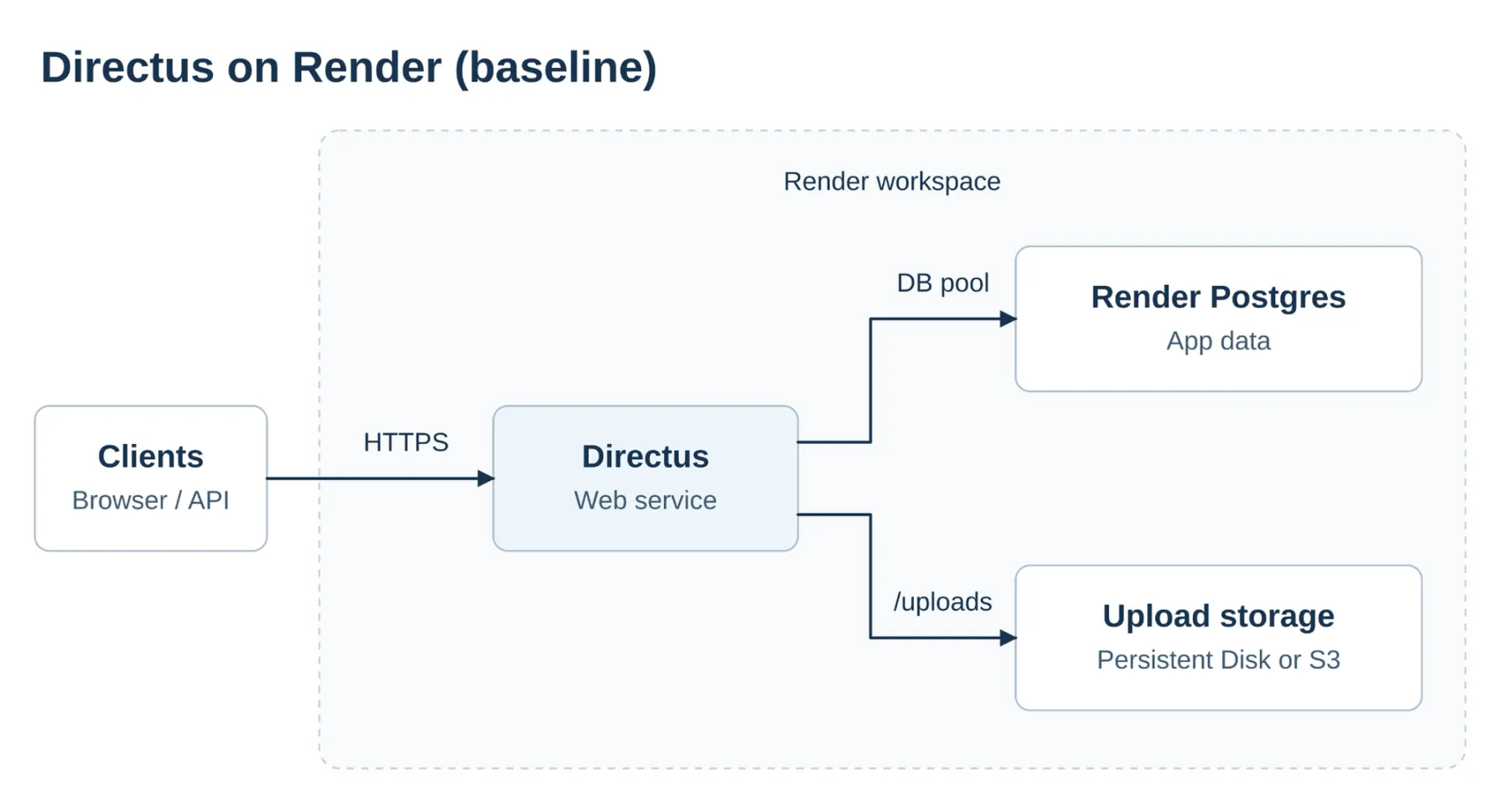
Figure: Clients reach the Directus web service. Render Postgres and upload storage sit outside the container. Point Directus at Postgres through PgBouncer when pooling is enabled.
The maintained starting template is the Directus Labs Render Blueprint (also covered in Directus’s Deploy Directus to Render tutorial). It provisions a web service, Render Postgres, and Render Key Value, with healthCheckPath set to /server/ping. Render’s Deploy Directus with Docker path is the quicker image-only on-ramp. Neither replaces durable uploads or the pool settings below.
Treat that Blueprint as the on-ramp, then adjust it for durable media before you rely on uploads in staging or production:
- Pin a current Directus image tag in the Blueprint’s Dockerfile (recheck before you ship)
- Add a Persistent Disk at
/directus/uploads, or switch Directus file storage to S3-compatible object storage - When PgBouncer is enabled on Render Postgres, point
DB_CONNECTION_STRINGat the pool URL
If you later run more than one web service instance, every instance must see the same files and cache. Use object storage for uploads and keep Render Key Value for shared cache and sync. The Labs Blueprint already wires Key Value. The main change for multiple instances is shared upload storage.
How do you define the stack via infrastructure as code?
Directus reads its runtime config from environment variables. A Render Blueprint (render.yaml) keeps those settings reproducible across staging and production without committing secrets to Git.
Start from the Directus Labs Render Blueprint, then shape it toward the durable layout from the architecture section. Set at least:
PUBLIC_URLfor absolute asset URLs and OAuth callbacks (the service URL, or your custom domain)SECRETfor token signingADMIN_EMAILandADMIN_PASSWORDfor the first admin user (sync: falseso passwords stay out of Git)- Upload persistence (a Persistent Disk mount and/or Directus
STORAGE_*vars) LICENSE_KEYonly on environments that should keep a Directus license activation
The sample below is a single-instance durable baseline: Render Postgres with PgBouncer, a Persistent Disk at /directus/uploads, health check on /server/ping, and the pool URL.
For S3-compatible uploads instead of a disk, omit the disk: block and set Directus file storage env vars.
How do you configure PostgreSQL for Directus?
Use Render Postgres as the application database. Wire the Directus web service over the private network so database traffic stays inside the workspace.
Directus Flows and other async work can open many database clients from one trigger. Postgres only accepts a fixed number of connections. When that fan-out exceeds the limit, new clients fail with FATAL: too many connections, and Flows or admin actions start erroring even though the database is otherwise healthy.
That is the problem connection pooling is meant to solve: many short-lived clients share a smaller set of server connections instead of each holding one open. On Render, PgBouncer is integrated with the Postgres instance (not a separate service you deploy). Enable it when you see that fan-out pattern (or expect Flows-heavy load). Skip it when concurrent clients stay well under that limit and you are not hitting connection errors. Point Directus at that instance’s pool URL, not the direct connection URL. Keep session-feature clients (LISTEN/NOTIFY, temporary tables, session variables) on the direct URL even if the pool is on for Directus.
In a Render Blueprint, set connectionPool: pgbouncer on the database and point Directus DB_CONNECTION_STRING at fromDatabase.property: connectionPoolString (as in the sample above).
You can also turn the pool on from the database Info page in the Render Dashboard, then set DB_CONNECTION_STRING to the pool URL shown there.
PgBouncer on Render uses transaction pooling. If you see prepare-related errors after enabling the pool, check current Directus and pg driver guidance, or use the direct connection for the failing client. Size the database against the connection docs.
How do you configure Directus persistent uploads?
Directus stores uploaded files under /directus/uploads by default. On Render, put that path on a Persistent Disk or point Directus at object storage so media is still there after a redeploy.
Strategy 1: Render Persistent Disk (one web service instance)
Attach a Persistent Disk and mount it at /directus/uploads. The volume survives container replacement on that service.
A disk mounts on only one instance at a time. For a single web service, that is usually the simplest durable setup. If you later run more than one instance, move uploads to object storage so every instance sees the same files.
Strategy 2: S3-compatible object storage
Use Directus’s S3 driver and point STORAGE_LOCATIONS at a bucket. Multiple web services can share the same uploads.
When more than one instance needs shared cache and sync, keep Render Key Value (Redis®-compatible) and set the Directus cache/sync env vars. Cloudflare R2 is a common S3-compatible target. Set the S3 region per your provider (R2 often uses auto).
How do you manage Directus version 12 licensing in CI/CD?
Skip this section if every environment runs Directus on Core with no LICENSE_KEY.
If you do use a key (paid features or an Open Innovation Grant), Render Preview Environments can spend activations you meant for staging and production. An activation binds to PUBLIC_URL and the project database. Each preview often gets both a new URL and a new database, so copying LICENSE_KEY into every preview can burn a fresh activation on every pull request.
Leave LICENSE_KEY unset on preview services so those deploys stay on Core. Set the key only on staging and production. In a Blueprint, sync: false keeps the secret out of Git. Still do not attach the variable to preview services. Core limits change over time: check Directus pricing before you publish.
How do you verify the deployment and platform health?
Render health checks probe a path before sending traffic to a new deploy. A bad response aborts the rollout.
Render’s HTTP health check calls your path with no auth. On Directus 12, /server/health requires authentication, so that probe gets 403 and the deploy never goes live. Set healthCheckPath to /server/ping, which answers without auth and returns pong.
Then confirm state lives outside the container:
- Create a record in a test collection.
- Upload a small image and copy its URL.
- Trigger a manual redeploy in the Render Dashboard.
- Confirm the record and image still load.
How do you troubleshoot common setup problems?
Symptom | What to do |
|---|---|
Container exits on boot | On Directus 12, do not call pm2-runtime directly in a custom start command. Route startup through docker-entrypoint.cjs. |
Login returns 500 | Check Directus ip_access values in Postgres. A malformed CIDR (for example a space in 10.0.0.0/ 24) can break login even when the text stored cleanly. Fix or clear the bad rows. |
Service dies during image transforms | Lower transformation concurrency in Directus env settings. Concurrent transforms can exhaust memory on smaller web service instances. |
Conclusion
You now have a production path for Directus on Render. Deploy the full project in one workspace and manage it in one place, so that you can put your time into growing the product.
Frequently asked questions
Redis® is a registered trademark of Redis Ltd. Any rights therein are reserved to Redis Ltd. Any use by Render is for referential purposes only and does not indicate any sponsorship, endorsement or affiliation between Redis and Render.