Django Hosting in Production: Workers, Postgres, Static Files, and Cost
TL;DR
- Hosting Django in production requires abandoning fat containers in favor of a topology that separates disposable application compute from durable state.
- Treat Gunicorn worker count and Postgres connection limits as one budget: connections-per-worker × workers must fit under the database
max_connections(with headroom). Raise the DB tier or cut workers when you hit the cap. Managed Postgres caps connections to protect instance memory. - Offload heavy processing to dedicated Celery background workers so a long job does not hold a web worker or get cut off by an HTTP request timeout.
- Manage PostgreSQL safely by enabling native connection pooling and applying the multi-step expand-and-contract migration pattern to prevent schema-related downtime.
- Serve application code assets using WhiteNoise and route untrusted user media to external object storage, because local block storage cannot be shared across horizontally scaled workers.
- Bind the web service, background worker, and managed Postgres with a Render Blueprint for flat-rate scaling.
Running Django locally with runserver provides a smooth development experience. However, it masks the operational complexity of a live environment.
Teams often make a critical mistake during Django production deployment: they drop their entire project into a single basic web container. This fat container approach leads to dropped database connections, missing CSS, and lost user-uploaded files.
This article breaks down the anatomy of a production Django topology. It covers Gunicorn worker sizing, Celery background workers and a task queue, PostgreSQL management, static and media files, hosting costs, and deployment automation.
What is the anatomy of a production Django topology?
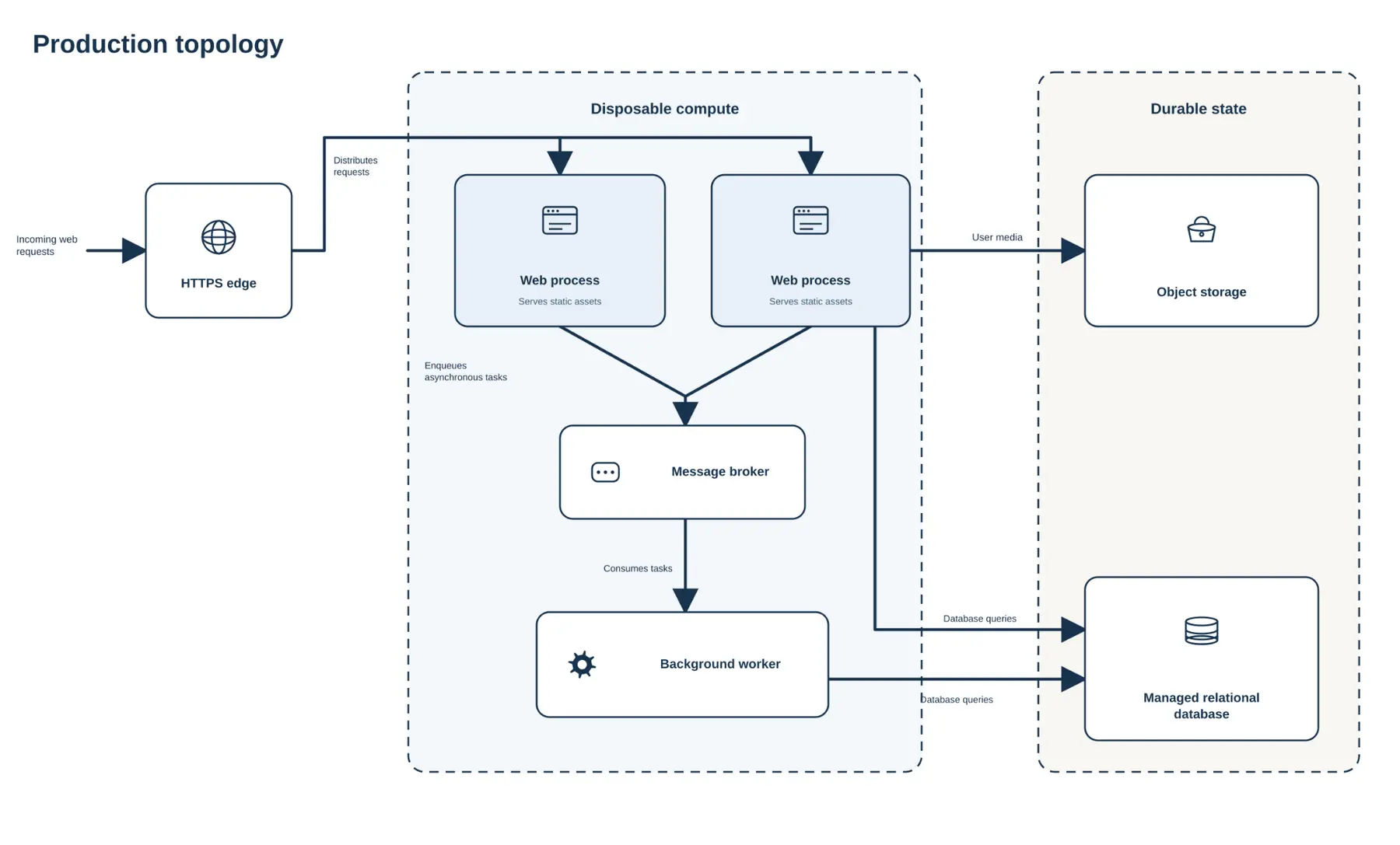
A production environment separates disposable application compute from durable state. Application instances can be replaced and scaled. Durable state (database rows and uploaded user files) needs persistent storage.
A standard Django production deployment relies on several independent layers to achieve this separation:
- An HTTPS edge or load balancer terminates SSL and distributes incoming web requests
- A WSGI or ASGI application server runs the Django web process
- Distinct compute instances act as background workers, backed by a message broker for long-running asynchronous tasks
- A managed PostgreSQL instance handles the durable relational database state
- WhiteNoise serves code-deployed static assets from the web process. A CDN can sit in front of that. User media goes to external object storage
Modern Python build systems are changing how teams provision this topology. The Django ecosystem is shifting away from legacy pip freeze workflows. Teams pin Python dependencies with uv and pyproject.toml so the build is reproducible on the native Python runtime or in Docker.
Historically, connecting these layers required manually configuring virtual private clouds, complex networking rules, and load balancers. Today, modern cloud platforms allow engineering teams to define this architecture as infrastructure-as-code. You can configure isolated web services, background workers, and managed databases declaratively. The platform handles the underlying routing and security.
How should you size Django Gunicorn workers?
Transitioning to a production environment requires a dedicated application server. The WSGI/ASGI layer manages process forking and concurrent request handling. Tuning this layer incorrectly is a common performance trap in Django hosting.
Understanding the baseline Gunicorn sizing formula
Gunicorn uses a pre-fork worker model. A central master process manages individual worker processes that handle HTTP requests and responses. Gunicorn recommends starting with a baseline worker count of (2 x number of CPU cores) + 1 per their design documentation.
This formula is only a starting hypothesis. It applies to synchronous WSGI workers dealing with I/O-bound workloads. Asynchronous deployments using Uvicorn or thread-based architectures scale differently.
Operators must treat the formula as a testing baseline. Tune the active worker count based on application behavior under real load.
Preventing database connection exhaustion
Worker sizing and database connection limits are one budget, not two independent dials.
Start from what each Gunicorn worker (or thread, for threaded workers) needs: how many Postgres connections that process can open under peak concurrent requests. Cap that at the process level with Django's connection settings and, when you enable it, native pooling. Then multiply: connections-per-worker × worker count must stay under the database max_connections, with headroom for migrations, admin sessions, and Celery workers that also talk to Postgres.
Managed Postgres hosts set that max_connections ceiling because each backend consumes RAM. Raising the plan raises the ceiling. Pooling reuses backends so you waste less of the budget on handshake churn, but it does not invent headroom beyond the plan limit.
If the product of workers and per-worker need exceeds the cap, either cut workers, lower per-worker concurrency, or move to a larger database plan. Measure latency, throughput, and connection usage under load before you scale web processes further.
When should you use Django Celery background workers?
Web workers must remain responsive to incoming HTTP traffic. Offloading heavy or synchronous external calls prevents web processes from blocking. This preserves request throughput.
Moving from web services to background queues
Transition logic from web services to Django Celery workers when request concurrency becomes a bottleneck. Tasks like generating complex PDF reports or sending batch emails tie up web workers unnecessarily.
Pushing these operations to a message broker allows a dedicated Celery worker to process them asynchronously. Celery task functions should ideally be idempotent. The worker acknowledges the message from the queue. Tasks must be safe to retry without causing unintended side effects or duplicating data.
Managing request timeouts
Long jobs should leave the HTTP request. Vercel Functions default to 300 seconds on every plan. Hobby cannot exceed 300 seconds. Pro and Enterprise can raise a function to 800 seconds, and supported Node.js, Bun, and Python runtimes on those plans can opt into 1,800 seconds (30 minutes), still in beta. Any limit above the 300-second default has to be set explicitly with maxDuration.
Render web services allow HTTP request timeouts up to 100 minutes. For work longer than that, move it to background workers or to Render Workflows (beta). Each Render Workflows task run can execute for up to 24 hours. A Vercel Workflows run has no maximum duration. Each step still follows the function caps above.
How do you manage PostgreSQL pooling and safe migrations?
Django's ORM handles database interactions securely. Production traffic requires connection management and careful schema evolution to prevent downtime.
Using native PostgreSQL connection pooling
Establishing a new PostgreSQL connection is computationally expensive. As Django instances scale horizontally, connection overhead causes latency spikes.
Historically, teams resolved this by deploying external poolers like PgBouncer. The ecosystem is now shifting toward native integration. Django 5.1+ introduced native PostgreSQL connection pooling (OPTIONS: {"pool": True}) in the database documentation.
Enabling this feature reduces connection overhead latency. It prevents connection thrashing under heavy concurrent load. The database spends memory executing queries rather than managing network handshakes.
Using the expand-and-contract migration pattern
Applying schema changes during a rolling deployment requires discipline. Blindly running python manage.py migrate during a rolling deploy is dangerous. If a migration drops a column while old instances serve traffic, those instances will crash querying the obsolete schema.
Safe schema updates demand the expand-and-contract migration pattern. This sequence requires multiple deployments to preserve backward compatibility.
First, perform the expand phase. Add new columns or tables using an additive, non-destructive migration. Execute this in an isolated pre-deploy command before new code accepts web traffic. Both old and new code versions can safely read the database during the overlap window.
Finally, execute the contract phase to clean up old data or drop constraints. Run the contract phase in a later deploy, after every old instance has drained.
How do you handle Django static files vs. user media?
Django separates code-deployed assets (STATIC_ROOT) from user-uploaded media (MEDIA_ROOT). Using Django's development static server to host files is unsuitable for production.
Serving application static assets with WhiteNoise
Bundle application static assets during the build phase. WhiteNoise is the industry-standard solution for serving Django static files. It integrates with the collectstatic command.
WhiteNoise intercepts requests for static assets within the web container. It detects the Accept-Encoding header and serves pre-compressed files generated during the collectstatic build phase, rather than compressing them on-the-fly upon interception.
However, applying Django's native manifest collection combined with WhiteNoise compression generates significant file bloat. It outputs multiple variants of a single file. Enable the WHITENOISE_KEEP_ONLY_HASHED_FILES setting to cut storage bloat in half.
Routing user media to object storage
User media is untrusted data. Never store it alongside application code. Containerized environments replace local filesystems upon every redeploy. Storing user uploads locally results in data loss.
Route user media to a durable object storage service like AWS S3 or Cloudflare R2 using the django-storages package. Cloudflare R2 is increasingly popular in the Django ecosystem because its zero egress fees reduce variable bandwidth costs compared to AWS S3.
Render Persistent Disks are billed per GB-month and survive container restarts. A disk is visible to a single service instance. That service cannot scale to multiple instances while the disk is attached, and a disk disables zero-downtime deploys. User media that more than one web instance must read belongs in external object storage.
How much does Django production hosting cost?
Production Django cost is the sum of a fixed topology, not a single sticker price. You pay for every piece that must stay up: the web process, background jobs, Postgres, and usually object storage for user media. A cache or Celery broker adds another datastore line item when you leave the minimal stack.
Choose a platform shape before you compare vendors. Prefer a flat-rate web service with managed Postgres and a background worker on one platform when you need a durable Django topology (web, workers, database, and media off local disk). Skip that shape if you only need short serverless API routes or a disposable hobby prototype without a shared production database.
If that matches you, start with Render and build the monthly number from the components below.
What you pay for
Cost component | Role in a Django deploy |
|---|---|
Web service | Gunicorn / ASGI request path |
Background worker | Celery (or similar) off the request path |
Managed Postgres | Durable relational state |
Render Key Value | Cache and task broker (Redis®-compatible) when you leave the minimal stack |
Object storage | User media (S3, R2, or equivalent) |
Bandwidth / egress | Media and API traffic |
A persistent disk can hold files for a single instance. It also blocks multi-instance scaling and zero-downtime deploys on that service.
How those components get billed
Pricing shape | What you should expect |
|---|---|
Flat-rate plans | Each always-on service has a plan tier. The monthly total is mostly the sum of those tiers. |
Usage-metered | The same topology can swing with traffic. Fine for hobby prototypes, noisy for production baselines. |
DIY hyperscaler | You still buy web, workers, and Postgres, plus NAT, Multi-AZ database scaffolding, and logging glue. |
Prefer comparing billing shape over chasing a dollar quote that will drift.
Build a worked monthly cost (minimal vs standard)
Use live plan rates on Render pricing. Add only the services you actually run.
Minimal topology (production baseline)
- Pick a web service plan for Gunicorn.
- Pick a background worker plan for Celery.
- Pick a Render Postgres plan for the database.
- Add object storage and egress outside Render if user media lives on S3 or R2.
That three-service sum is the smallest production-shaped monthly bill for this architecture on flat-rate compute and datastore plans.
Standard topology (when you need a broker or shared cache)
- Start from the minimal sum.
- Add a Render Key Value plan for Celery or caching (Redis®-compatible). New instances run Valkey under the hood.
- Optionally step up the web plan and workspace tier if concurrency or seat limits require it (Pro workspace notes).
The step up is "add Key Value (+ size)," not a different pricing model. The bill stays plan-based and predictable.
Other shapes (brief)
Usage-metered hobby hosts can run a similar topology for prototypes, but the bill moves with traffic and is a weak production baseline. Assembling the same stack yourself on AWS Fargate-class infrastructure usually costs more in operational overhead (NAT, Multi-AZ RDS, logging) than in raw app compute.
Your Django hosting cost is that component sum at current plan rates, refreshed whenever you change topology, not a one-time vendor sticker price.
Redis is a registered trademark of Redis Ltd. Any rights therein are reserved to Redis Ltd. Any use by Render Inc is for referential purposes only and does not indicate any sponsorship, endorsement, or affiliation between Redis and Render Inc.
How do you automate your Django deployment flow?
Unified platforms simplify deployment pipelines by moving configuration into version control. On Render, the Django quickstart covers the first service. The steps below bind that service into a full production topology.
Defining your infrastructure as code
Define the full topology in a render.yaml Blueprint. That file declares the web service, background workers, and Render Postgres. The snippet below is the web service, the Celery worker, and Render Postgres. The Blueprint is the desired state. Git-connected builds on Render, or checks in GitHub Actions before merge, are how that state ships.
This declarative approach grants teams flexibility over runtimes. Leverage native Python environment support for rapid iteration. Switch to multi-stage Docker caching if the application requires heavy AI models or specific system dependencies. For AI workloads, teams can use Render's native Python runtime support as an alternative to Docker.
Automating builds, hooks, and zero-downtime swaps
A robust deployment flow completely automates the release cycle. Pushing to the main Git branch triggers the build script to install dependencies and run collectstatic.
The platform then runs the pre-deploy command before new instances take traffic. Put the expand migration there, as described above. A full python manage.py migrate belongs in that hook only when every pending migration is additive. Run the contract migration in a later deploy, after the old instances are gone. Once the schema update finishes and health checks pass, Render shifts traffic to the new instances with zero downtime.
Render uses one health check path on a web service. The docs recommend a simple operation-critical check, such as a lightweight database query, so traffic reaches an instance that can serve. Keep that query cheap. Failed checks cancel a new deploy after 15 minutes and leave traffic on the existing instances. On a running instance, consecutive failures stop routing after 15 seconds and restart the instance after 60 seconds. A heavy check turns a brief database blip into a canceled deploy or a restart.
Modern unified platforms allow teams to spin up isolated preview environments for every Pull Request. These include seeded Postgres databases, ensuring code is rigorously tested against a production-like state before merging.
Conclusion
Deploying Django safely requires treating infrastructure as a collection of distinct, tunable entities. Bundling a WSGI application server, database, and background queues into a single unmanaged container prevents scalability.
A resilient production architecture depends on optimizing Gunicorn worker constraints. It requires protecting the database with connection pooling and expand-and-contract migrations. Assets must route intelligently through WhiteNoise and object storage.
Unified cloud platforms allow teams to declare these boundaries via infrastructure-as-code. This grants predictable pricing, zero-downtime deployment pipelines, and built-in background workers.
Declare the web service, worker, and Postgres on Render to get flat-rate scaling without assembling the topology by hand.