We recently launched OIDC support for third-party service providers such as AWS, GCP, OpenAI, and Anthropic. OIDC is a neat feature which lets your services authenticate to these service providers without needing to generate sensitive API tokens. Instead, you simply set a few environment variables on any Render service, and suddenly that service can authenticate to the service provider. It Just Works™!
This makes it easier to connect your services, and it’s much more secure than generating long-lived API tokens. But beneath the surface of that simplicity lies deceptively complex machinery to make this feature happen. Let’s open up this clock and see how it ticks!
What OIDC actually means
When you use OIDC to access a service provider, your Render service authenticates with them by sending a Render-generated OIDC token. This token is a plain old JSON blob that contains relevant information about your service, such as its ID and the environment it’s running in:
This token is cryptographically signed to prevent it from being edited or faked. You can configure the external service provider (e.g. AWS) to accept these tokens by providing them a link to Render’s validation keys, which can be used to validate the token’s signature.
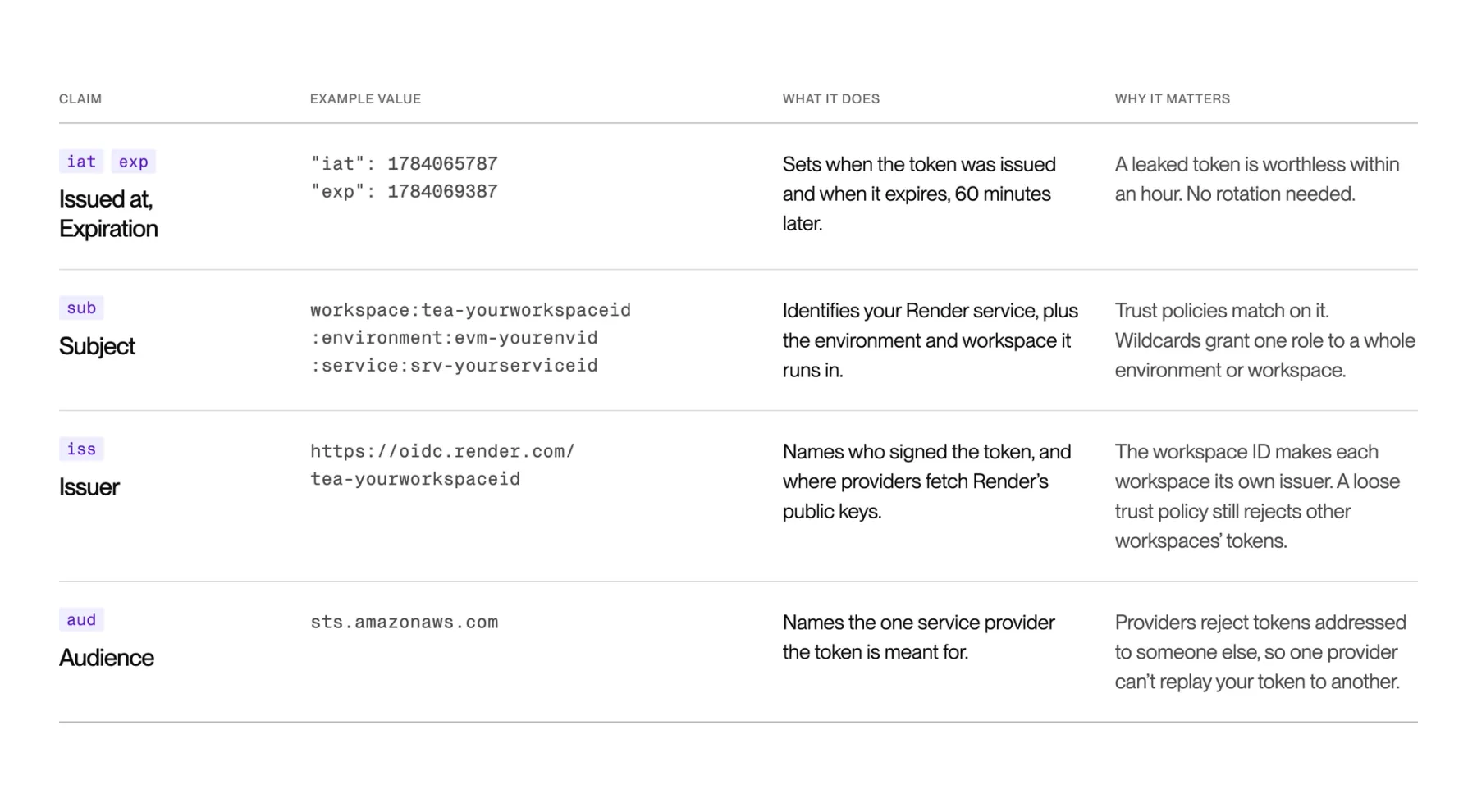
Each field in that blob is called a claim. Claims each have a different role in keeping the token secure. Let's take a look!
OIDC is a limited-time offer
The issued-at (iat) and expiration (exp) claims are the easiest to understand. Each token Render signs expires 60 minutes after issuance, at which point the service provider no longer accepts it. In the unlikely event that a token is leaked or stolen, it becomes worthless within an hour. No rotation needed!
This 60-minute window carefully straddles a line between security and usability. If tokens expire faster, leaking one is less dangerous. But shorter tokens also increases the impact of a service outage: if Render is unable to issue new tokens for any reason, this expiration time becomes the deadline when connections start to fail. We never expect one of these service outages to occur, but part of ensuring our platform’s reliability is to be ready for the unexpected. One hour is a solid middle ground: it greatly limits the damage an attacker can do with the token, while providing enough buffer room to recover gracefully if an incident ever occurs.
Who are you, anyway?
The subject (sub) claim is the most important, because it’s what actually identifies your Render service to the service provider. Take AWS, for example: each AWS IAM role has a “Trust Relationship” policy that defines who is and isn’t allowed to assume that role, and those policies can restrict access to specific Render services based on this claim.
This claim can be any kind of identifier, so the simplest solution is to set it to the ID of the Render service. But by also including environment and workspace IDs in this string, users can grant one role to multiple Render services with a single Trust Relationship. For example, users can specify an environment but set the service ID to a wildcard, allowing any service in that environment to assume the role:
With other combinations of wildcards, you could grant access to the whole workspace or limit it to a single service. Or not limit it to any subject at all! Which brings us to the next claim…
Tidying up the foot-guns
The issuer claim (iss) specifies who signed the token. In the example above, this is https://oidc.render.com/tea-yourworkspaceid.
This issuer represents the identity provider who creates OIDC tokens. That URL hosts the public keys used to validate those tokens. You specify this URL when you configure a service provider like AWS, which ensures that they only trust tokens which were authentically issued by Render. Every time that service provider receives a token, they will pull the public keys from this issuer URL and make sure they match. We host our public validation keys at oidc.render.com, so it makes sense that the issuer URL includes that.
But why does the path also include the workspace ID?
That’s is actually a safeguard against service provider misconfigurations. When our users configure a service provider to trust Render, we have no control over how much access they grant, or which service IDs they grant that access to. Some of our users may want to configure a role that doesn’t check the subject claim at all, which would allow any service to assume the role. It’s not the most secure configuration, but there are cases where it makes sense.
But there's a problem: when we say that “any service” can assume the role, we don’t just mean “any service in the user’s workspace”; we mean any service owned by any Render customer! If the service provider is not configured to check a specific subject, it would allow any OIDC token issued to any Render user to assume the role. Of course, we try to be as clear as possible that our users should never configure their service providers this way. But mistakes happen, and we don’t want our users’ safety to hinge on an optional validation step.
This is where the issuer comes into play: by including the workspace ID in the URL, service providers treat each workspace as a unique identity provider. OIDC tokens issued by one workspace are not accepted by other workspaces. Under the hood each issuer URL is functionally identical (they even host the same public keys), but from AWS’s perspective they are entirely separate. This means that even if users disable all validation of these tokens, the service provider will still only accept tokens issued to the user’s own workspace.
This does have one downside, which is that users with multiple Render workspaces need to configure AWS to trust each one individually. However, most of our customers only have one or two workspaces so this is rarely a problem in practice.
Know your audience
Finally, there’s the audience (aud) claim. The audience identifies who should receive the token, so in the case of AWS it’s sts.amazonaws.com. At first glance, this seems redundant: of course the recipient of the token already knows who they are! This field doesn’t tell AWS anything which they didn’t already know. But this claim is used to prevent a notable problem inherent to OIDC, which occurs when multiple service providers are involved.
Let’s say you use one OIDC token to authenticate to both AWS and a second service provider called HackerCorp. This one OIDC token can be used access to any service provider who trusts it, so if you send the token to HackerCorp, they could turn right around and present it to AWS to pretend to be you!
OIDC solves this with the “audience” claim: each token specifies which service provider is intended to receive it, and a provider rejects any token whose audience isn't itself. Render sets the audience in these OIDC to be sts.amazonaws.com, and when you configure AWS to add Render as a trusted identity provider, you need to specify what this audience will be. We set these audiences automatically based on the service provider, so we can ensure that two tokens never have the same audience. If Render ever adds HackerCorp as a provider (don’t worry, we won’t), we would give its token a brand new audience (say, get.hacked.com) so if they tried to reuse the token with AWS it would get rejected.
Looking under the hood
Generating these tokens is easy, we just need to construct this JSON blob and generate the cryptographic signature. The hard part is making them available to your Render service. This is trickier than it seems, because we don’t know when your service needs to authenticate with AWS, or how long it maintains that access. Any time your service might need an OIDC token, we need to have one ready. And each token only lasts an hour, so we need some way to replace expired tokens with fresh ones.
We could require the user’s application to handle this complexity, but the magic of Render lies in the fact that everything works right out of the box.
Worrying about key fetching and rotation should be our concern, not yours. Thankfully, all of the service providers we integrate with offer some kind of SDK or command-line tool which we can configure on behalf of our users. For example, we can configure the AWS SDK without needing a single line of code, by setting specific environment variables.
Wrangling the SDKs
In a perfect world, we would configure the various service provider SDK to request a token from a URL whenever it needs a new one. This keeps the implementation simple, as we could spin up an internal service endpoint, a unix socket, or whatever else makes sense for our architecture, and let the SDK determine when it needs us to provision a new token OIDC tokens. There’s just one problem: nobody supports it.
The AWS SDK can be configured to fetch credentials from an endpoint with the AWS_CONTAINER_CREDENTIALS_FULL_URI environment variable, but that mechanism wasn't built for third-party providers like us, its exact behavior is undocumented, and it acts differently depending on the client language and SDK version. In some cases it only allows the specific IP addresses used internally by Amazon EKS. Even if it did work nicely with our system, there aren’t analogous configuration options for other OIDC service providers.
Instead, the most common denominator among most of the popular SDKs is that they expect to read the OIDC token from a file on the disk. There’s no way to tell if or when the SDK will read this file, so it needs to exist at all times just in case the service needs it to authenticate. The exact file file is usually configurable through an environment variable, such as the AWS_WEB_IDENTITY_TOKEN_FILE setting for AWS, but that’s the most we can configure it.
Introducing: the OIDC Daemon
Even getting a file onto the disk is hard. Each service instance runs in its own containerized environment, and we don’t run any Render agents or other code alongside them which can access the filesystem. The keys are specific to each service and they need to be refreshed every few minutes, so we can’t bake them into the filesystem. We even allow services to run using custom images which we don’t control, so we can’t guarantee we’ll have any code inside the runtime environment.
Instead, we have to work from outside the environment. We've started running a service outside of each runtime container called the OIDC Daemon: This simple program has the ability to generate and sign OIDC tokens, but not much else.
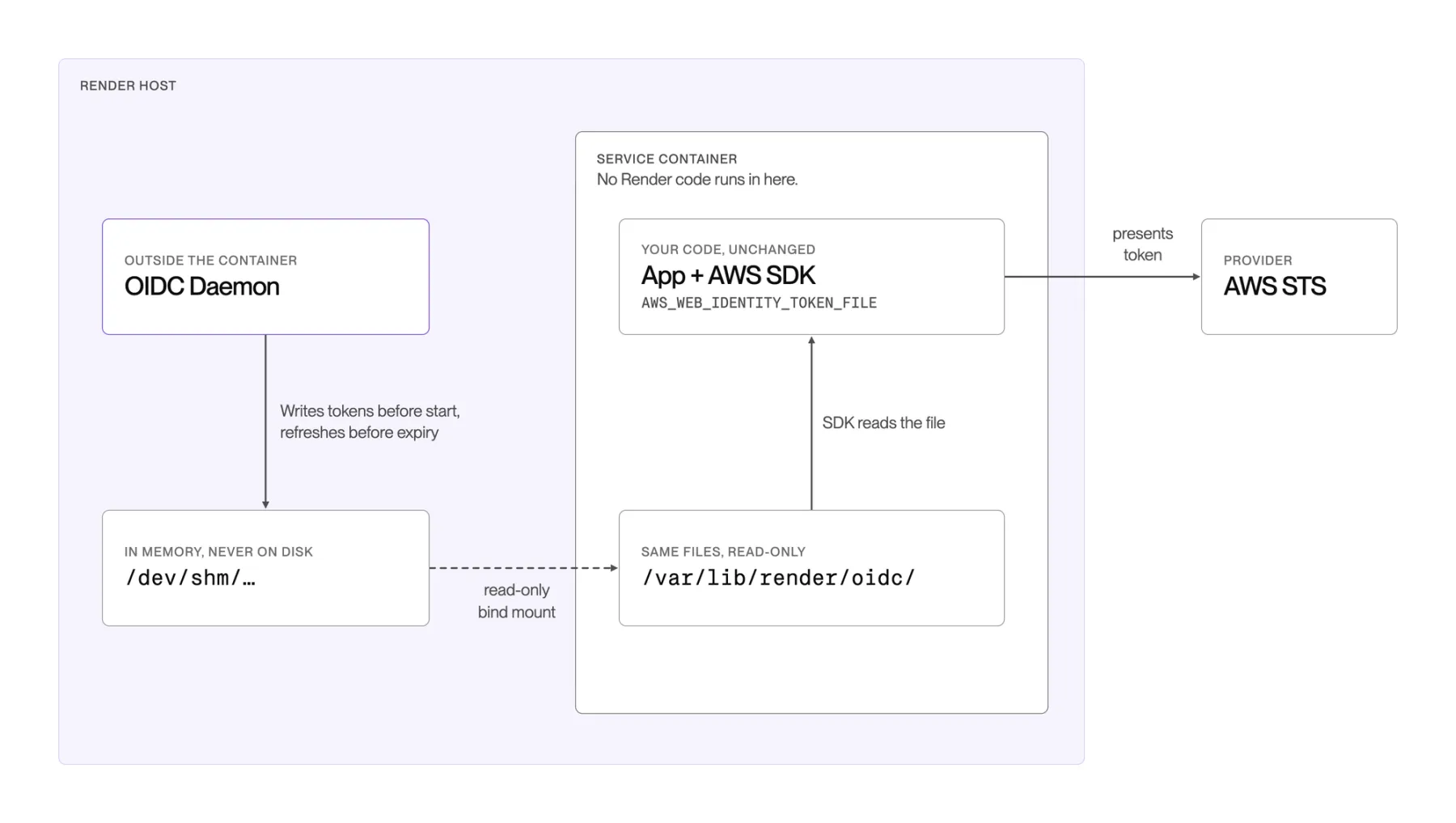
Whenever a new service instance starts up and requires OIDC tokens, we initialize it with a read-only bind mount#Bind_mounting) between /var/lib/render/oidc/ inside the container, and a directory inside /dev/shm on the underlying host. The OIDC Daemon also has a bind mount to this same directory, which allows the Daemon to write files to that one specific path without having any additional access to the service. The /dev/shm directory is backed by a virtual in-memory filesystem, so none of the files it writes are ever actually persisted to the disk.
If a Render service needs OIDC tokens, the Daemon writes all of those tokens to the shared directory before the service ever starts. Because the token will expire within an hour, the Daemon keeps watching the files and updates them periodically.
For every OIDC token we set, we also configure the environment to pick these files up automatically. Each provider is configured in different ways, for example AWS only needs a single AWS_WEB_IDENTITY_TOKEN_FILE environment variable, while GCP requires us to write a custom credential configuration file to the disk.
Try it yourself (it’s easy!)
The benefit of all this internal machinery is a frictionless user experience: our users simply tell us which service provider they want access to, and we handle the rest. No copying API keys or configuring secret managers. It’s rare for the easiest option to also be the most secure one, so it’s very satisfying to have the ability to do both.
If you want to see this in action, the docs walk through setting up OIDC for your own services. It only takes a few minutes to configure, and you can stop worrying about your API keys forever!
At Render we spend our time figuring out how to turn hard infrastructure problems into simple features for millions of builders. If this kind of work sounds interesting to you, we're hiring.