SSE vs WebSockets for Streaming Responses
TL;DR
- SSE provides a unidirectional stream of text over a standard HTTP response. Use it when the client sends a request and then receives a stream of responses.
- WebSockets provide a bidirectional, persistent connection. Use them when both sides keep sending during the session, such as microphone audio in and generated audio out.
- A stop button on a text chat does not require WebSockets. The client can close the SSE stream, or send a separate request that says stop. Use a WebSocket only when that connection is already carrying other client data, such as microphone audio.
- On Render, run the service as a web service. HTTP responses can last up to 100 minutes. WebSocket connections have no fixed time limit. If the client connects again, Render can send it to a different server. Keep session data where every server can read it.
When an LLM generates a complex response, waiting multiple seconds/minutes for a standard HTTP response breaks the user experience. Without streaming, users stare at a blank screen and a loading spinner until the model finishes generating the entire answer. Streaming changes this by pushing tokens to the browser as the model produces them, reducing perceived latency to a few hundred milliseconds so users can digest the text while the rest is still generated.
Delivering that real-time experience requires choosing between two persistent transport protocols: Server-Sent Events (SSE) and WebSockets. Engineering teams often default to WebSockets under the assumption that real-time AI requires a two-way socket. In practice, the architectural choice hinges on one fundamental question: does the client only receive text after submitting its prompt, or does it need to send continuous data back to the server on the same channel?
Using an AI chat application as a concrete walkthrough, this guide evaluates SSE and WebSockets across their entire operational lifecycle. You will see how to match each protocol to your messaging pattern (and why stop buttons do not require WebSockets), how persistent connections scale across multiple instances with shared storage, how to prevent intermediate proxies from buffering tokens, and how to handle authentication, backpressure, and reconnection on Render.
How SSE and WebSocket connections work
A unidirectional connection lets the server send a series of messages after the request has started, while the client only reads data on that connection.
A bidirectional connection lets either side send messages at any time over an open connection.
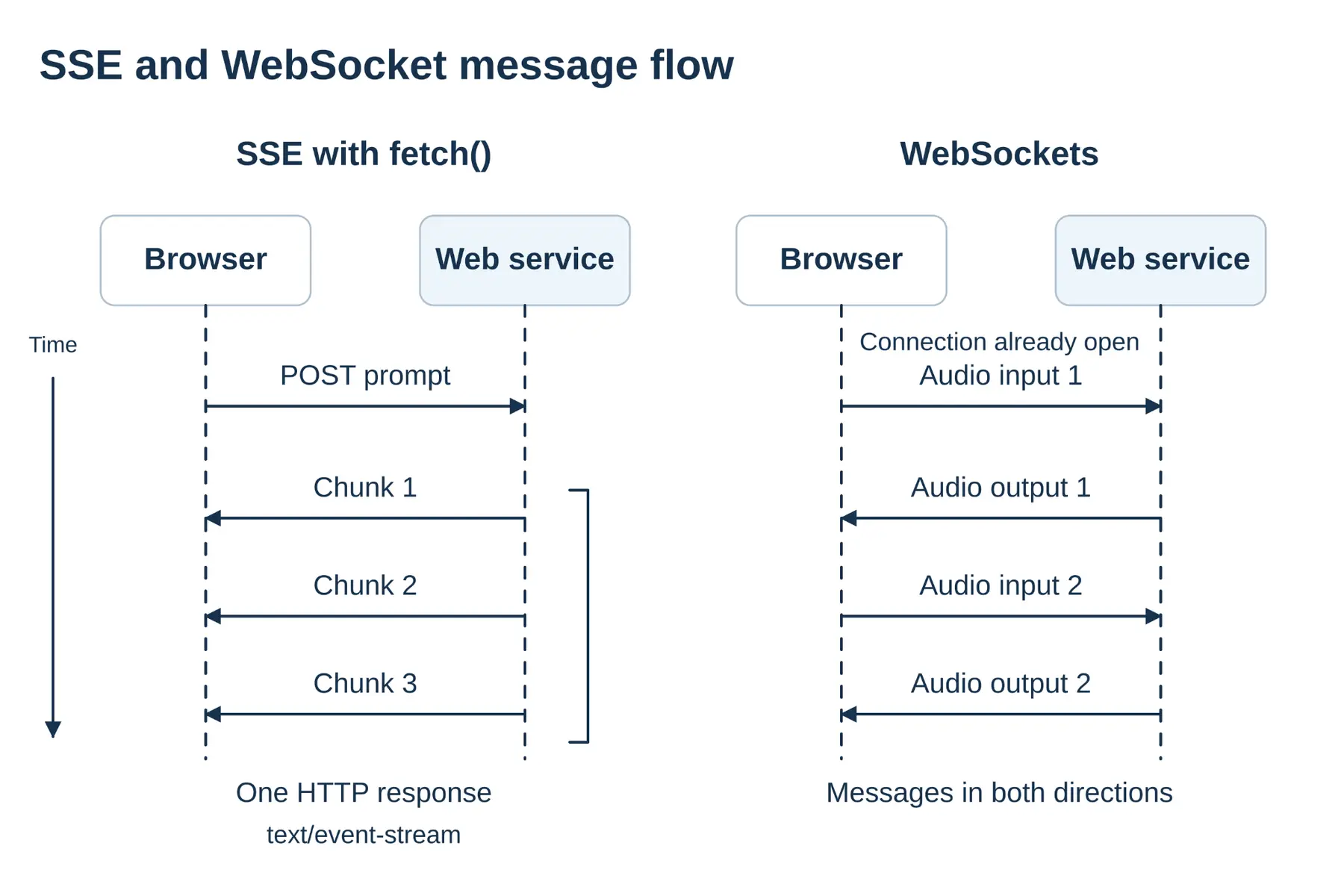
Server-Sent Events (SSE) are the unidirectional option. Your service answers an HTTP request with a stream of text events, and the client reads that response until it ends. The format is text/event-stream, defined in the HTML standard.
In the chat walkthrough, the browser sends the prompt with a separate POST request, and the reply text returns on the SSE stream. To stop generation early, the browser closes the stream or sends a separate cancellation request. The SSE connection itself stays unidirectional.
WebSockets are the bidirectional option. The client starts with an HTTP request, the connection upgrades, and both sides exchange text or binary messages over a single persistent connection. The WebSocket API is the browser interface. In the walkthrough, that pattern is a voice session, with microphone audio going in and generated audio coming out, or a shared board where each person sends updates while receiving everyone else's.
The browser's EventSource client speaks SSE. You give it a URL, and you can choose whether it sends cookies. It sends cookies to your own origin, and withCredentials extends that to other origins. The request is a GET, and the constructor takes only a URL and a credentials flag, so there is no JSON body and no place to set your own headers. If the connection drops, the browser reconnects on its own and can send the last event id. A fetch() stream can POST a JSON prompt and set headers such as Authorization. You write the retry yourself.
When to use SSE vs WebSockets for AI applications
In the chat walkthrough, the browser sends one prompt and then waits. Your server calls the model and streams tokens as each one is ready. The reader can start reading, and the client can start processing, while the rest of the answer is still arriving. During that reply the browser has nothing new to send on the same connection, so a unidirectional SSE stream is sufficient.
A voice session keeps the browser talking. Microphone audio goes in while generated audio comes out, and both flows continue after the session has started. A shared board works the same way. Each person sends an update and receives everyone else's on the open connection. One connection has to carry both directions for the whole session. Use a WebSocket for that.
After the response starts | Choose |
|---|---|
The client only receives text | SSE |
The client and the server both keep sending | WebSockets |
How SSE and WebSockets scale across servers
With both SSE and WebSockets, the browser’s connection remains with the same server instance for as long as it is open. Scaling to multiple instances does not, by itself, require a message broker.
You add a path between servers when tokens are produced on a server that does not hold the connection. Server A is streaming to the browser. A job on Server B has the next token. Put the token where Server A can read it. On Render, that store is Render Key Value, Redis®-compatible, in the same region as the web service.
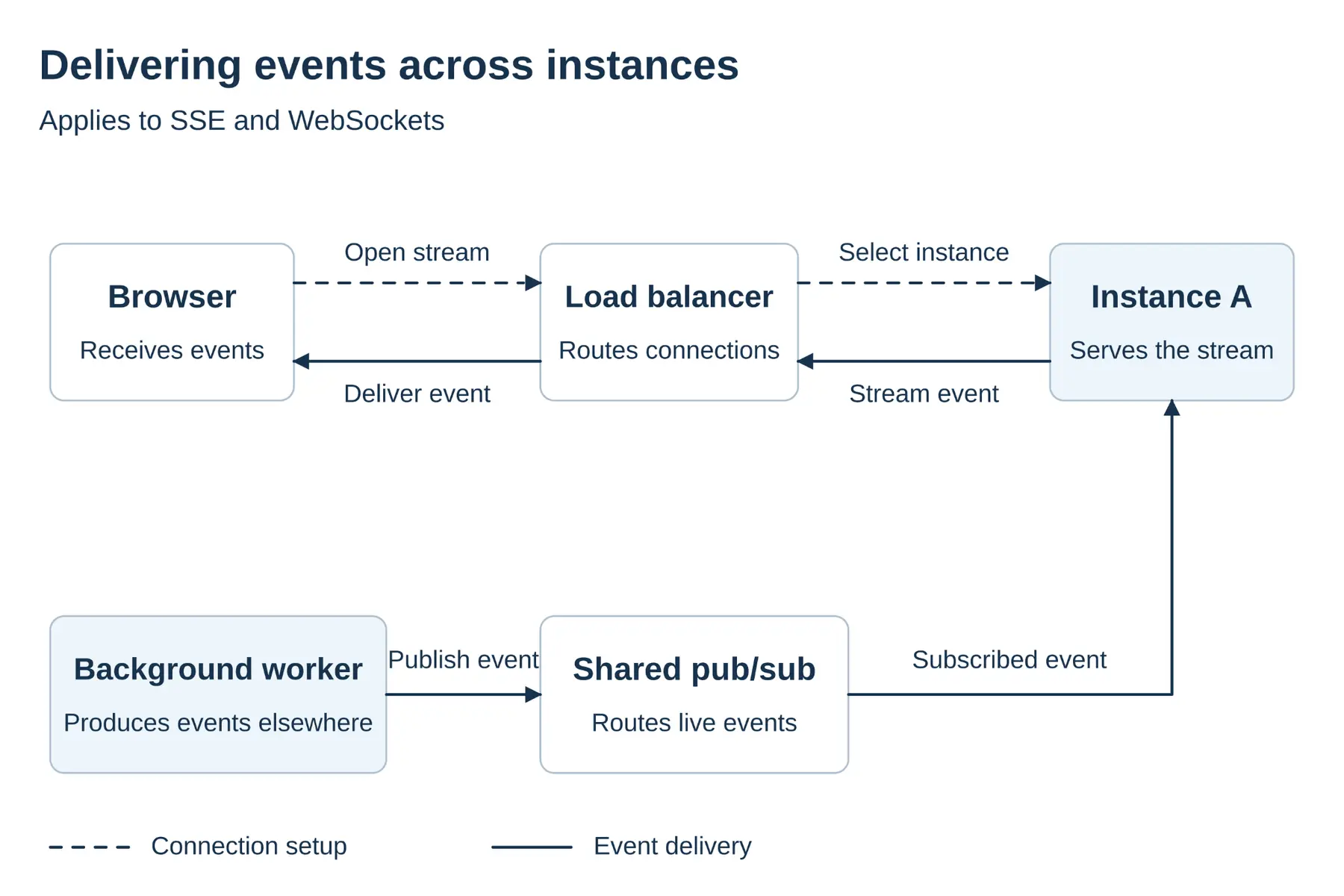
A reconnect can land on another server. Render assigns each new WebSocket connection across instances. Where a load balancer offers sticky sessions, they route the client back to the original server, but they still cannot move a token from Server B to Server A. Store session state and stream offsets in shared storage, such as Render Key Value, so any instance can resume the stream.
On a stack you run yourself, a WebSocket sometimes sits behind a layer-4 load balancer. On Render, the web service accepts the upgrade. Your work is the stream on that server, and the shared store when another server has to reach it.
How buffering and idle timeouts affect streaming responses
The first tokens can be ready on your server while the reader still sees a blank screen. Proxy buffering can delay delivery by batching response data, or an idle connection can close when it exceeds an inactivity timeout.
Many proxies, including Nginx, hold response data in a buffer and release it in larger pieces. Nginx buffering is on by default. Set X-Accel-Buffering: no when Nginx is the proxy. That header applies to Nginx only. Compression can hold tokens the same way. If your app compresses the stream, flush the compressor after each write, or turn compression off for the stream. Render's load balancer compresses HTTP responses with Brotli and gzip.
An idle connection can close if neither side sends data. Nginx and AWS ALB default to 60 seconds. Send keepalive messages under that timeout. On SSE, write a comment line that starts with :, every 15 seconds or so. On a WebSocket, send a ping and wait for the pong. Render's example does that every 30 seconds.
A browser also limits the number of HTTP/1.1 connections it opens to one domain. MDN puts the SSE cap at 6 across all tabs. HTTP/2 puts many streams on one connection. The 6-connection cap applies to SSE over HTTP/1.1. An idle connection can close on either protocol, and the keepalive bytes differ.
Authentication, backpressure, and stream recovery
After you choose a protocol, the browser still has to authenticate the request, your server must handle backpressure when token generation outpaces client consumption, and your application needs reconnection logic if the stream drops.
An SSE request can send cookies, and fetch() can set an Authorization header. EventSource cannot set custom headers. The WebSocket constructor takes a URL and optional sub-protocols, with no slot for custom HTTP headers. The handshake still sends cookies. If you need a bearer token, issue a short-lived ticket over HTTP, then open the WebSocket and validate the ticket on connection. Do not put the bearer token in the URL.
When token production outpaces client rendering, unconsumed data buffers in server memory. To handle backpressure in Node.js on an HTTP or SSE stream, check whether write() returns false, and wait for drain before writing more chunks. On a WebSocket server, inspect the library's bufferedAmount (such as in ws) and pause sending until the buffered count drops.
EventSource reconnects automatically and sends the Last-Event-ID header so the server knows where to resume. A fetch() stream and a WebSocket do not reconnect on their own, requiring you to implement reconnection logic. A new connection does not bring back the tokens the client missed. Persist the generated response, a session identifier, and the client's stream offset so the next connection can resume without data loss.
How to run SSE and WebSocket services on Render
The stream lives on a web service. That service has the public URL. It answers the POST, holds the SSE response, and accepts a WebSocket. One service can do both. An HTTP response can last up to 100 minutes. A WebSocket has no fixed time limit. A new connection can land on a different server.
When another process produces tokens, or a reconnect has to continue, add Render Key Value in the same region. It is Redis®-compatible. The web service reads the next token, or the client's stream offset, from that store. A background worker can write there too. The web service and the worker each reach Key Value through its internal URL over the private network, so the store does not have to be on the public internet.
On a deployment, the web service gets SIGTERM and a shutdown delay of 30 seconds by default, up to 300. Close the open streams and write session data to Key Value before SIGKILL.
A Blueprint can declare the web service, the worker, and Key Value together. It does not change which protocol you pick.
Choosing the right streaming protocol
Choosing between Server-Sent Events and WebSockets is not a question of which protocol is newer or faster, but how data flows through your application. SSE is the ideal transport for text-based chat, code generation, and completion streams where the browser asks once and listens. WebSockets are the right tool when communication is genuinely bidirectional, carrying incoming microphone audio or live canvas updates alongside outgoing tokens.
In production, both protocols share the same operational challenges: keeping connections open through intermediate proxies, preventing memory bloat when models outpace clients, and storing stream state where any instance can access it after a reconnect.
Deploy your real-time streaming architectures on Render to run SSE endpoints and WebSocket connections from a single managed web service with private networking and fast session storage.
Frequently asked questions
Redis is a registered trademark of Redis Ltd. Any rights therein are reserved to Redis Ltd. Any use by Render is for referential purposes only and does not indicate any sponsorship, endorsement or affiliation between Redis and Render.