Render vs DigitalOcean App Platform: Web App Hosting Comparison
TL;DR
- List prices for a small web instance look similar on Render and DigitalOcean App Platform. They hide the rules that matter for a multi-service app, including pull-request previews, continuous workers, database recovery, and egress overages.
- Choose Render when you want GitOps deploys with full-stack preview environments that spin up separate services and fresh database instances per pull request, plus web services, workers, and managed data on one private network.
- DigitalOcean App Platform can fit when substantial billable outbound traffic makes its lower transfer overage rate important, its standard component SLA matches your coverage requirements, or the app belongs alongside Droplets, Spaces, or other DigitalOcean infrastructure. Render offers contractual uptime SLAs on Enterprise.
- For Express, Django, or Rails-class stacks that need always-on workers and Postgres beside the API, Render brings those services together on one private network. Compare DigitalOcean when its broader infrastructure portfolio, component SLA, or lower outbound-transfer overage rate better fits the workload.
Picking a managed application platform for a multi-service stack requires looking past list prices for single compute instances. When evaluating options for production, stopping at basic compute rates obscures the hidden costs and architectural rules that ultimately dictate multi-service performance.
In practice, initial price comparisons break down because they ignore the operational realities of running in production. Teams often overlook pull-request preview environments, treat continuous workers as optional, assume database recovery and high availability are included, or fail to account for egress overages until the first invoice arrives. By then, switching platforms can mean migrating production data and reworking deployment workflows while keeping the app running.
This guide puts both platforms on the same multi-service baseline, then compares deploy workflow, workers, data recovery, scaling, and monthly cost so you can pick on the constraints that show up once the app is in production.
Render and DigitalOcean App Platform: Managed Hosting Overview
On Render, you can run your web service, background worker, Postgres database, and Key Value store together, connect them over a private network in the same region, and define the stack in a Blueprint. DigitalOcean App Platform is a managed application service within DigitalOcean's broader infrastructure portfolio, distinct from its Droplet virtual machines.
What are the core criteria for evaluating managed application platforms?
To establish a consistent, production-grade benchmark across both platforms, we evaluate each service using a standard illustrative SaaS application topology. This baseline captures the core architectural components common to modern multi-service deployments:
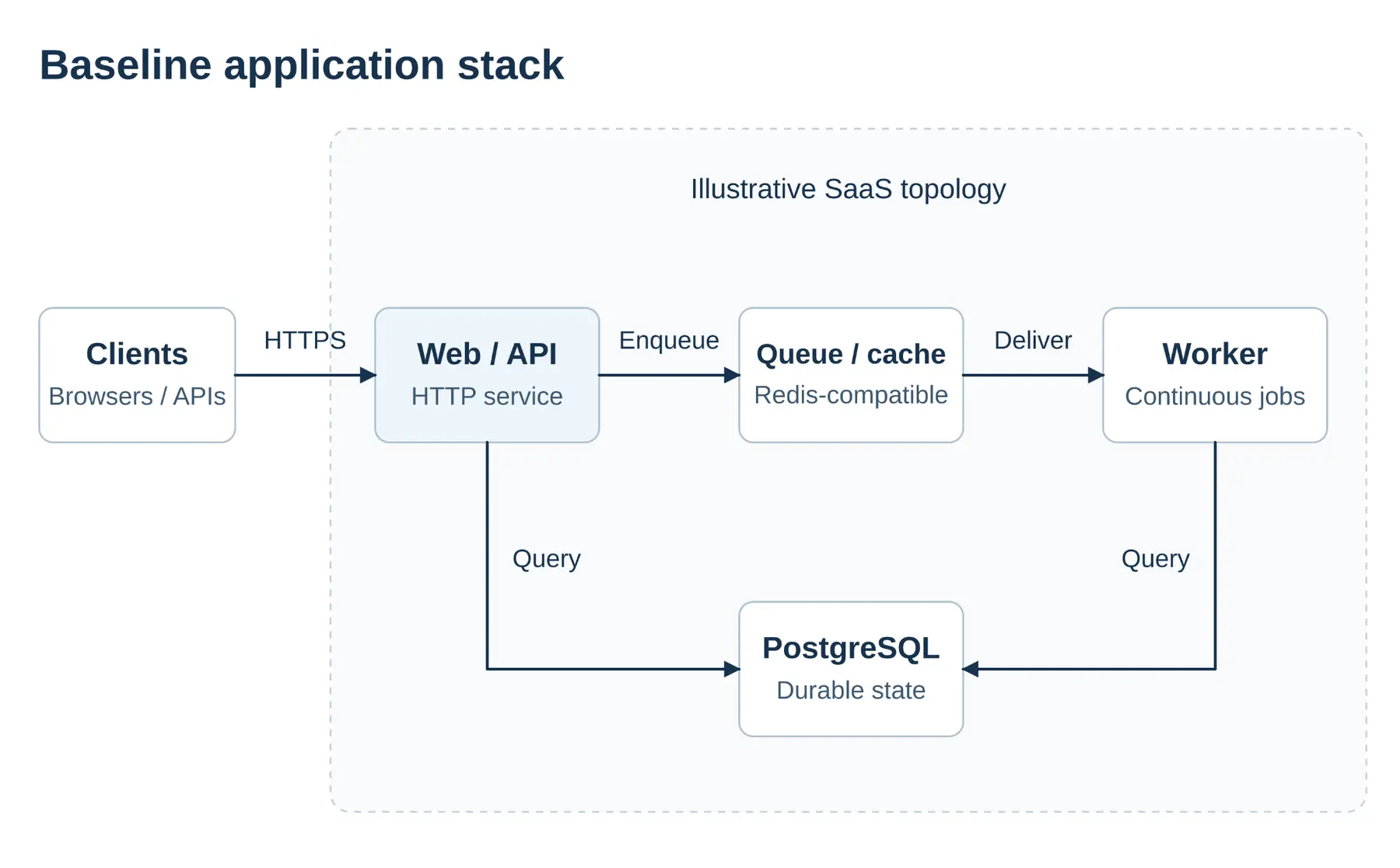
- A web or API service
- A continuous background worker that consumes a queue
- A relational database such as PostgreSQL
- An in-memory Redis-compatible queue or cache
The following vendor-neutral criteria establish a benchmark for evaluation, which can be applied to compare managed application platforms such as Render and DigitalOcean App Platform.
Deployment mechanics and workflows
GitOps ties each environment to a source-control branch. A commit builds and deploys from a declarative config file, defining what should be running. This pattern supports spinning up a temporary environment for a pull request, including fresh databases when the platform supports it.
Container-registry deploys separate the build step from hosting. Pushing a pre-built image allows the platform to run it, providing flexibility for custom CI pipelines while requiring explicit alignment between image tags and infrastructure definitions.
Compute, background workers, and execution models
Long-running processes should be decoupled from HTTP request handlers. Dedicated background workers continuously consume queue jobs, allowing processing to continue independently of incoming web traffic.
Scheduled cron jobs run periodically to execute repetitive tasks. While they consume fewer idle compute resources, they do not continuously drain event-driven queues as dedicated background workers do.
Managed data and durable persistence
Production workloads require data durability beyond single-node storage. High availability (HA) maintains synchronized standby replicas for automatic failover, while point-in-time recovery (PITR) archives transaction logs to allow restoration to specific timestamps.
Local persistent volumes attached to individual compute instances restrict horizontal autoscaling across multiple nodes. Storage selection must account for these architectural scaling constraints.
Scaling capabilities and reliability standards
Autoscaling strategies depend on the triggering metric. CPU and memory metrics scale compute after resource utilization increases, whereas HTTP request rate or latency metrics add capacity based on incoming traffic volume. Neither metric automatically scales internal background worker queues.
Pricing models and total cost of ownership (TCO)
Total operational cost includes base compute instances, plan or workspace fees, and data transfer egress overages beyond included allowances. Mapping network traffic requirements against provider overage rates is necessary for an accurate cost comparison.
Render vs DigitalOcean App Platform: Head-to-head comparison
The table summarizes deploy, data, and scale. Pricing details, including workspace fees and bandwidth overages, are in the TCO section below.
Category | Render provides | DigitalOcean App Platform provides | Best fit when |
|---|---|---|---|
Deployments | Git, Docker, Blueprints, and full-stack pull-request previews | Git, Docker, and pull-request preview apps configured through GitHub Actions | Choose Render to define preview stacks with the app's Blueprint; choose DigitalOcean to use its GitHub Actions preview workflow. |
Managed data | Postgres point-in-time recovery, optional HA standby, disk-backed Key Value, and persistent disks for local files | Managed PostgreSQL with HA on eligible plans; app components use external storage for durable files | Choose based on the database recovery and failover setup, and whether the app needs persistent local files. |
Scaling and SLA | CPU and memory autoscaling for web services and workers; contractual uptime SLAs on Enterprise | CPU and eligible HTTP request autoscaling; standard 99.95% SLA for covered App Platform components | Compare the metrics and SLA coverage available on the plans you're considering. |
How do deployment mechanics and workflows compare?
On Render, Git-backed services and Docker images both work. Preview environments bring up your API, worker, and fresh databases for a pull request, so you can test changes across the stack before merging. Define the services together in a Blueprint (render.yaml) to keep the preview setup tied to your application configuration.
DigitalOcean App Platform builds from GitHub or GitLab, Dockerfiles, or container registries. Redeploys keep the previous instance running until the new container is healthy. For pull-request checks, GitHub Actions workflows create a preview app and remove it when the PR closes.
For that baseline app, the practical question is what a pull request stands up before merge. On Render, a Blueprint preview can bring up the API, worker, Postgres, and cache together. On DigitalOcean, a separate preview app wired through GitHub Actions.
The difference is mostly setup and upkeep. Render's preview stack comes from the same Blueprint as production, with optional hooks to seed the fresh database after the first deploy, and preview resources billed like normal services while the environment exists. DigitalOcean's preview route needs GitHub Actions to create the preview app and a second workflow to delete it when the pull request closes, so the PR path is configured in CI rather than only in the app spec.
How do compute, workers, and long-running tasks compare?
For this baseline, the API enqueues work and the worker drains it. Both Render and DigitalOcean App Platform can run that continuous worker as its own component beside the web service.
What happens when a deploy restarts the worker, a job fails, or the same message is delivered twice is mostly controlled by your queue library and app code (acks, retries, idempotency). The platform comparison is narrower: you get a long-running worker process in the same app, and you scale that worker on its own when the queue grows while the API is quiet.
If you need managed task orchestration beyond a simple queue consumer, Render Workflows work for longer runs with platform-managed queuing and retries. DigitalOcean's worker components stay closer to "run this process continuously."
How do managed data and durable persistence compare?
Render Postgres includes point-in-time recovery, so you can restore after a bad migration or accidental deletion. If your application also needs database failover, you can enable high availability with a standby that takes over automatically if the primary becomes unavailable. Render Key Value uses disk-backed persistence by default.
DigitalOcean's entry-level managed PostgreSQL is a single node. High availability needs standby nodes. Advanced Edition is the HA path for affected new clusters. Example rates for the shared baseline live in the pricing section below.
Database recovery and high availability address two different types of failures. If a migration deletes data you still need, point-in-time recovery lets you restore the database to a time before the mistake, then point the API and worker at the restored database. If the primary database fails, that is a high-availability problem: a standby must be configured beforehand, at extra cost. Neither baseline database setup includes a high-availability standby.
Render lets you attach a persistent disk when your app needs local files to survive deploys, such as a CMS storing uploads. DigitalOcean App Platform has no persistent local volumes, so those files must live in external storage such as Spaces.
A disk-backed service runs on one instance and pauses briefly during deploys. For services that need horizontal scaling and zero-downtime deploys, keep persistent data outside the service's local filesystem.
How do scaling and reliability features compare?
Render autoscales web services and background workers on CPU and memory utilization, so you can scale API and worker capacity independently. For stateless web services, zero-downtime deploys keep existing instances serving traffic until replacements pass health checks.
DigitalOcean includes a standard 99.95% monthly uptime SLA for each App Platform component instance, with service credits and exclusions. Render offers contractual uptime SLAs on Enterprise. Compare each plan’s coverage, exclusions, and cost against your requirements. The DigitalOcean SLA excludes managed databases. Autoscaling uses CPU metrics on dedicated plans and HTTP request metrics on eligible instance types.
On this stack, API load and worker backlog move independently. CPU or request autoscaling on the web service does not drain a growing queue by itself, so the worker still needs its own capacity plan on either platform.
How do pricing and TCO compare?
Recheck Render pricing and App Platform pricing before you budget.
The tables price that same four-part baseline on each side. They are worksheets for the API, worker, database, and cache roles, even when the SKUs differ.
For a standard ~2 GB application stack (web service, background worker, database, and cache) on Render Pro:
Component | Example monthly rate |
|---|---|
Web compute ( 1c-2g) | $25 |
Worker ( 1c-2g) | $25 |
Postgres ( 0.5c-1g) | $19 |
Key Value ( 256mb) | $10 |
Pro workspace | $25 |
Total | $104 |
The Pro workspace fee is a flat subscription with unlimited seats. Pro is also the workspace plan required for full-stack preview environments and horizontal autoscaling. The $104 total above is the baseline services plus the workspace fee. Preview resources and extra autoscaled instances bill on top when you use them.
An equivalent DigitalOcean baseline using dedicated App Platform containers (required for CPU autoscaling on eligible plans) plus managed data:
Component | Example monthly rate |
|---|---|
Web service (dedicated 1 vCPU / 2 GiB) | $39 |
Worker (dedicated 1 vCPU / 2 GiB) | $39 |
Managed PostgreSQL (entry single-node) | $15 |
Managed Valkey (entry single-node) | $15 |
Workspace / platform subscription | $0 |
Total | $108 |
Shared App Platform containers list lower (about $25 each for 2 GiB) but omit that CPU autoscaling path.
At these near-parity totals, Render's $104 is baseline compute, data, and the Pro workspace. DigitalOcean's $108 is compute and data only. Neither total includes a Postgres HA standby or running preview environments. Adding standbys, previews, or extra instances raises either side further.
After included transfer, Render bills egress overage at $0.15/GB. DigitalOcean App Platform bills additional outbound transfer at $0.02/GiB. For comparable outbound traffic beyond each allowance, DigitalOcean’s lower overage rate reduces the transfer charge. Estimate actual billable traffic and include each plan’s allowance and the rest of the stack in your comparison.
Which platform profile best fits your workload?
Need | Better fit |
|---|---|
GitOps deploys with full-stack preview environments (including databases) | Render |
Private network and Blueprint for web, workers, and data | Render |
Substantial billable outbound traffic after included transfer | DigitalOcean App Platform, when the lower rate reduces total cost for your workload |
Standard 99.95% monthly SLA for each App Platform component instance, excluding managed databases | DigitalOcean App Platform, when this plan-level coverage meets your requirements |
Managed web services, workers, and data on one platform for Express, Django, or Rails-class apps | Render |
Choose Render when:
- You need full-stack preview environments that spin up separate services and fresh database instances per pull request
- Web services, continuous workers, and managed data should share one private network
- You want the stack declared in a Blueprint (
render.yaml)
Prefer DigitalOcean App Platform when:
- Substantial billable outbound traffic makes App Platform’s lower overage rate important after you account for included transfer and the rest of the workload cost
- You want DigitalOcean's App Platform SLA (99.95% monthly uptime per app component instance, with exclusions). That SLA does not cover managed database uptime.
- You already operate Droplets, Spaces, or other DigitalOcean networking and want the app next to that portfolio
Conclusion
Render versus DigitalOcean App Platform is a full-stack application-platform decision. The sections above cover which factors to weigh, how each platform handles them, and how to estimate total cost of ownership for the same baseline on both sides.
Avoid stopping at list compute. Keep recovery separate from high availability in the budget, and include transfer past each plan's allowance. Verify current rates, then choose based on the constraints that matter for your app.
Frequently asked questions
Redis is a registered trademark of Redis Ltd. Any rights therein are reserved to Redis Ltd. Any use by Render is for referential purposes only and does not indicate any sponsorship, endorsement or affiliation between Redis and Render.