
You proved the task locally. Now ship that same task to the hosted Workflow service and verify that production shows the trace you expect.
1. Commit and push
Make sure you removed the forced failure from the retry demo. Then:
git add packages/workflow-agents/src/workflows/your-review/index.tsgit status # sanity-check what's about to landgit commit -m "your-review: compose security reviewer as a task"git pushgit add packages/workflow_agents/src/workflow_agents/workflows/your_review.pygit status # sanity-check what's about to landgit commit -m "your-review: compose security reviewer as a task"git pushKeep the diff small. A tight commit makes a rollback cheap if the hosted run misbehaves.
2. Redeploy the workflow service
Auto-deploy on push is on by default, so the push triggers a deploy.
Two services may redeploy because they share the repo. Watch the Workflow service. That is the service that reloads the task code and registers your-review / your_review.
- Watch the Workflow service deploy Open it in the Render Dashboard. It reinstalls dependencies and re-registers tasks on startup.
- Confirm your authored task is registered
The loader rediscovers it from the workflow module. No registration step on your part.
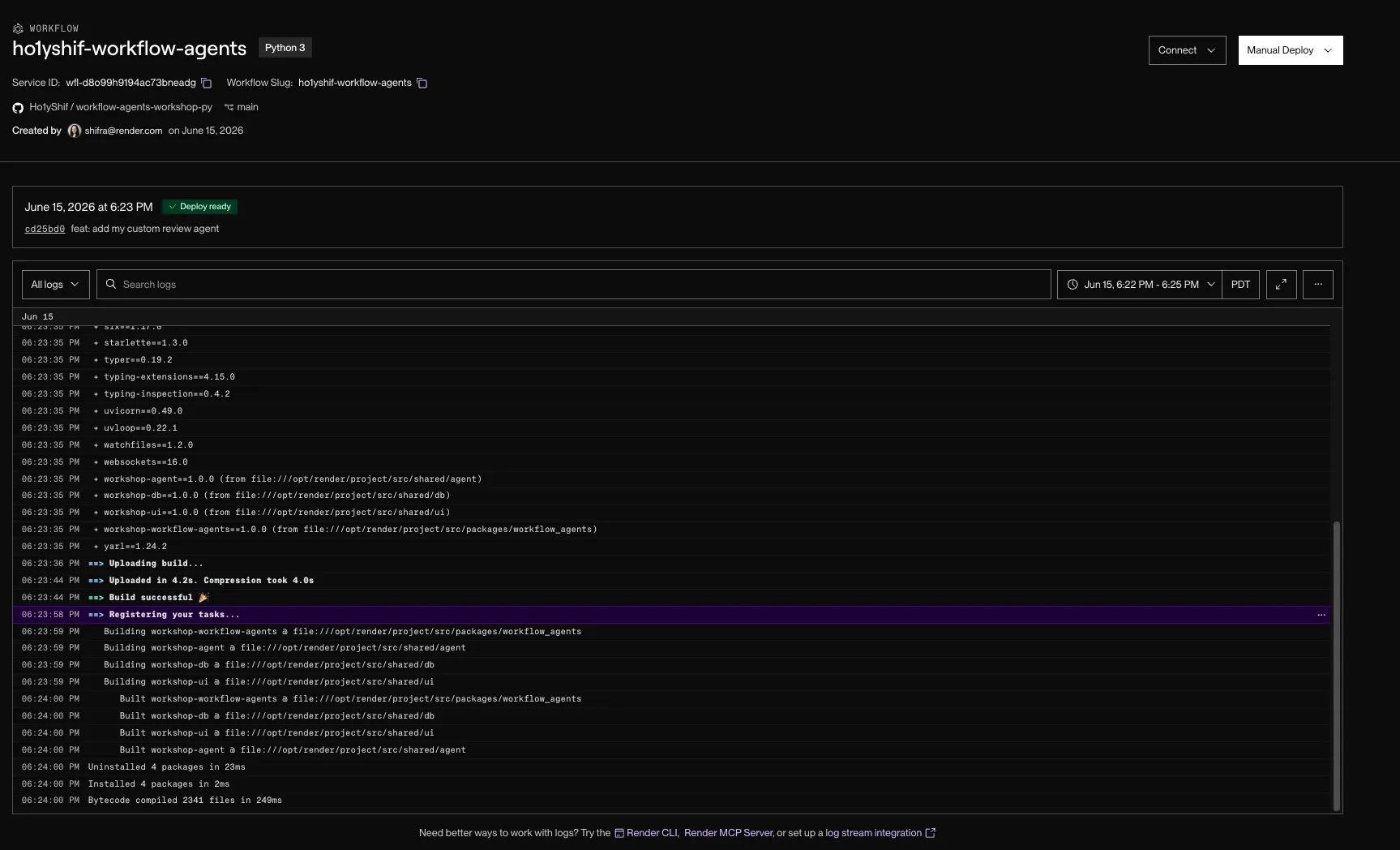
The push triggers a redeploy that re-registers your authored task.
The gateway also redeploys because it shares the repo, but nothing about it changed.
sequenceDiagram
  participant You
  participant GitHub
  participant WF as Workflow service
  You->>GitHub: git push
  GitHub->>WF: auto-deploy
  WF->>WF: re-register tasks
  You->>WF: trigger authored task
  WF-->>You: run trace with nested security task
3. Run it in production
Trigger your authored task against the LlamaIndex baseline PR. Open the gateway dashboard, choose your authored task from the Workflow selector, paste the PR URL, and click Review.
You can also trigger it from the CLI. In production, use the Workflow slug plus task name:
render workflows start workflow-agents/your-review \ --input='[{"url":"https://github.com/run-llama/LlamaIndexTS/pull/2234"}]'render workflows start workflow-agents/your_review \ --input='[{"url":"https://github.com/run-llama/LlamaIndexTS/pull/2234"}]'If the Workflow service has a pending deploy version, release it before starting the task:
render workflows versions release <workflow-id>- Trigger the task Use the same PR URL you ran locally.
- Open the run trace Find the run on the workflow service.
- Confirm the nested task Your authored task shows the nested
my-reviewertask you customized, its LLM turns, and token usage, the same shape you saw underrender workflows dev.
At this point, the task you wrote on your laptop is running in your Render workspace. The production run has the same shape as your local run, but Render owns the isolation, retries, and trace.
4. What changed
You’ve run one agent three ways. Here’s the decision this tutorial was building toward:
| Reach for | When |
|---|---|
| In-process (Pattern 1) | Prototypes and low-volume internal tools. Simple, but the work dies with the request. |
| Worker + queue (Pattern 2) | You need async, scale, and durability, and you’re willing to own the coordination code. |
| Render Workflows (Pattern 3) | You want that same coordination plus observability for free, and you’d rather author tasks than maintain a queue. |
The agent never changed across any of it. That’s the takeaway: pick the runtime pattern for the operational properties you need, and let it carry the coordination so your code stays about the work.
5. Take it to production
This tutorial ends at a durable, traced, multi-agent reviewer. Shipping that for real is mostly more tasks, steps, and config on the same graph. Four directions, and where each plugs into this codebase:
- Evals. Score the shared review runner over a labeled corpus of PRs to catch quality regressions before they ship. The mock model makes runs reproducible in CI, and the decision parser gives you a structured verdict to compare against expectations.
- Guardrails. Validate input and output: strip prompt-injection from a diff before an agent sees it, and re-ask when the judge’s JSON is malformed. The filter-diff step is already the first guard, and the decision parser is where a re-ask loop attaches.
- Circuit breakers. Cap tokens and wall-clock per run, and fail fast when a dependency degrades instead of burning the budget on retries. The shared
Budgettype and per-taskretryconfig are the starting points. - Observability. Track p95 latency, token spend, and per-agent failure rate. Every agent already runs as a traced task keyed by
runId, so the signal exists. The work is aggregation and export.
None of these change the agent. As with every pattern in this tutorial, the substrate does the work.
The task code stayed the same shape. The runtime changed.
Locally, render workflows dev ran the task on your machine and showed the trace. In production, Render runs the task in isolated Workflow instances, applies the retry config, and keeps the trace in the Dashboard.
Every service in this tutorial runs on a paid plan. Delete them when you’re done.
- Delete the hand-created Workflow service Open
workflow-agents(the Workflow service you created in step 06) and delete it. Blueprint deletion does not remove it because you created it outside the Blueprint. - Delete the workflow project Open the project holding the gateway and delete it. That removes the gateway web service and
workflow-agents-db. - Delete the queue project Open the project holding
queue-agents-weband delete it. That removes the web service,queue-agents-worker,queue-agents-valkey, andqueue-agents-db. - Delete the naive project Open the project holding
naive-agentand delete it. That removes the web service andnaive-agent-db.
======== The shared workshop workspace is torn down after the session. Until then, the Workflow stack stays useful for inspecting runs, traces, and dashboard rows while you finish the tutorial.
Troubleshooting
Find the symptom that matches what you’re seeing, then apply the fix.
You can’t find a forced failure to remove. The flaky throw ships commented out, and the Step on the previous page was optional. If you never uncommented it, there’s nothing to remove. If you did, recomment or delete it and confirm with git diff before committing.
git commit says nothing to commit, or stages the wrong file. The hardcoded path assumes you edited the your-review sandbox. If you edited something else or added a new folder, stage that path instead. A safe catch-all: git add -A packages/workflow-agents (TypeScript) or git add -A packages/workflow_agents (Python), then git status to confirm.
git push does nothing or is rejected. Check git remote -v points at your fork, not upstream. Use git push -u origin main on the first push. A 403 means you cloned upstream or have no GitHub auth. And confirm the Render services are connected to your fork, or the push won’t trigger a deploy.
--input='[...]' won’t parse on Windows. cmd.exe and PowerShell handle single quotes differently. Put the JSON array in input.json and pass --input-file=input.json instead of the inline --input.
render workflows start workflow-agents/your-review returns workflow not found. The slug is <your-workflow-service-name>/<task>. Run render workflows list (after render workspace set) and use the exact name it prints. Drop the --local flag here: this is the production path and needs render login plus the right workspace.
The run succeeds but the trace shows the old code. Your redeploy created a pending Workflow version that isn’t released yet, so start dispatches the previous one. List versions to get the id, then render workflows versions release <workflow-id>, and re-run.
You watched a deploy but nothing changed. A push redeploys both services. The gateway redeploy changes nothing; the Workflow service is the one that re-registers your task. Watch that one’s startup logs.
Via the gateway selector, the row never populates. Same root causes as dispatch failures: on the gateway, RENDER_WORKFLOW_SLUG must equal your actual Workflow service slug and RENDER_API_KEY must be a valid key. Redeploy the gateway after changing env, and check its logs return a run id, not 401/404. A run that shows in the trace but no findings usually means the Workflow service is wired to the wrong database or region.
Confirm your real slug with render workflows list before you run it in production. Don’t re-trigger on a perceived hang: concurrent run caps and build queues are shared across your workspace, so re-triggering only deepens the backlog.
What you learned
- Pushed the authored task and let the workflow service auto-deploy
- Confirmed the task was rediscovered with no registration step
- Ran it in production and saw the nested `my-reviewer` task in the Dashboard trace
- Moved the same Workflow task from local dev to the hosted Workflow service