
Pattern 2 keeps the same agent and moves the work off the request path. The web tier becomes a thin producer that enqueues a job and returns right away. A background worker consumes the queue and runs the identical review out-of-band.
flowchart LR
  browser(["Browser"])
  web["Web service<br/>producer"]
  kv[("Key Value<br/>stream + pub/sub")]
  worker["Background worker<br/>consumer"]
  db[("Postgres")]

  browser -->|"POST /api/reviews"| web
  web -->|"enqueue job, return 202"| kv
  kv --> worker
  worker -->|"run review"| db
  worker -.->|"progress (pub/sub)"| web
  web -.->|SSE| browser
The worker runs the same review as Pattern 1, byte for byte. Scale it by running more worker instances.
- Producer:
packages/queue-agents/src/web.ts - Consumer:
packages/queue-agents/src/worker.ts - Queue and pub/sub:
packages/queue-agents/src/kv.ts
- Producer:
packages/queue_agents/src/queue_agents/web.py - Consumer:
packages/queue_agents/src/queue_agents/worker.py - Queue and pub/sub:
packages/queue_agents/src/queue_agents/kv.py
The agent code didn’t change. Only where it runs did.
1. Deploy the Pattern 2 Blueprint
This Blueprint provisions four resources.
Use packages/queue-agents/render.yaml.
projects:  - name: queue-agents    environments:      - name: production        databases:          - name: <YOUR_USERNAME>-queue-agents-db            plan: basic-256mb            region: oregon            postgresMajorVersion: "18"
        services:          # Shared queue + progress bus.          - type: keyvalue            name: <YOUR_USERNAME>-queue-agents-valkey            plan: starter            region: oregon            maxmemoryPolicy: noeviction            ipAllowList: []
          # Producer: enqueues jobs, serves the UI, streams progress.          - type: web            name: <YOUR_USERNAME>-queue-agents-web            runtime: node            region: oregon            plan: starter            buildCommand: npm ci            startCommand: npm run start --workspace @workshop/queue-agents            healthCheckPath: /healthz            envVars:              - key: DATABASE_URL                fromDatabase:                  name: <YOUR_USERNAME>-queue-agents-db                  property: connectionString              - key: VALKEY_URL                fromService:                  name: <YOUR_USERNAME>-queue-agents-valkey                  type: keyvalue                  property: connectionString              - key: ANTHROPIC_API_KEY                sync: false              - key: OPENAI_API_KEY                sync: false              - key: GITHUB_TOKEN                sync: false              - key: NODE_ENV                value: production
          # Consumer: runs the agent. Scale `numInstances` up to fan out across PRs.          - type: worker            name: <YOUR_USERNAME>-queue-agents-worker            runtime: node            region: oregon            plan: starter            numInstances: 1            buildCommand: npm ci            startCommand: npm run start:worker --workspace @workshop/queue-agents            envVars:              - key: DATABASE_URL                fromDatabase:                  name: <YOUR_USERNAME>-queue-agents-db                  property: connectionString              - key: VALKEY_URL                fromService:                  name: <YOUR_USERNAME>-queue-agents-valkey                  type: keyvalue                  property: connectionString              - key: ANTHROPIC_API_KEY                sync: false              - key: OPENAI_API_KEY                sync: false              - key: GITHUB_TOKEN                sync: false              - key: NODE_ENV                value: production
Use packages/queue_agents/render.yaml.
projects:  - name: queue-agents    environments:      - name: production        databases:          - name: <YOUR_USERNAME>-queue-agents-db            plan: basic-256mb            region: oregon            postgresMajorVersion: "18"
        services:          # Shared queue + progress bus.          - type: keyvalue            name: <YOUR_USERNAME>-queue-agents-valkey            plan: starter            region: oregon            maxmemoryPolicy: noeviction            ipAllowList: []
          # Producer: enqueues jobs, serves the UI, streams progress.          - type: web            name: <YOUR_USERNAME>-queue-agents-web            runtime: python            region: oregon            plan: starter            buildCommand: pip install uv && uv sync --frozen --no-dev --package workshop-queue-agents            startCommand: uv run python -m queue_agents.web            healthCheckPath: /healthz            envVars:              - key: DATABASE_URL                fromDatabase:                  name: <YOUR_USERNAME>-queue-agents-db                  property: connectionString              - key: VALKEY_URL                fromService:                  name: <YOUR_USERNAME>-queue-agents-valkey                  type: keyvalue                  property: connectionString              - key: ANTHROPIC_API_KEY                sync: false              - key: OPENAI_API_KEY                sync: false              - key: GITHUB_TOKEN                sync: false              - key: PYTHON_VERSION                value: "3.12"
          # Consumer: runs the agent. Scale `numInstances` up to fan out across PRs.          - type: worker            name: <YOUR_USERNAME>-queue-agents-worker            runtime: python            region: oregon            plan: starter            numInstances: 1            buildCommand: pip install uv && uv sync --frozen --no-dev --package workshop-queue-agents            startCommand: uv run python -m queue_agents.worker            envVars:              - key: DATABASE_URL                fromDatabase:                  name: <YOUR_USERNAME>-queue-agents-db                  property: connectionString              - key: VALKEY_URL                fromService:                  name: <YOUR_USERNAME>-queue-agents-valkey                  type: keyvalue                  property: connectionString              - key: ANTHROPIC_API_KEY                sync: false              - key: OPENAI_API_KEY                sync: false              - key: GITHUB_TOKEN                sync: false              - key: PYTHON_VERSION                value: "3.12"
maxmemoryPolicy: noeviction matters: this Key Value instance is a work queue, not a cache, so you never want it dropping jobs under memory pressure. Both the web service and the worker get VALKEY_URL wired from the Key Value instance with fromService, and both declare optional provider keys with sync: false.
- Start a new Blueprint In the Render Dashboard, click
+ New, thenBlueprint, and select your connected workshop fork. - Set the Blueprint Path Set it to your track’s Pattern 2 path, exactly:
packages/queue-agents/render.yaml(TypeScript) orpackages/queue_agents/render.yaml(Python). Mind the hyphen vs underscore. There’s no rootrender.yaml. - Create all as new services
Then click
Deploy Blueprint.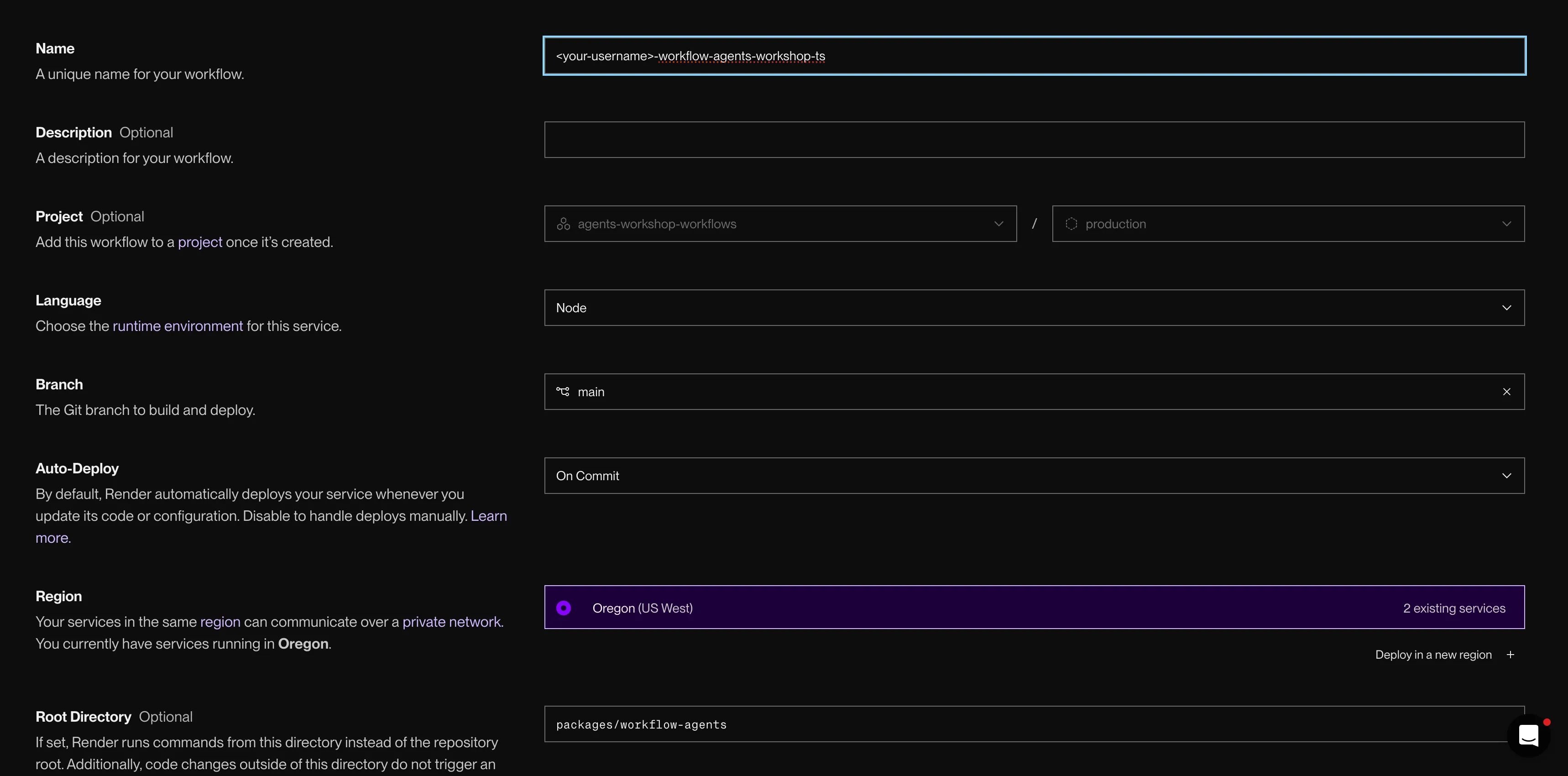
Deploy the Pattern 2 Blueprint to create the web service, worker, Key Value, and Postgres.
2. Confirm the four resources
When the sync finishes, your project has four resources:
| Resource | Name | Job |
|---|---|---|
| Web service | <your-username>-queue-agents-web | Enqueues jobs and serves the dashboard |
| Background worker | <your-username>-queue-agents-worker | Pulls jobs off the queue and runs the review |
| Key Value | <your-username>-queue-agents-valkey | The work queue and progress bus |
| Postgres | <your-username>-queue-agents-db | Durable telemetry the UI reads |
3. Choose mock or real model output
The worker is what actually runs the review. If you set ANTHROPIC_API_KEY or OPENAI_API_KEY on the worker, you get real review text. Without a key, the deterministic mock model runs instead. The queue, worker, dashboard, and telemetry still work either way.
4. Review the same PR, new runtime
Open the <your-username>-queue-agents-web URL and submit the same LlamaIndex baseline PR you ran in Pattern 1.
- Submit the PR Paste the URL and click
Review. - Notice the fast response The web service returns a
202almost immediately instead of blocking. The request didn’t run the review; it enqueued one. - Watch the row update
The dashboard can show a
queuedorrunningrow while the review is active, then refreshes that row until the result is done.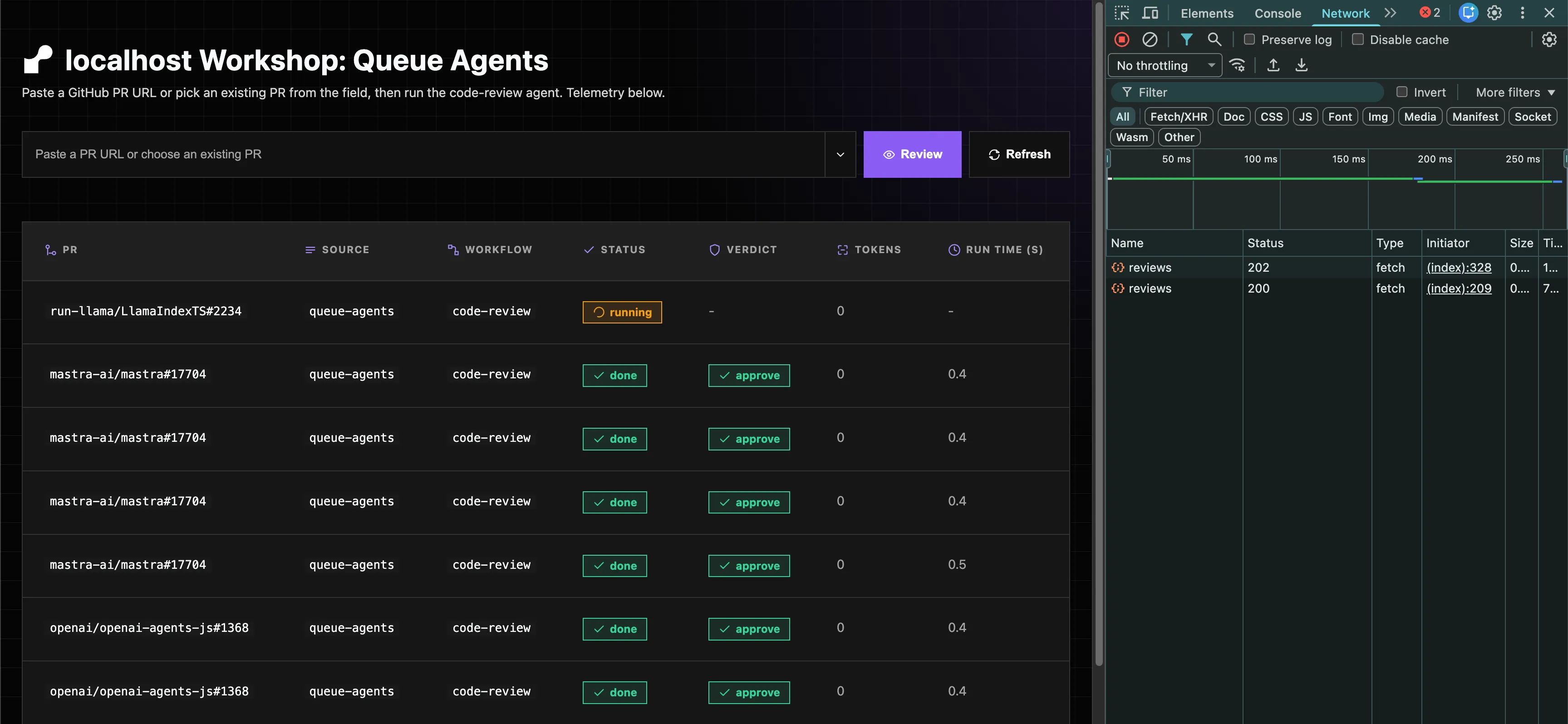
The web service returns a 202 and the row shows queued or running. - Watch the worker logs Open
<your-username>-queue-agents-workerand itsLogstab. You’ll see it pick up the job and run the review. - Read the result
Click the completed row for
Reason,Reviewer findings, andAgent spans.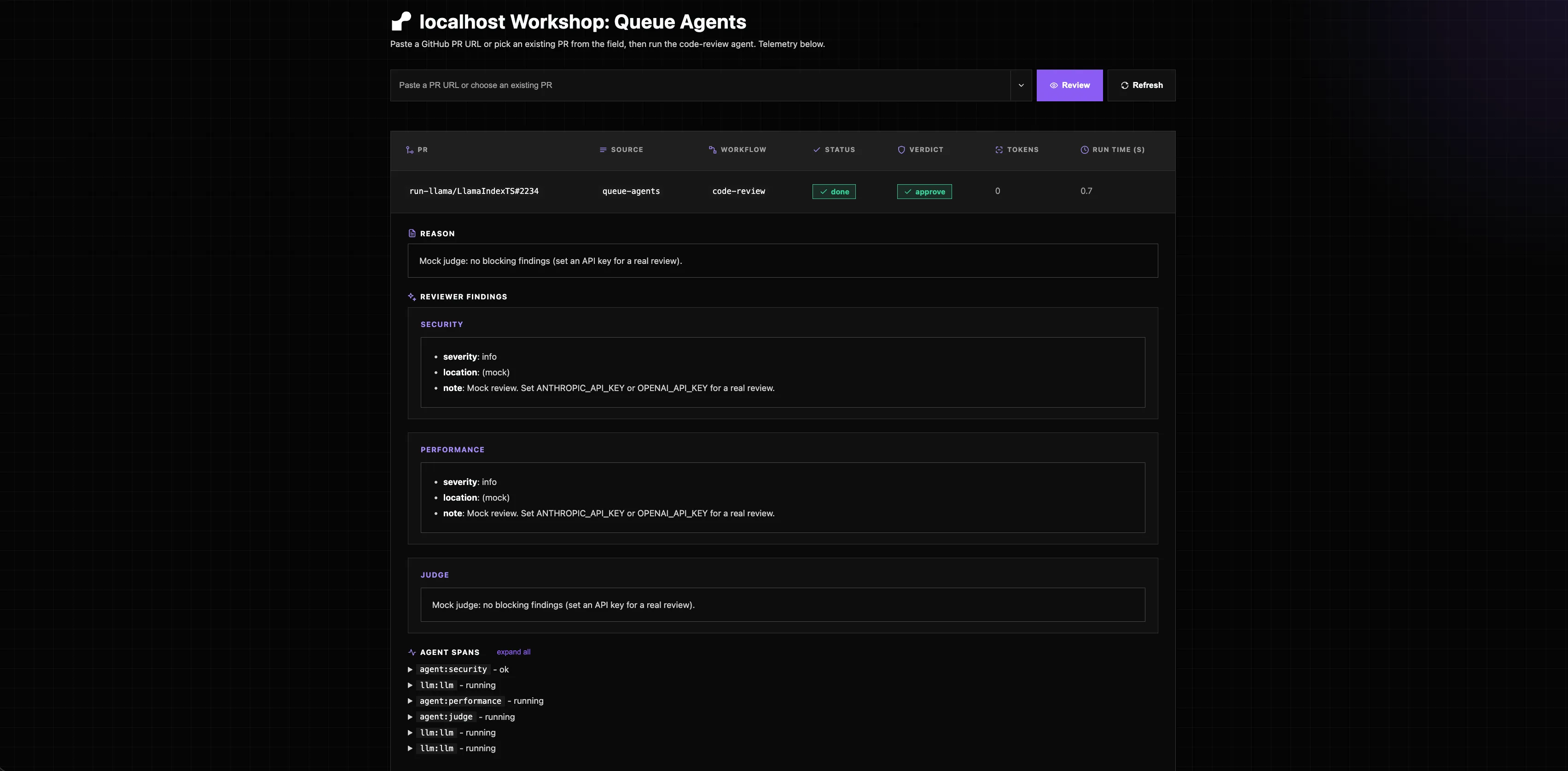
The completed review with findings and agent spans.
Same finding as Pattern 1. The only thing that changed is where the work ran. The review now survives a slow model or a busy web tier because it isn’t trapped in the request.
Troubleshooting
Find the symptom that matches what you’re seeing, then apply the fix.
Wrong Blueprint Path deploys the wrong pattern. Set it explicitly: packages/queue-agents/render.yaml (TypeScript) or packages/queue_agents/render.yaml (Python). The repo holds three Blueprints; the root path is not one of them.
You set a provider key but reviews are still mock. The key has to be on <your-username>-queue-agents-worker, not just <your-username>-queue-agents-web. The web service only enqueues and returns 202; the worker runs the review, so the worker is the process that calls the model. Add the key to the worker and redeploy it. Confirm in the worker logs: a falling back to mock model warning means the key isn’t reaching it.
The submit returns instantly with no review. A 202 is success: the request enqueued a job and returned. Watch the dashboard row move from queued to running to done, and open the <your-username>-queue-agents-worker Logs tab to see it pick up the job. Don’t refresh expecting an immediate verdict.
The worker has no URL and looks broken. Background workers don’t bind a port or expose a health check, by design. The proof it’s healthy is the log line picking up a job, not a live link.
Running locally as a fallback needs four moving parts. Postgres, Key Value, the web process, and the worker process. The two process commands alone aren’t enough.
Start the datastores first with npm run docker:up (brings up Postgres + Valkey), then npm run queue:web and npm run queue:worker in separate terminals.
Start Postgres and Valkey first (for example docker run --rm -p 6379:6379 redis plus a local Postgres with DATABASE_URL exported), then run uv run python -m queue_agents.web and uv run python -m queue_agents.worker in separate terminals. Bare python -m ... fails with ModuleNotFoundError; the uv run prefix is required.
What you learned
- Deployed the Pattern 2 Blueprint: web producer, background worker, Key Value queue, and Postgres
- Used a provider key for real reviews if present, or the mock model fallback if not
- Reviewed the same public PR and saw the web service return a 202 instantly
- Watched the worker run the identical review out-of-band and write the result back