
Pattern 1 is the baseline: one web service that runs the whole review inside the HTTP request. It’s the simplest thing that works, and the rest of the workshop improves on it. Deploy it first so you have something live to compare against.
sequenceDiagram
  participant Browser
  participant Web as Web service
  participant DB as Postgres
  Browser->>Web: POST /api/reviews (PR URL)
  Web->>Web: run review blocks the request
  Web->>DB: persist findings + verdict
  Web-->>Browser: response, only when the review is done
The handler awaits the review and only then responds. While that runs, the request is held open.
The whole pipeline lives in packages/naive-agent/src/server.ts.
The whole pipeline lives in packages/naive_agent/src/naive_agent/server.py.
1. Fork the repo
You deploy from your own copy so a git push redeploys on Render.
- Open the workshop repo Go to render-examples/workflow-agents-workshop-ts.
- Fork it Click
Fork, then create the fork under your account.
- Open the workshop repo Go to render-examples/workflow-agents-workshop-py.
- Fork it Click
Fork, then create the fork under your account.
You’ll connect this fork to Render in the next step.
2. Deploy the Pattern 1 Blueprint
A Blueprint is Render’s infrastructure-as-code spec — a single YAML file that declares the services, databases, and environment variables for a stack. When you deploy a Blueprint, Render reads the file and provisions everything in one step.
The naive agent has its own Blueprint. It provisions a web service and a Postgres database:
Use packages/naive-agent/render.yaml.
projects:  - name: naive-agent    environments:      - name: production        databases:          - name: <YOUR_USERNAME>-naive-agent-db            plan: basic-256mb            region: oregon            postgresMajorVersion: "18"
        services:          - type: web            name: <YOUR_USERNAME>-naive-agent            runtime: node            region: oregon            plan: starter            buildCommand: npm ci            startCommand: npm run start --workspace @workshop/naive-agent            healthCheckPath: /healthz            envVars:              - key: DATABASE_URL                fromDatabase:                  name: <YOUR_USERNAME>-naive-agent-db                  property: connectionString              - key: ANTHROPIC_API_KEY                sync: false              - key: OPENAI_API_KEY                sync: false              - key: GITHUB_TOKEN                sync: false              - key: NODE_ENV                value: production
Use packages/naive_agent/render.yaml.
projects:  - name: naive-agent    environments:      - name: production        databases:          - name: <YOUR_USERNAME>-naive-agent-db            plan: basic-256mb            region: oregon            postgresMajorVersion: "18"
        services:          - type: web            name: <YOUR_USERNAME>-naive-agent            runtime: python            region: oregon            plan: starter            buildCommand: pip install uv && uv sync --frozen --no-dev --package workshop-naive-agent            startCommand: uv run python -m naive_agent.server            healthCheckPath: /healthz            envVars:              - key: DATABASE_URL                fromDatabase:                  name: <YOUR_USERNAME>-naive-agent-db                  property: connectionString              - key: ANTHROPIC_API_KEY                sync: false              - key: OPENAI_API_KEY                sync: false              - key: GITHUB_TOKEN                sync: false              - key: PYTHON_VERSION                value: "3.12"
The Blueprint lives inside packages/naive-agent, but Render evaluates it from the repo root. npm ci installs the workspace from the root lockfile.
The Blueprint lives inside packages/naive_agent, but Render evaluates it from the repo root. uv sync --package workshop-naive-agent installs the service package and its workspace dependencies.
Pattern 1 has one required env source and a few optional secrets:
| Source | How it is wired |
|---|---|
DATABASE_URL | fromDatabase on <your-username>-naive-agent-db |
OPENAI_API_KEY / ANTHROPIC_API_KEY / GITHUB_TOKEN | sync: false on the service, only if you need real model output or private GitHub access |
- Connect your GitHub account Click
Connect GitHuband authorize the Render GitHub app for your fork. This lets Render read the repo, deploy on push, and report status back. You only do this once. - Select your fork Pick your fork from your connected repos, then click
Continue. - Set the Blueprint Name Name it
workflow-agents-workshop-ts(TypeScript) orworkflow-agents-workshop-py(Python). This is the display name for the Blueprint instance in your Dashboard. - Set the Blueprint Path Set it to your track’s Pattern 1 path, exactly:
packages/naive-agent/render.yaml(TypeScript) orpackages/naive_agent/render.yaml(Python). Mind the hyphen vs underscore. The repo holds three Blueprints, one per pattern, and has no rootrender.yaml, so the default path won’t work. - Pick `Create all as new services`
Then click
Deploy Blueprint.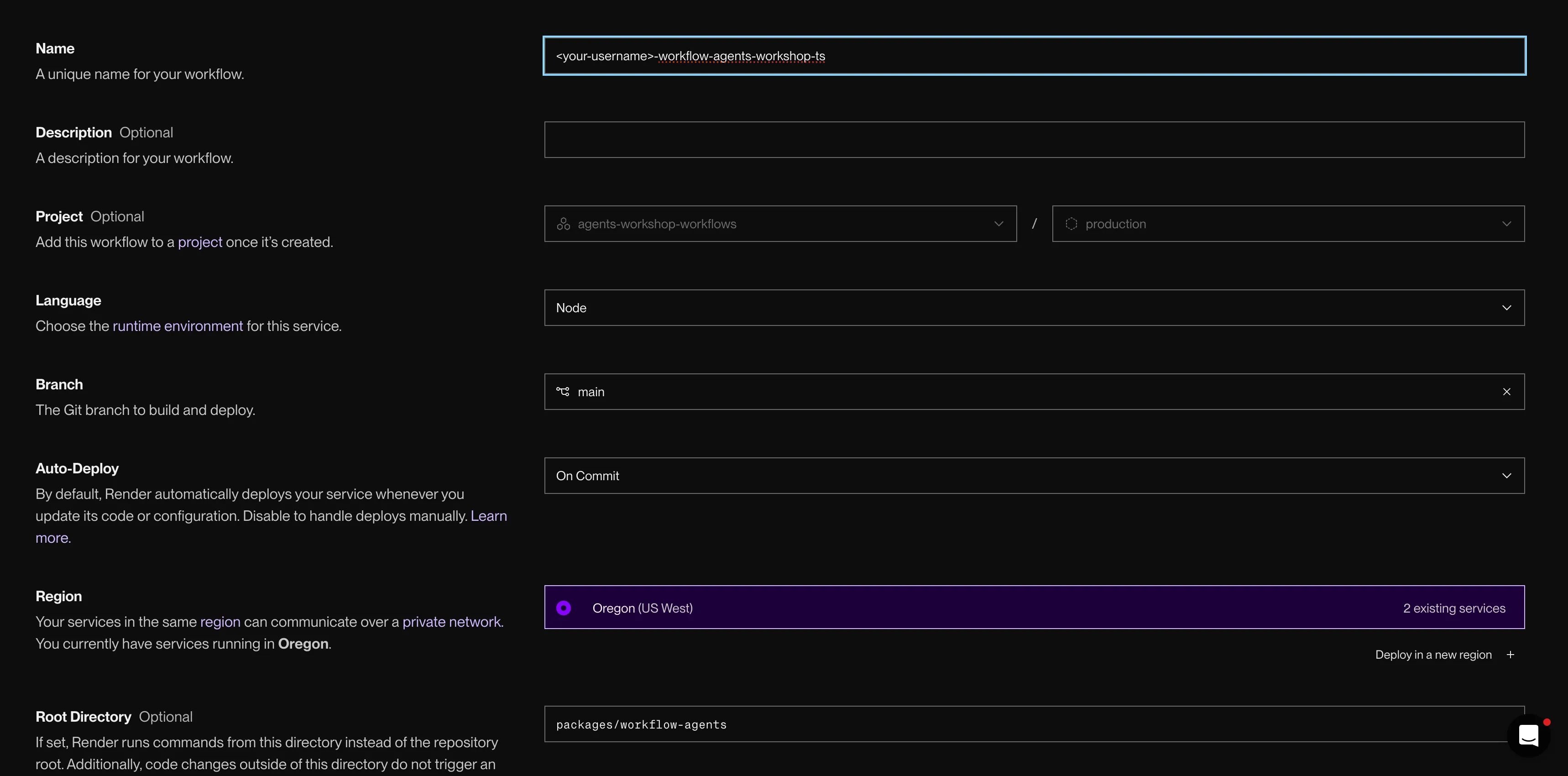
Deploy the Pattern 1 Blueprint to create the web service and Postgres.
Use packages/naive-agent/render.yaml for the Blueprint Path.
Use packages/naive_agent/render.yaml for the Blueprint Path.
2. Review a public PR
Click on the name of the web service to open it. Once the web service is green, open its *.onrender.com URL. You’ll see the Workshop: Naive Agent dashboard with a PR field, a built-in PR picker, a Review button, and an empty review table.
Use the LlamaIndex baseline PR. It is small enough for a first run and is also available from the dashboard picker.
- Choose the PR Pick
LlamaIndex baselinefrom the dropdown, or pastehttps://github.com/run-llama/LlamaIndexTS/pull/2234into the input. - Watch the request block The button can show
Reviewing..., but the handler is still waiting on the whole review before it responds. - Read the result
When the request returns, the row appears in the table with
Status,Workflow, token count, and run time. Click it to inspectReason,Reviewer findings, andAgent spans.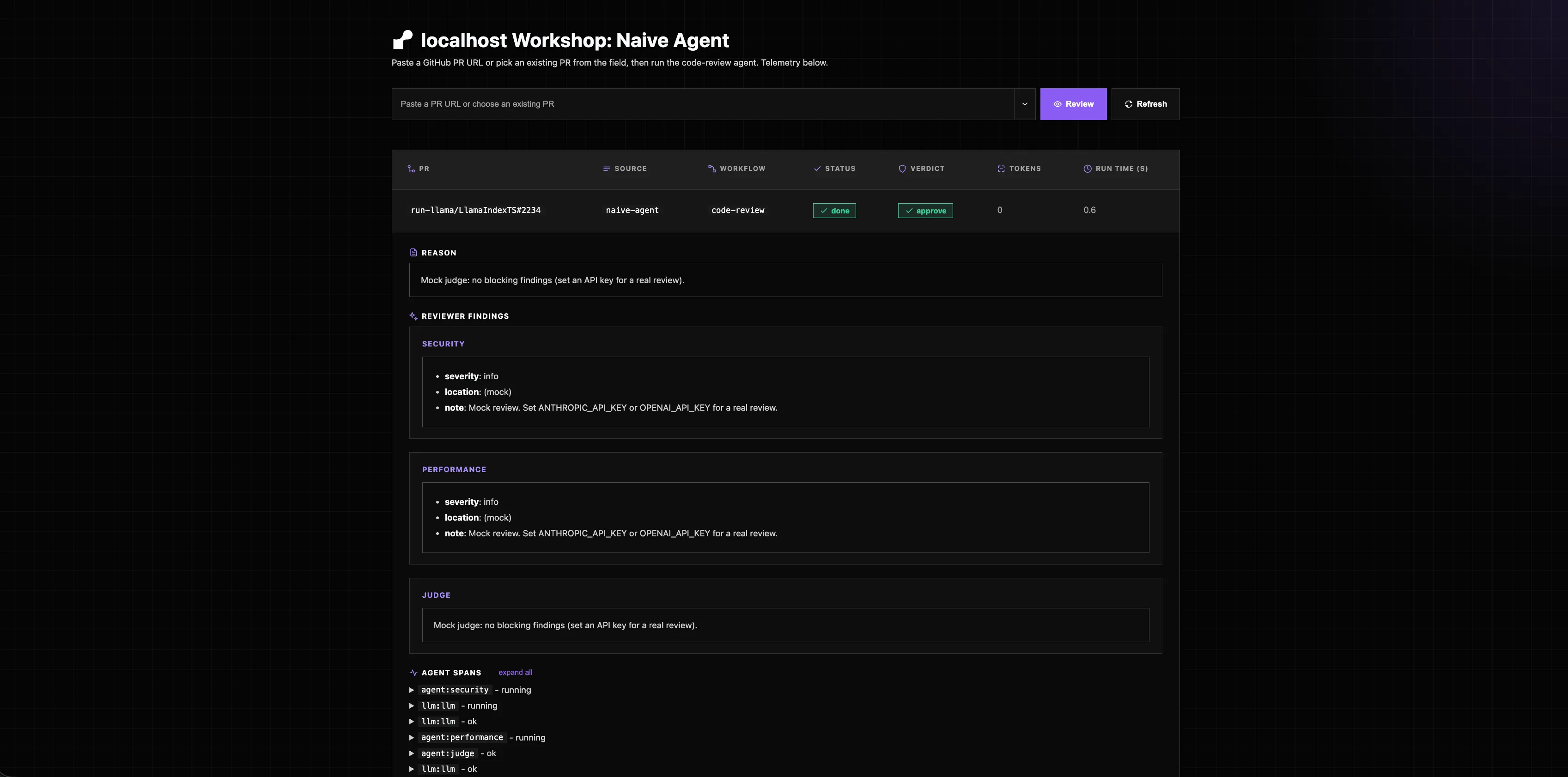
The completed review row, with findings and agent spans on click.
With the mock model, the output is deterministic and canned. With a provider key, exact wording varies because LLM output is nondeterministic.
3. See the limits
The row appearing only after the request completes is the whole lesson. Submit the same PR a second time and watch the browser hang until the full review finishes. Open a few tabs and submit at once — every request queues behind the same process.
With the mock model or a small PR, the response may come back fast enough that nothing visibly breaks. That’s fine. The limitations are architectural, not a demo you need to force:
- The review runs inside the request. A larger PR or a real model would push response times past HTTP and proxy timeouts.
- A deploy or crash kills in-flight reviews. There’s nowhere durable for the work to live.
- Concurrent users share one process. Every “parallel” reviewer competes for the same box.
- You can’t scale the agent independently of the web tier.
Pattern 2 exists to solve all four.
Troubleshooting
Find the symptom that matches what you’re seeing, then apply the fix.
The Blueprint step won’t proceed or says no render.yaml found. The default path is the repo root, which has no render.yaml. Set the Blueprint Path to your track’s Pattern 1 file: packages/naive-agent/render.yaml (TypeScript) or packages/naive_agent/render.yaml (Python). Note the hyphen vs underscore.
Your fork doesn’t appear in Render’s repo picker. If you forked into a GitHub organization, an org admin may need to approve the Render GitHub app. When authorizing, grant access to that specific repo. Forking into your personal account avoids this.
The web service is stuck Deploying or the health check fails on the first deploy. A fresh basic-256mb Postgres takes one to three minutes to provision (longer when the whole room creates databases at once). The web service runs migrations on boot and can flap until the database shows Available. A first deploy that flaps then recovers is normal. Don’t panic-redeploy.
The review row appears only after the request finishes. That’s the point of Pattern 1: the handler awaits the whole review, so a slow model or large PR can blow past HTTP and proxy timeouts, and a crash loses the run. That limitation is the motivation for Pattern 2.
Local fallback fails with ModuleNotFoundError: No module named 'naive_agent'. Prefix the command with uv run: uv run python -m naive_agent.server. Bare python uses the system interpreter, which can’t see the uv workspace packages.
What you learned
- Forked the repo and deployed the Pattern 1 Blueprint (web service + Postgres)
- Used a provider key for real reviews, or the mock model fallback
- Reviewed the LlamaIndex baseline PR and saw the review run inside the request
- Named the limits of in-process review: timeouts, lost work on crash, shared process, no independent scaling