
You proved the task locally. Now ship that same task to the hosted Workflow service and verify that production shows the trace you expect.
1. Commit and push
Make sure you removed the forced failure from the retry demo. Then:
git add packages/workflow-agents/src/workflows/your-review/index.tsgit status # sanity-check what's about to landgit commit -m "your-review: compose security reviewer as a task"git pushgit add packages/workflow_agents/src/workflow_agents/workflows/your_review.pygit status # sanity-check what's about to landgit commit -m "your-review: compose security reviewer as a task"git pushKeep the diff small. A tight commit makes a rollback cheap if the hosted run misbehaves.
2. Redeploy the workflow service
Auto-deploy on push is on by default, so the push triggers a deploy.
Two services may redeploy because they share the repo. Watch the Workflow service. That is the service that reloads the task code and registers your-review / your_review.
- Watch the Workflow service deploy Open it in the Render Dashboard. It reinstalls dependencies and re-registers tasks on startup.
- Confirm your authored task is registered
The loader rediscovers it from the workflow module. No registration step on your part.
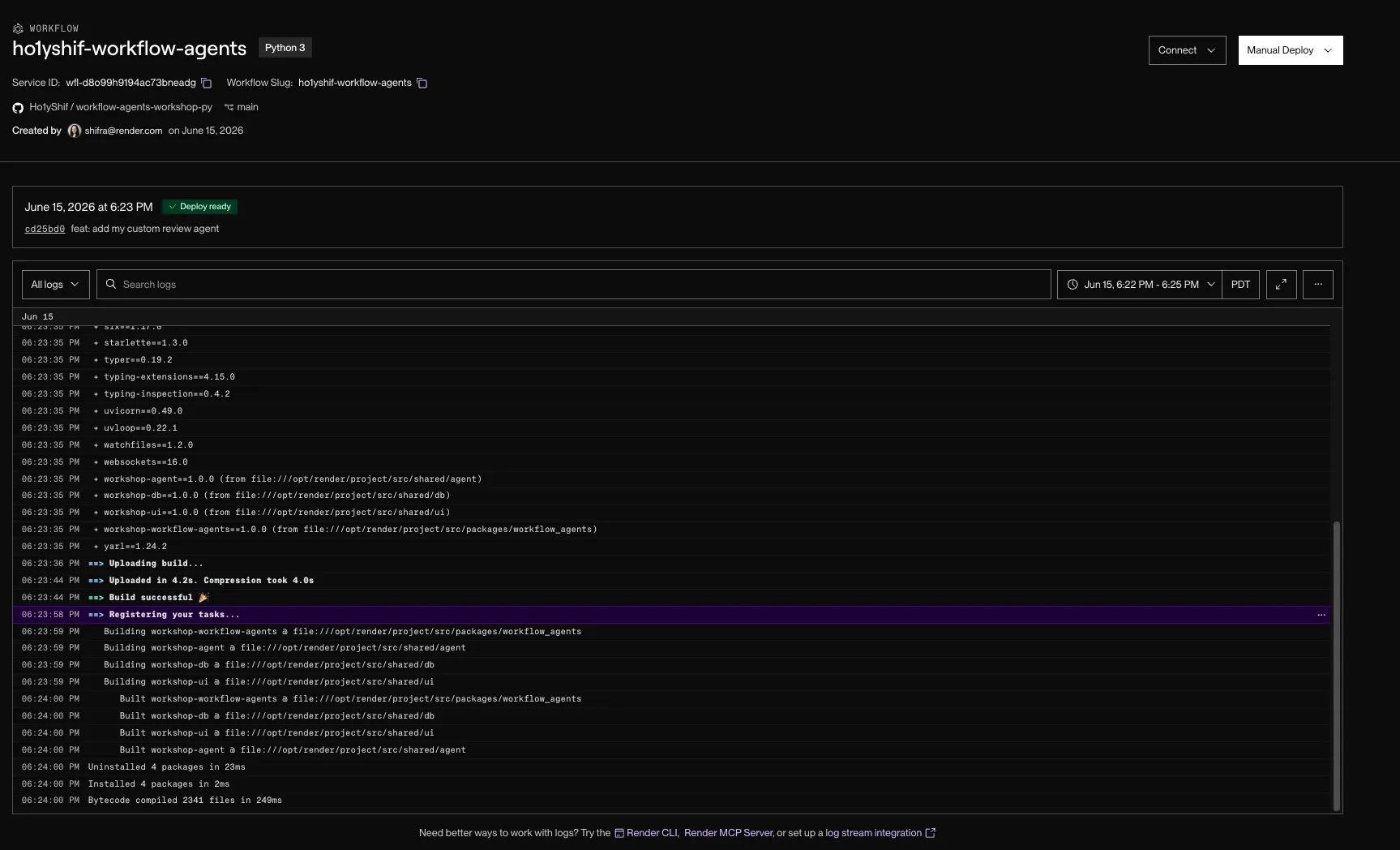
The push triggers a redeploy that re-registers your authored task.
The gateway also redeploys because it shares the repo, but nothing about it changed.
sequenceDiagram
  participant You
  participant GitHub
  participant WF as Workflow service
  You->>GitHub: git push
  GitHub->>WF: auto-deploy
  WF->>WF: re-register tasks
  You->>WF: trigger authored task
  WF-->>You: run trace with nested security task
3. Run it in production
Trigger your authored task against the LlamaIndex baseline PR. Open the gateway dashboard, choose your authored task from the Workflow selector, paste the PR URL, and click Review.
You can also trigger it from the CLI. In production, use the Workflow slug plus task name:
render workflows tasks start <your-username>-workflow-agents/your-review \ --input='[{"url":"https://github.com/run-llama/LlamaIndexTS/pull/2234"}]'render workflows tasks start <your-username>-workflow-agents/your_review \ --input='[{"url":"https://github.com/run-llama/LlamaIndexTS/pull/2234"}]'If the Workflow service has a pending deploy version, release it before starting the task:
render workflows versions release <workflow-id>- Trigger the task Use the same PR URL you ran locally.
- Open the run trace Find the run on the workflow service.
- Confirm the nested task Your authored task shows the nested
my-reviewertask you customized, its LLM turns, and token usage, the same shape you saw underrender workflows dev.
At this point, the task you wrote on your laptop is running in your Render workspace. The production run has the same shape as your local run, but Render owns the isolation, retries, and trace.
4. What changed
The task code stayed the same shape. The runtime changed.
Locally, render workflows dev ran the task on your machine and showed the trace. In production, Render runs the task in isolated Workflow instances, applies the retry config, and keeps the trace in the Dashboard.
5. Keep exploring the trace
The shared workshop workspace is torn down after the session. Until then, the Workflow stack stays useful for inspecting runs, traces, and dashboard rows while you finish the tutorial.
Troubleshooting
Find the symptom that matches what you’re seeing, then apply the fix.
You can’t find a forced failure to remove. The flaky throw ships commented out, and the Step on the previous page was optional. If you never uncommented it, there’s nothing to remove. If you did, recomment or delete it and confirm with git diff before committing.
git commit says nothing to commit, or stages the wrong file. The hardcoded path assumes you edited the your-review sandbox. If you edited something else or added a new folder, stage that path instead. A safe catch-all: git add -A packages/workflow-agents (TypeScript) or git add -A packages/workflow_agents (Python), then git status to confirm.
git push does nothing or is rejected. Check git remote -v points at your fork, not upstream. Use git push -u origin main on the first push. A 403 means you cloned upstream or have no GitHub auth. And confirm the Render services are connected to your fork, or the push won’t trigger a deploy.
--input='[...]' won’t parse on Windows. cmd.exe and PowerShell handle single quotes differently. Put the JSON array in input.json and pass --input-file=input.json instead of the inline --input.
render workflows tasks start workflow-agents/your-review returns workflow not found. The slug is <your-workflow-service-name>/<task>, so yours is <your-username>-workflow-agents/..., not bare workflow-agents. Run render workflows list (after render workspace set) and use the exact name it prints. Drop the --local flag here: this is the production path and needs render login plus the right workspace.
The run succeeds but the trace shows the old code. Your redeploy created a pending Workflow version that isn’t released yet, so start dispatches the previous one. List versions to get the id, then render workflows versions release <workflow-id>, and re-run.
You watched a deploy but nothing changed. A push redeploys both services. The gateway redeploy changes nothing; the Workflow service (named <username>-workflow-agents, start command runs start:workflow / workflow_agents.workflow) is the one that re-registers your task. Watch that one’s startup logs.
Via the gateway selector, the row never populates. Same root causes as dispatch failures: on the gateway, RENDER_WORKFLOW_SLUG must equal your actual Workflow service slug and RENDER_API_KEY must be a valid key. Redeploy the gateway after changing env, and check its logs return a run id, not 401/404. A run that shows in the trace but no findings usually means the Workflow service is wired to the wrong database or region.
Confirm your real slug with render workflows list before you run it in production. Don’t re-trigger on a perceived hang: concurrent run caps and build queues are shared across the whole workspace, so re-triggering only deepens the backlog.
What you learned
- Pushed the authored task and let the workflow service auto-deploy
- Confirmed the task was rediscovered with no registration step
- Ran it in production and saw the nested `my-reviewer` task in the Dashboard trace
- Moved the same Workflow task from local dev to the hosted Workflow service